> ## Documentation Index
> Fetch the complete documentation index at: https://funnelfox.com/docs/llms.txt
> Use this file to discover all available pages before exploring further.
# Release: December 4, 2025
> Global Project Themes for consistent funnel design, Canvas Comments for team collaboration, password hashes in webhooks, reorganized Settings menu, and UTM filters in Cohorts
## Global Project Themes
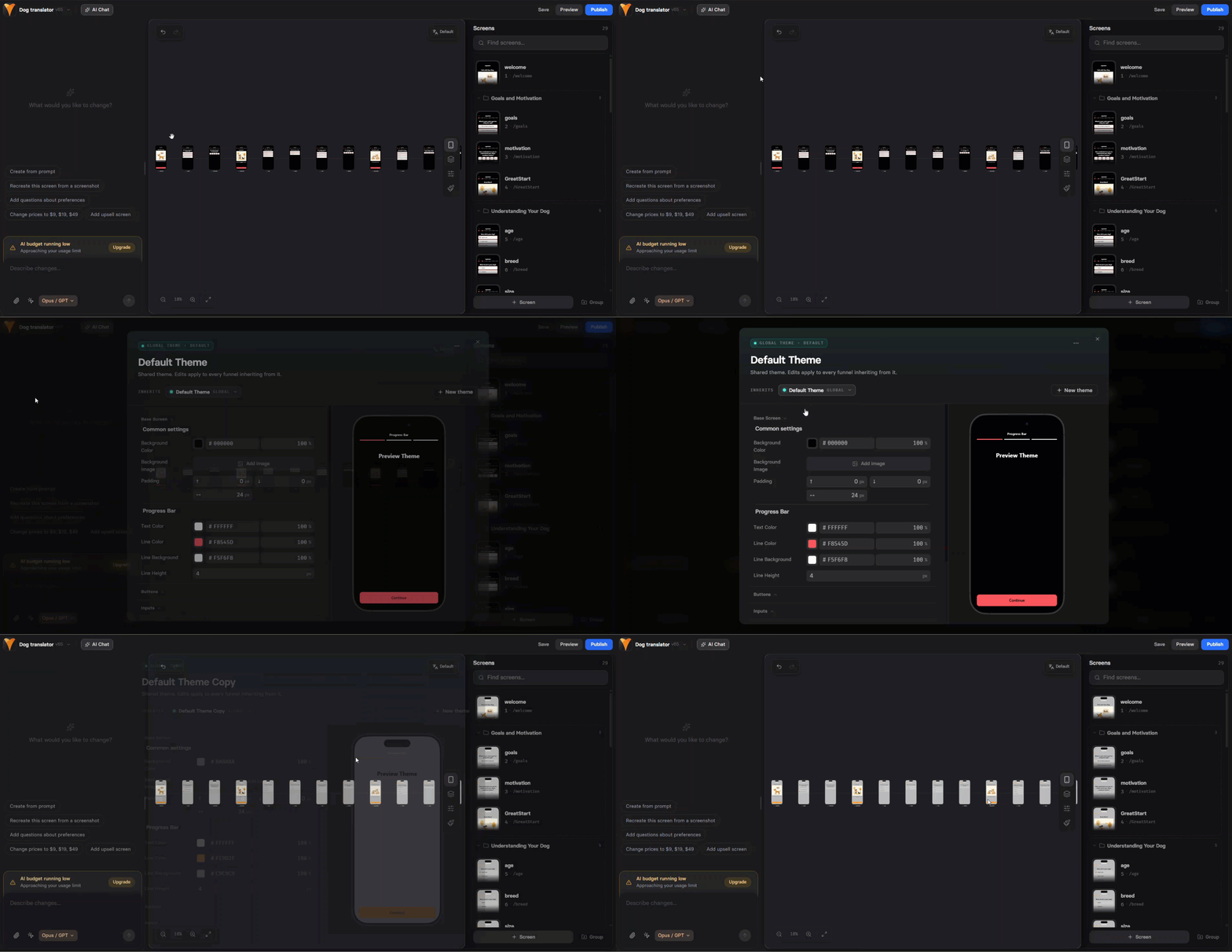
Style funnels faster with reusable, project-wide themes.\
Define a consistent look for all funnel screens at once instead of tweaking the Style tab for each element on every screen.
 **Key features:**
* **Default theme** — new funnels automatically use the default theme
* **Create multiple themes** for different products or campaigns
* **Global updates** — edit a theme to update all funnels using it
* **Override when needed** — make element-specific adjustments without affecting the global theme
Access themes from the Global themes brush icon at the top of the Visual Editor.
[Learn more about themes →](https://funnelfox.com/docs/editor/themes)
## Canvas Comments
Collaborate directly on canvas with inline comments.\
Add comments, reply to feedback, and resolve discussions without leaving the canvas or using external tools.
**Key features:**
* **Default theme** — new funnels automatically use the default theme
* **Create multiple themes** for different products or campaigns
* **Global updates** — edit a theme to update all funnels using it
* **Override when needed** — make element-specific adjustments without affecting the global theme
Access themes from the Global themes brush icon at the top of the Visual Editor.
[Learn more about themes →](https://funnelfox.com/docs/editor/themes)
## Canvas Comments
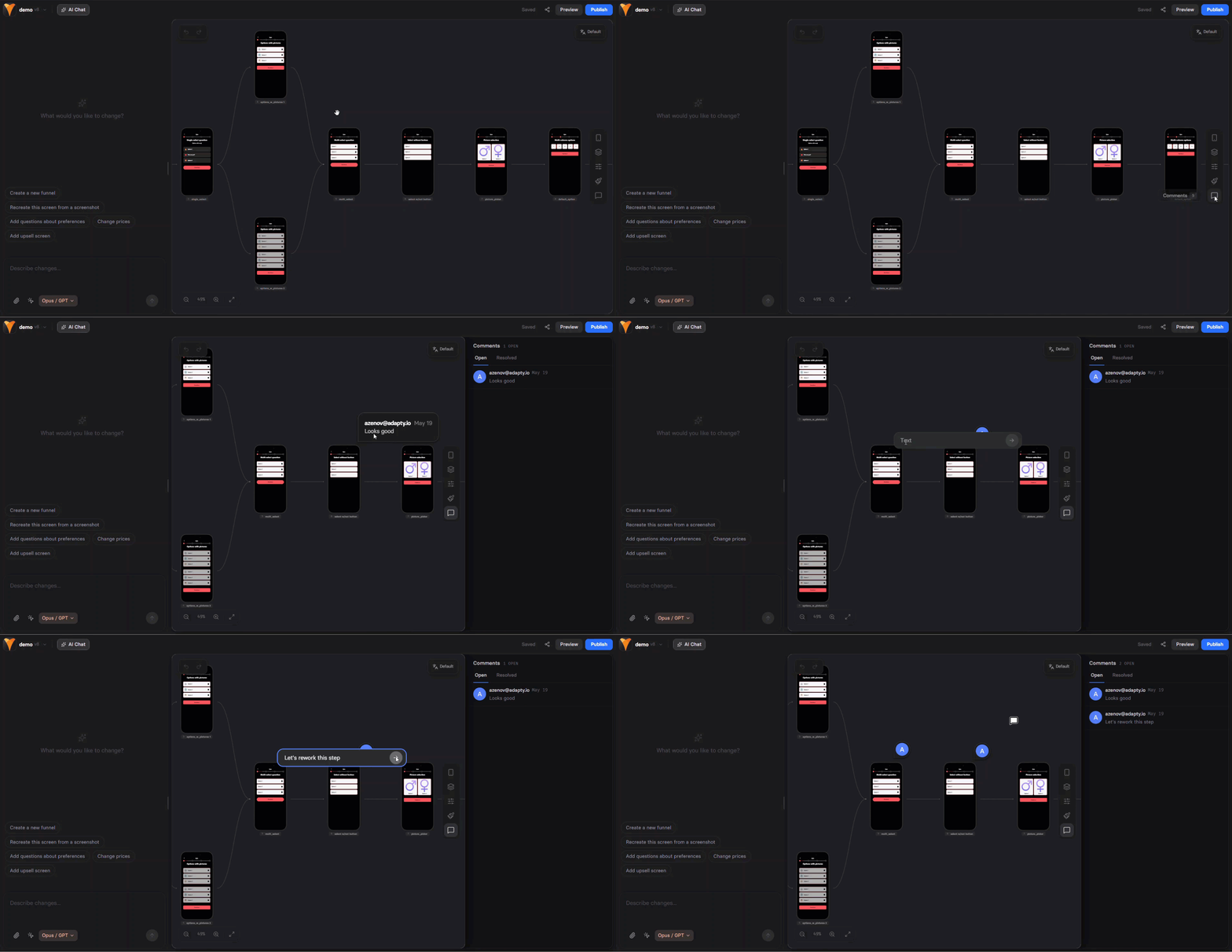
Collaborate directly on canvas with inline comments.\
Add comments, reply to feedback, and resolve discussions without leaving the canvas or using external tools.
 **How it works:**
* Click the comment icon to enter comment mode
* Click anywhere to add a new comment
* Reply to existing comments or mark them as resolved
* Resolved comments are hidden from the canvas
Comments are available to logged-in users only. Not available for shared preview links.
[Learn about canvas comments →](https://funnelfox.com/docs/editor/overview#comments)
## Password Hashes in Webhooks
Added password hashes to the `profile.updated` webhook.\
When users update their password through a password input, FunnelFox sends hashed versions in four formats for compatibility with different auth systems:
* `argon2id` — modern, secure (PHC format)
* `bcrypt` — widely supported (standard format)
* `pbkdf2_sha256` — FIPS-compliant (PHC format)
* `scrypt` — memory-hard (PHC format)
All passwords are normalized to UTF-8 NFC before hashing. Salts are included in the hash strings.
[Learn about password verification →](https://funnelfox.com/docs/develop/password-hashes) | [See webhook reference →](https://funnelfox.com/docs/api-reference/webhook-reference/profileupdated)
## Settings Menu Reorganization
Reorganized the Settings menu for easier navigation:
* **Integrations** moved to main menu
* **Billing** moved to Integrations → Payment Providers → FunnelFox Billing
* **Chargeback Protect** added as a new section in Integrations
* Old billing URLs redirect automatically to the new location
## Cohorts: UTM Filters
Added UTM parameter filters in the Cohorts dashboard.\
Filter cohort data by `utm_source`, `utm_medium`, `utm_campaign`, `utm_content`, and `utm_term` to analyze revenue by traffic source and calculate ROAS.
Combine multiple UTM filters with AND conditions for precise analysis.
[Learn about cohort filters →](https://funnelfox.com/docs/dashboard/analytics#filters)
**How it works:**
* Click the comment icon to enter comment mode
* Click anywhere to add a new comment
* Reply to existing comments or mark them as resolved
* Resolved comments are hidden from the canvas
Comments are available to logged-in users only. Not available for shared preview links.
[Learn about canvas comments →](https://funnelfox.com/docs/editor/overview#comments)
## Password Hashes in Webhooks
Added password hashes to the `profile.updated` webhook.\
When users update their password through a password input, FunnelFox sends hashed versions in four formats for compatibility with different auth systems:
* `argon2id` — modern, secure (PHC format)
* `bcrypt` — widely supported (standard format)
* `pbkdf2_sha256` — FIPS-compliant (PHC format)
* `scrypt` — memory-hard (PHC format)
All passwords are normalized to UTF-8 NFC before hashing. Salts are included in the hash strings.
[Learn about password verification →](https://funnelfox.com/docs/develop/password-hashes) | [See webhook reference →](https://funnelfox.com/docs/api-reference/webhook-reference/profileupdated)
## Settings Menu Reorganization
Reorganized the Settings menu for easier navigation:
* **Integrations** moved to main menu
* **Billing** moved to Integrations → Payment Providers → FunnelFox Billing
* **Chargeback Protect** added as a new section in Integrations
* Old billing URLs redirect automatically to the new location
## Cohorts: UTM Filters
Added UTM parameter filters in the Cohorts dashboard.\
Filter cohort data by `utm_source`, `utm_medium`, `utm_campaign`, `utm_content`, and `utm_term` to analyze revenue by traffic source and calculate ROAS.
Combine multiple UTM filters with AND conditions for precise analysis.
[Learn about cohort filters →](https://funnelfox.com/docs/dashboard/analytics#filters)