> ## Documentation Index
> Fetch the complete documentation index at: https://funnelfox.com/docs/llms.txt
> Use this file to discover all available pages before exploring further.
# Meta Ads
> Browse and filter the actual ad creatives running in your market in FunnelFox Radar.
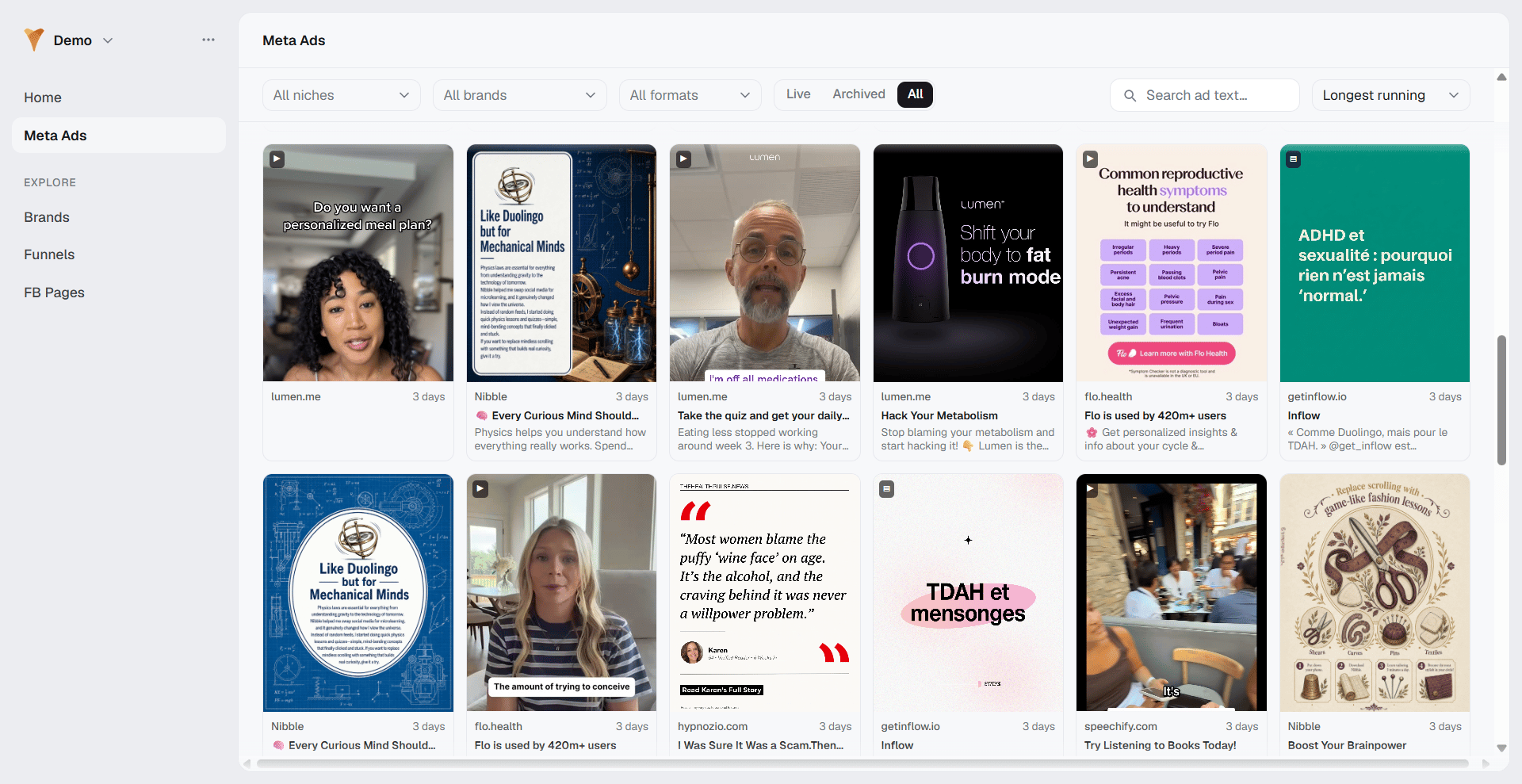
The Meta Ads gallery shows the real ad creatives running in the market.
Instead of a table, it presents a grid of ad cards you can filter down to
a niche, a brand, a funnel, or a single Facebook page.
 ## Meta Ads gallery
Each ad card shows the creative media, the brand name, a badge with how
long the ad has run (or its launch month), and the ad title and body
copy. Click a card to open the ad detail. Use **Load more ads** to page
through results.
Cards handle each media type:
* **Image**: The static creative.
* **Video**: Plays silently on hover, with a play control.
* **Carousel**: A multi-card creative.
* **Text only**: A fallback tile when there is no media.
## Filter and sort
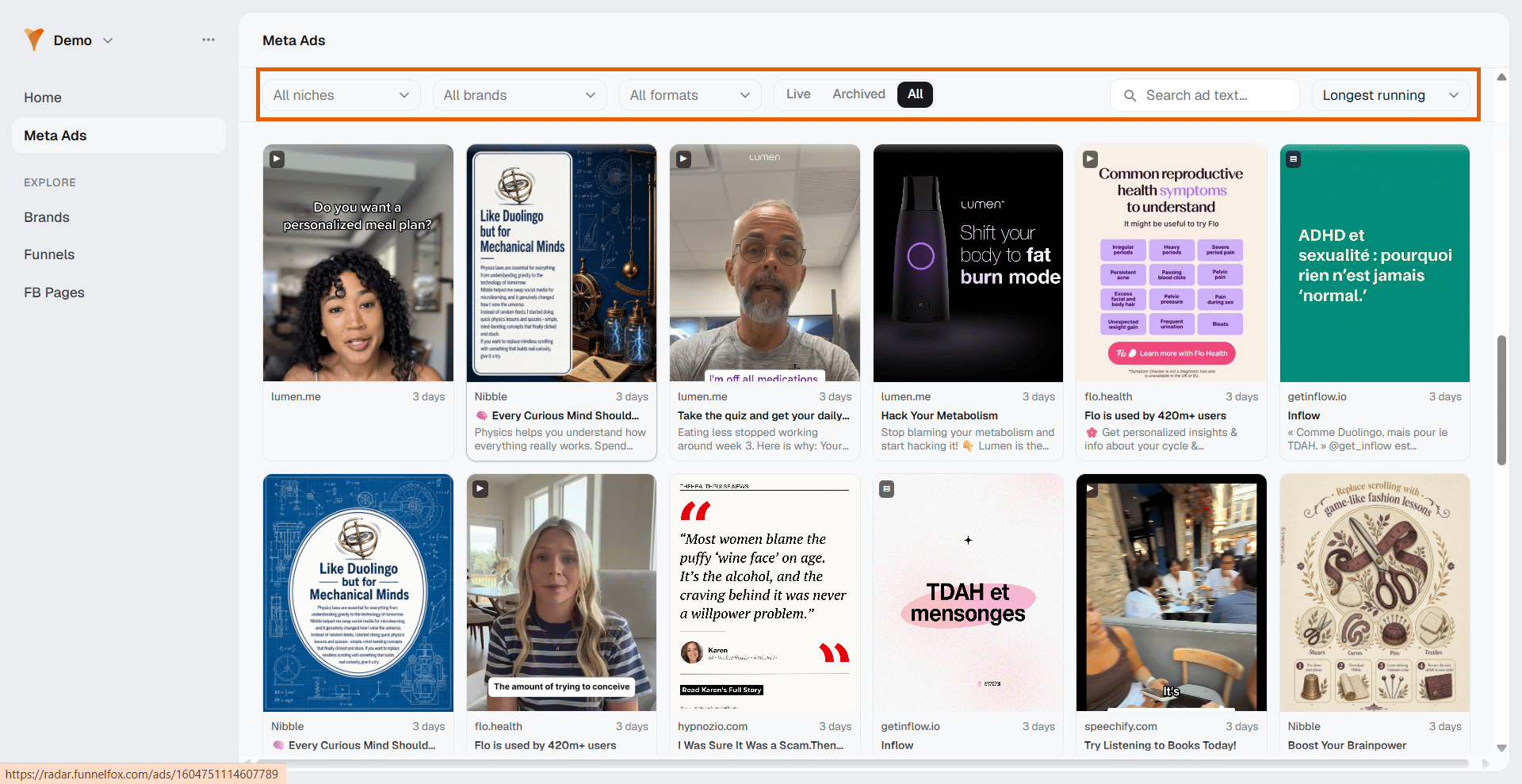
A sticky filter bar sits above the grid. The filters cascade from left to
right, so each choice narrows the next:
* **Niche**: Limit to one or more categories.
* **Brand**: Narrowed by the selected niches.
* **Funnel** and **FB page**: Appear once your scope is narrow enough
(25 brands or fewer).
* **Format**: **Image**, **Video**, or **Carousel**.
* **Status**: **Live**, **Archived**, or **All**. Defaults to **All**.
You can also search ad text, and sort by **Newest first**, **Oldest
first**, or **Longest running** (the default). All filters are saved in
the page URL, so you can share a filtered view.
Ad collection can lag, so an empty result does not mean those brands
are not advertising. Radar says as much in the empty state: "No ads
captured yet for this selection — ad collection can lag, so this
doesn't mean these brands aren't advertising."
## Meta Ads gallery
Each ad card shows the creative media, the brand name, a badge with how
long the ad has run (or its launch month), and the ad title and body
copy. Click a card to open the ad detail. Use **Load more ads** to page
through results.
Cards handle each media type:
* **Image**: The static creative.
* **Video**: Plays silently on hover, with a play control.
* **Carousel**: A multi-card creative.
* **Text only**: A fallback tile when there is no media.
## Filter and sort
A sticky filter bar sits above the grid. The filters cascade from left to
right, so each choice narrows the next:
* **Niche**: Limit to one or more categories.
* **Brand**: Narrowed by the selected niches.
* **Funnel** and **FB page**: Appear once your scope is narrow enough
(25 brands or fewer).
* **Format**: **Image**, **Video**, or **Carousel**.
* **Status**: **Live**, **Archived**, or **All**. Defaults to **All**.
You can also search ad text, and sort by **Newest first**, **Oldest
first**, or **Longest running** (the default). All filters are saved in
the page URL, so you can share a filtered view.
Ad collection can lag, so an empty result does not mean those brands
are not advertising. Radar says as much in the empty state: "No ads
captured yet for this selection — ad collection can lag, so this
doesn't mean these brands aren't advertising."
 ## Ad detail
An ad page opens with its title and a meta line showing the media type,
the brand, the Facebook page, a Facebook Ad Library link, and the ad
archive id.
## Ad detail
An ad page opens with its title and a meta line showing the media type,
the brand, the Facebook page, a Facebook Ad Library link, and the ad
archive id.
 The KPI strip shows four tiles:
* **Status**: **Live** (with a pulsing dot) or **Stopped**.
* **Days running**: The total active time.
* **First seen**: The month the ad started.
* **Last seen**: "Live today", the end month, or a dash when unknown.
Below the KPIs:
* **Media**: The full creative, with video controls when relevant.
* **Ad copy**: The body copy, plus a call-to-action button to the live
URL and a link to the Facebook Ad Library.
* **Destination**: Where the ad sends people, linking to the tracked
funnel when Radar has one, or to the raw URL.
* **More from this page or brand**: A grid of related ad cards.
### Creatives
Radar surfaces creatives two ways. **Winners** are the longest-running
ads, a durability signal that they are working. **Newest** are the most
recently launched ads; in that sort mode, recent ads carry a **NEW**
badge.
Creative capture is being rolled out, so a grid can be empty for a
brand, funnel, or page until the next
sweep
collects its ads.
Radar captures the parts of an ad you need to read a competitor's
approach:
* **Title and body copy**: The ad's text.
* **Call to action**: The button text, such as "Shop Now".
* **Destination**: The link the ad points to.
* **Media type**: Image, video, or carousel.
* **Status and dates**: Whether the ad is active, plus its start and end.
* **Days running**: Total active time, a signal of how well it works.
## Next steps
* See how ad activity is counted in [metrics and data](/docs/radar/metrics)
The KPI strip shows four tiles:
* **Status**: **Live** (with a pulsing dot) or **Stopped**.
* **Days running**: The total active time.
* **First seen**: The month the ad started.
* **Last seen**: "Live today", the end month, or a dash when unknown.
Below the KPIs:
* **Media**: The full creative, with video controls when relevant.
* **Ad copy**: The body copy, plus a call-to-action button to the live
URL and a link to the Facebook Ad Library.
* **Destination**: Where the ad sends people, linking to the tracked
funnel when Radar has one, or to the raw URL.
* **More from this page or brand**: A grid of related ad cards.
### Creatives
Radar surfaces creatives two ways. **Winners** are the longest-running
ads, a durability signal that they are working. **Newest** are the most
recently launched ads; in that sort mode, recent ads carry a **NEW**
badge.
Creative capture is being rolled out, so a grid can be empty for a
brand, funnel, or page until the next
sweep
collects its ads.
Radar captures the parts of an ad you need to read a competitor's
approach:
* **Title and body copy**: The ad's text.
* **Call to action**: The button text, such as "Shop Now".
* **Destination**: The link the ad points to.
* **Media type**: Image, video, or carousel.
* **Status and dates**: Whether the ad is active, plus its start and end.
* **Days running**: Total active time, a signal of how well it works.
## Next steps
* See how ad activity is counted in [metrics and data](/docs/radar/metrics)