> ## Documentation Index
> Fetch the complete documentation index at: https://funnelfox.com/docs/llms.txt
> Use this file to discover all available pages before exploring further.
# Qonversion integration
> Connect Qonversion to FunnelFox for cross-platform subscription analytics. Sync web and in-app purchases in one dashboard.
Qonversion integration enables subscription management and entitlement control
for purchases made through FunnelFox funnels. Unlike other platforms,
Qonversion focuses on entitlement management rather than transaction tracking.
 ## What is Qonversion?
Qonversion is a subscription infrastructure platform that manages user
entitlements and access control across platforms. The integration allows your
apps to verify user access based on purchases made through FunnelFox funnels.
## How It Works
When a user completes a subscription purchase in your funnel:
1. **User Creation**: FunnelFox creates a Qonversion User with ID
`fnlfx_{profile_id}`
2. **Identity Creation**: Links the user to an Identity ID (email or custom)
for cross-platform access
3. **Entitlement Grant**: Grants the configured entitlement with expiration
based on subscription period
4. **App Verification**: Your app identifies the user and checks their
entitlements through Qonversion SDK
Qonversion profiles are created only for **subscription purchases**. One-time
products create profiles only if they have a custom entitlement configured
in the checkout.
## Configuration
### Prerequisites
* Active Qonversion account with configured products
* App with Qonversion SDK integrated
* Recurring products configured in FunnelFox
### Setup Steps
1. Log into [Qonversion Dashboard](https://dash.qonversion.io)
2. Go to **Project Settings**
3. Copy your **Project Key** (for SDK initialization)
4. Copy your **Secret Key** (for server-side API calls)
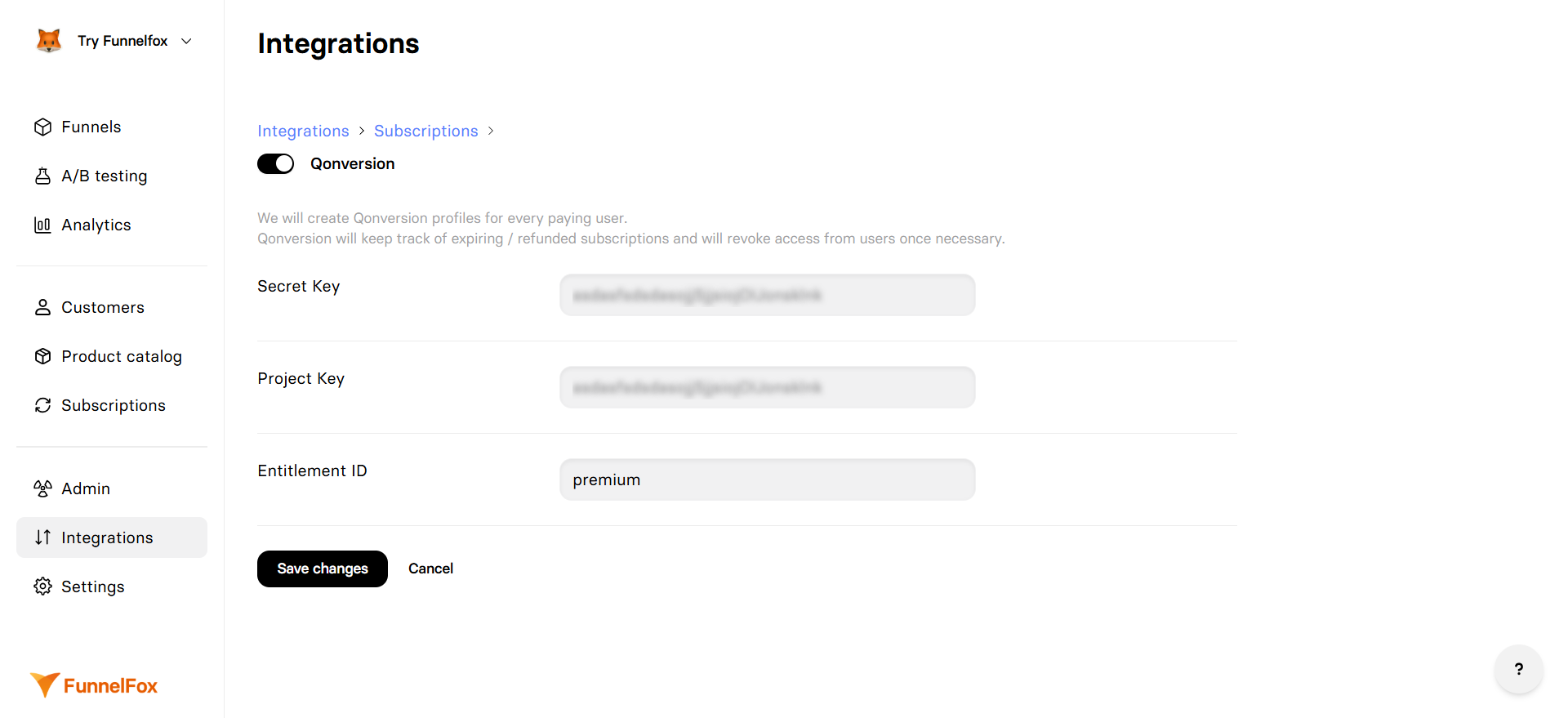
1. Go to **Integrations** → **Qonversion**
2. Toggle **Qonversion** integration on
3. Paste your **Project Key**
4. Paste your **Secret Key**
5. Set **Default Entitlement** (e.g., "premium")
6. Click **Save changes**
Note: One Qonversion configuration is shared across all funnels in the
project.
* Open your funnel in preview mode
* Make a test purchase (automatically uses sandbox)
* Check Qonversion dashboard for the new user
* Verify entitlement is granted with correct expiration
## User Identification
### Dual ID System
Qonversion uses two identifiers for each user:
1. **User ID**: `fnlfx_{profile_id}` - Unique identifier created by FunnelFox
2. **Identity ID**: Email or custom ID - Used for cross-platform access
The Identity ID allows users to access their subscription across different
devices and platforms when they log in with the same credentials.
### Customer ID Mapping
FunnelFox sets the Identity ID using this priority:
1. **Custom Input**: Value from `_USERID_` input element in your funnel
2. **Email**: User's email address if collected
3. **Fallback**: `fnlfx_` + FunnelFox profile ID
Unlike Adapty, Qonversion integration doesn't support URL parameters for
existing user IDs. Users must be identified through your app.
## User Properties
FunnelFox sets the following properties on Qonversion users:
| Property | Value | Description |
| ---------------------- | ---------- | ------------------------------- |
| **fnlfx\_profile\_id** | Profile ID | FunnelFox's internal profile ID |
| **fnlfx\_session\_id** | Session ID | Current funnel session ID |
## Entitlement Management
### Granting Entitlements
* Entitlements are granted with an expiration date matching the subscription
period
* Default entitlement is configured in FunnelFox settings
* Can be overridden per product using custom entitlements in checkout
### Environment Handling
Qonversion maintains separate environments within the same account:
* **Production**: Real purchases
* **Sandbox**: Test purchases in preview mode
Users are created in the appropriate environment based on the purchase type.
### Expiration and Revocation
Qonversion doesn't track subscription transactions directly. FunnelFox
manages all subscription lifecycle events and updates entitlements
accordingly.
FunnelFox handles these events:
* **Renewals**: Updates entitlement expiration
* **Refunds**: Revokes active entitlements
* **Pauses**: Revokes active entitlements
* **Natural Expiration**: Qonversion automatically expires entitlements
## Mobile App Integration
Your app needs to identify users and check their entitlements:
```swift iOS (Swift) theme={null}
// Identify the user with their email
Qonversion.shared.identify(userEmail) { (result, error) in
// Check entitlements
Qonversion.shared.checkEntitlements { (entitlements, error) in
if let premium = entitlements["premium"], premium.isActive {
// Grant premium features
}
}
}
```
```kotlin Android (Kotlin) theme={null}
// Identify the user with their email
Qonversion.shared.identify(userEmail, object : QonversionEntitlementsCallback {
override fun onSuccess(entitlements: Map) {
val premium = entitlements["premium"]
if (premium?.isActive == true) {
// Grant premium features
}
}
override fun onError(error: QonversionError) {
// Handle error
}
})
```
```javascript React Native theme={null}
// Identify the user with their email
await Qonversion.getSharedInstance().identify(email);
// Check entitlements
const entitlements = await Qonversion.getSharedInstance().checkEntitlements();
const premium = entitlements.get('premium');
if (premium !== null && premium.isActive) {
// Grant premium features
}
```
The identifier used in `identify()` must match the Identity ID created by
FunnelFox (email or custom ID). This links the web purchase to the app user.
See [Qonversion's SDK documentation](https://documentation.qonversion.io) for
complete implementation guides for iOS, Android, React Native, Flutter,
Unity, and Web.
## Testing
### Sandbox Mode
Testing with preview mode automatically uses sandbox:
1. Open your funnel in preview mode
2. Purchases automatically create sandbox users
3. Use test cards for payments
4. Check Qonversion dashboard in sandbox environment
### Verification Checklist
* [ ] User created in Qonversion with correct User ID format
* [ ] Identity created and linked to user
* [ ] Entitlement granted with correct expiration
* [ ] User properties set correctly
* [ ] Mobile app recognizes user's entitlements
## Multiple Entitlements
Qonversion supports multiple active entitlements per user. This enables:
* Tiered access levels (basic, pro, enterprise)
* Feature-specific entitlements
* Add-on subscriptions
Configure different entitlements for different products in your checkout
elements.
## Troubleshooting
* Verify Project Key and Secret Key are correct
* Check product is configured as recurring
* Ensure Qonversion integration is enabled
* Look for errors in webhook logs
* Confirm entitlement name matches exactly
* Check expiration date is set correctly
* Verify purchase completed successfully
* Ensure correct environment (prod vs sandbox)
* Verify `_USERID_` input element ID is exact
* Ensure email is collected before purchase
* Check Identity ID matches what your app expects
* Ensure `identify()` uses the same ID as FunnelFox
* Refresh entitlements in the app
* Check entitlement names match configuration
* Verify Qonversion SDK is properly initialized
* Ensure you're testing in preview mode for sandbox
* Production purchases should be made through published funnels
* Check environment settings in Qonversion dashboard
## Limitations
* No direct PSP integration (unlike RevenueCat)
* FunnelFox must send all subscription updates
* No URL parameter support for existing users
* Limited to entitlement-based access (no revenue tracking)
## Next Steps
* [Configure recurring products](/dashboard/products#recurring-products)
* [Set up payment providers](/integrations/payments)
* [Test with sandbox mode](/billing/testing)
* [Monitor subscriptions](/dashboard/subscriptions)
## What is Qonversion?
Qonversion is a subscription infrastructure platform that manages user
entitlements and access control across platforms. The integration allows your
apps to verify user access based on purchases made through FunnelFox funnels.
## How It Works
When a user completes a subscription purchase in your funnel:
1. **User Creation**: FunnelFox creates a Qonversion User with ID
`fnlfx_{profile_id}`
2. **Identity Creation**: Links the user to an Identity ID (email or custom)
for cross-platform access
3. **Entitlement Grant**: Grants the configured entitlement with expiration
based on subscription period
4. **App Verification**: Your app identifies the user and checks their
entitlements through Qonversion SDK
Qonversion profiles are created only for **subscription purchases**. One-time
products create profiles only if they have a custom entitlement configured
in the checkout.
## Configuration
### Prerequisites
* Active Qonversion account with configured products
* App with Qonversion SDK integrated
* Recurring products configured in FunnelFox
### Setup Steps
1. Log into [Qonversion Dashboard](https://dash.qonversion.io)
2. Go to **Project Settings**
3. Copy your **Project Key** (for SDK initialization)
4. Copy your **Secret Key** (for server-side API calls)
1. Go to **Integrations** → **Qonversion**
2. Toggle **Qonversion** integration on
3. Paste your **Project Key**
4. Paste your **Secret Key**
5. Set **Default Entitlement** (e.g., "premium")
6. Click **Save changes**
Note: One Qonversion configuration is shared across all funnels in the
project.
* Open your funnel in preview mode
* Make a test purchase (automatically uses sandbox)
* Check Qonversion dashboard for the new user
* Verify entitlement is granted with correct expiration
## User Identification
### Dual ID System
Qonversion uses two identifiers for each user:
1. **User ID**: `fnlfx_{profile_id}` - Unique identifier created by FunnelFox
2. **Identity ID**: Email or custom ID - Used for cross-platform access
The Identity ID allows users to access their subscription across different
devices and platforms when they log in with the same credentials.
### Customer ID Mapping
FunnelFox sets the Identity ID using this priority:
1. **Custom Input**: Value from `_USERID_` input element in your funnel
2. **Email**: User's email address if collected
3. **Fallback**: `fnlfx_` + FunnelFox profile ID
Unlike Adapty, Qonversion integration doesn't support URL parameters for
existing user IDs. Users must be identified through your app.
## User Properties
FunnelFox sets the following properties on Qonversion users:
| Property | Value | Description |
| ---------------------- | ---------- | ------------------------------- |
| **fnlfx\_profile\_id** | Profile ID | FunnelFox's internal profile ID |
| **fnlfx\_session\_id** | Session ID | Current funnel session ID |
## Entitlement Management
### Granting Entitlements
* Entitlements are granted with an expiration date matching the subscription
period
* Default entitlement is configured in FunnelFox settings
* Can be overridden per product using custom entitlements in checkout
### Environment Handling
Qonversion maintains separate environments within the same account:
* **Production**: Real purchases
* **Sandbox**: Test purchases in preview mode
Users are created in the appropriate environment based on the purchase type.
### Expiration and Revocation
Qonversion doesn't track subscription transactions directly. FunnelFox
manages all subscription lifecycle events and updates entitlements
accordingly.
FunnelFox handles these events:
* **Renewals**: Updates entitlement expiration
* **Refunds**: Revokes active entitlements
* **Pauses**: Revokes active entitlements
* **Natural Expiration**: Qonversion automatically expires entitlements
## Mobile App Integration
Your app needs to identify users and check their entitlements:
```swift iOS (Swift) theme={null}
// Identify the user with their email
Qonversion.shared.identify(userEmail) { (result, error) in
// Check entitlements
Qonversion.shared.checkEntitlements { (entitlements, error) in
if let premium = entitlements["premium"], premium.isActive {
// Grant premium features
}
}
}
```
```kotlin Android (Kotlin) theme={null}
// Identify the user with their email
Qonversion.shared.identify(userEmail, object : QonversionEntitlementsCallback {
override fun onSuccess(entitlements: Map) {
val premium = entitlements["premium"]
if (premium?.isActive == true) {
// Grant premium features
}
}
override fun onError(error: QonversionError) {
// Handle error
}
})
```
```javascript React Native theme={null}
// Identify the user with their email
await Qonversion.getSharedInstance().identify(email);
// Check entitlements
const entitlements = await Qonversion.getSharedInstance().checkEntitlements();
const premium = entitlements.get('premium');
if (premium !== null && premium.isActive) {
// Grant premium features
}
```
The identifier used in `identify()` must match the Identity ID created by
FunnelFox (email or custom ID). This links the web purchase to the app user.
See [Qonversion's SDK documentation](https://documentation.qonversion.io) for
complete implementation guides for iOS, Android, React Native, Flutter,
Unity, and Web.
## Testing
### Sandbox Mode
Testing with preview mode automatically uses sandbox:
1. Open your funnel in preview mode
2. Purchases automatically create sandbox users
3. Use test cards for payments
4. Check Qonversion dashboard in sandbox environment
### Verification Checklist
* [ ] User created in Qonversion with correct User ID format
* [ ] Identity created and linked to user
* [ ] Entitlement granted with correct expiration
* [ ] User properties set correctly
* [ ] Mobile app recognizes user's entitlements
## Multiple Entitlements
Qonversion supports multiple active entitlements per user. This enables:
* Tiered access levels (basic, pro, enterprise)
* Feature-specific entitlements
* Add-on subscriptions
Configure different entitlements for different products in your checkout
elements.
## Troubleshooting
* Verify Project Key and Secret Key are correct
* Check product is configured as recurring
* Ensure Qonversion integration is enabled
* Look for errors in webhook logs
* Confirm entitlement name matches exactly
* Check expiration date is set correctly
* Verify purchase completed successfully
* Ensure correct environment (prod vs sandbox)
* Verify `_USERID_` input element ID is exact
* Ensure email is collected before purchase
* Check Identity ID matches what your app expects
* Ensure `identify()` uses the same ID as FunnelFox
* Refresh entitlements in the app
* Check entitlement names match configuration
* Verify Qonversion SDK is properly initialized
* Ensure you're testing in preview mode for sandbox
* Production purchases should be made through published funnels
* Check environment settings in Qonversion dashboard
## Limitations
* No direct PSP integration (unlike RevenueCat)
* FunnelFox must send all subscription updates
* No URL parameter support for existing users
* Limited to entitlement-based access (no revenue tracking)
## Next Steps
* [Configure recurring products](/dashboard/products#recurring-products)
* [Set up payment providers](/integrations/payments)
* [Test with sandbox mode](/billing/testing)
* [Monitor subscriptions](/dashboard/subscriptions)