> ## Documentation Index
> Fetch the complete documentation index at: https://funnelfox.com/docs/llms.txt
> Use this file to discover all available pages before exploring further.
# Adapty integration
> Connect Adapty to FunnelFox for unified subscription management across web and app. Sync users, purchases, and subscription data.
Adapty integration enables seamless subscription management between FunnelFox
and your mobile applications. When users purchase recurring products through
your funnels, FunnelFox automatically creates Adapty profiles and grants
appropriate access levels.
 ## What is Adapty?
Adapty is a subscription management platform for mobile apps. The integration
allows your mobile app to verify user access based on purchases made through
FunnelFox funnels.
## How It Works
When a user completes a subscription purchase in your funnel:
1. **Profile Creation**: FunnelFox creates an Adapty profile using a unique
customer ID
2. **Transaction Sync**: Purchase details are sent to Adapty including price,
product info, and subscription status
3. **Access Grant**: The configured access level is granted to the user
4. **Mobile App Verification**: Your app checks the user's access level
through Adapty SDK
Adapty profiles are created only for **subscription purchases**. Consumable
(one-time) products create profiles only if they have a custom access level
configured in the checkout.
## Configuration
### Prerequisites
* Active Adapty account with configured products
* Products in Adapty must include their corresponding Stripe/Paddle/other payment provider product IDs for accurate tracking
* Mobile app with Adapty SDK activated in the app code
* Recurring products configured in FunnelFox
### Setup Steps
1. Log into your [Adapty Dashboard](https://app.adapty.io)
2. Navigate to **App Settings** → **API Keys**
3. Copy your **Secret Key** (not the public SDK key)
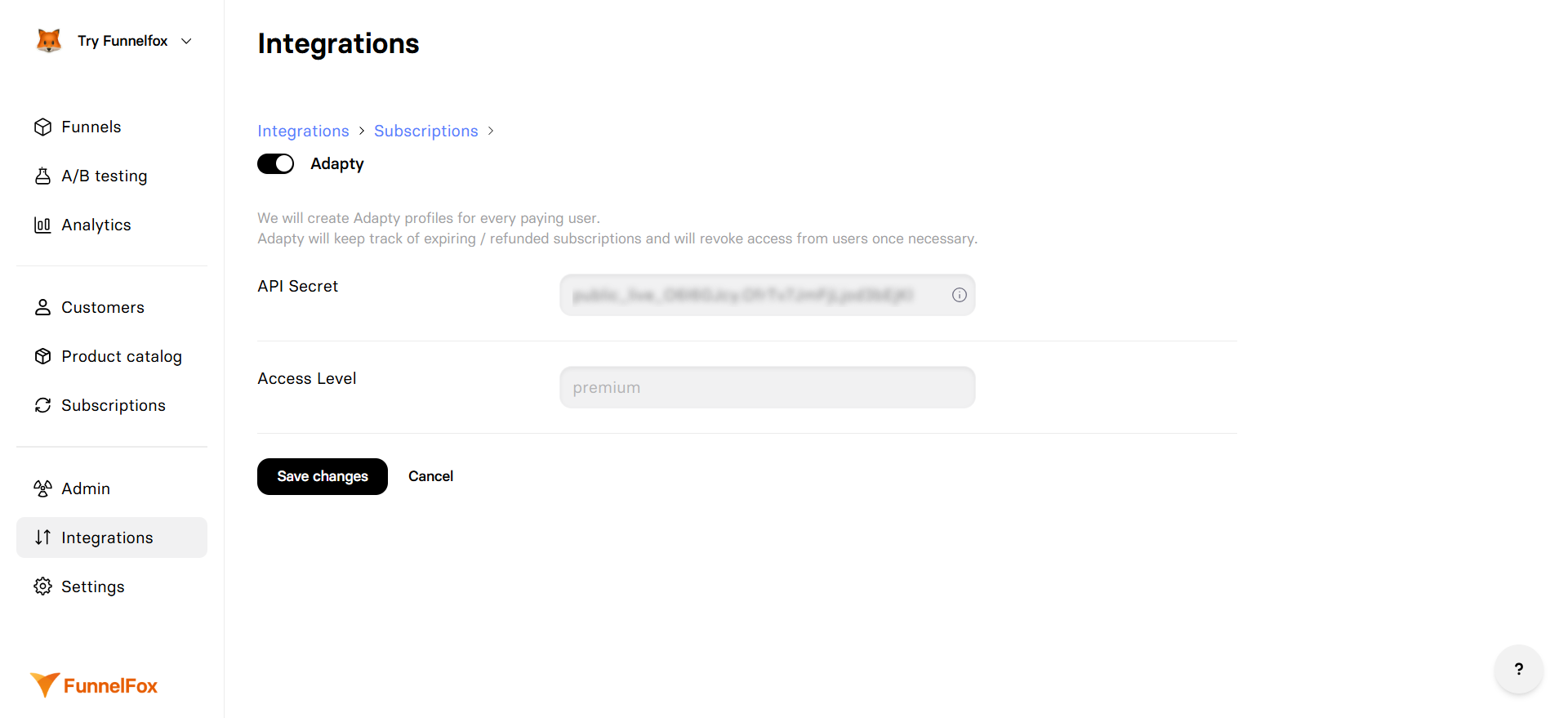
1. Go to **Integrations** → **Adapty**
2. Toggle **Adapty** integration on
3. Paste your API Secret
4. Enter your Access Level name (default: "premium")
5. Click **Save changes**
Note: One Adapty configuration is shared across all funnels in the project.
Test the integration using preview mode:
* Open your funnel in preview mode
* Make a test purchase (automatically uses sandbox)
* For paid Adapty users: Check the new profile in Adapty dashboard
* For free Adapty users: Verify by attempting to access paid content in your app
* Check Event Feed in Adapty for sandbox events
## Profile Creation
### Customer User ID
By default, FunnelFox creates Adapty profiles using the **user's email** as
the Customer User ID. This can be customized:
1. **Custom input**: If you add an input element with the `_USERID_` element ID, its value becomes the App User ID.
2. **From your backend**: When you fetch the user ID from your backend, set it using [custom code](/editor/coding) inside a Raw HTML element:
```
```
3. **Email (default)**: If none of the above are provided, the user's email address is used as the App User ID.
4. **Fallback**: If no email is collected, FunnelFox uses `fnlfx_` + FunnelFox profile ID.
The `adapty_profile_id` URL parameter is supported for compatibility but not recommended.
Use Customer User IDs for consistency. If you need to link to an existing Adapty
profile, use the same Customer User ID that was originally used to create that profile.
If Customer User IDs don't match between FunnelFox and your app, a new Adapty
profile will be created, leading to duplicate profiles for the same user.
### Profile Attributes
FunnelFox sets the following attributes in Adapty profiles:
| Attribute | Value | Description |
| ----------------------- | ---------------- | ---------------------------------- |
| **Email** | User's email | If collected in the funnel |
| **IP Country** | Session country | Based on user's location |
| **fnlfx\_profile\_id** | Profile ID | FunnelFox's internal profile ID |
| **fnlfx\_session\_id** | Session ID | Current funnel session ID |
| **fnlfx\_funnel\_id** | Funnel ID | Funnel that acquired the user |
| **vendor\_profile\_id** | PSP customer ID | Payment provider's customer ID |
| **vendor** | Payment provider | `stripe`, `paddle`, `paypal`, etc. |
If you use Adapty for both in-app purchases and FunnelFox purchases, create
a segment in Adapty with profiles where `fnlfx_profile_id` is not empty. Use
this segment to filter FunnelFox purchases in analytics and separate them from
in-app purchases.
## Access Level Configuration
The **Access Level** field in FunnelFox settings determines which Adapty
access level is granted when users purchase subscriptions.
If you have multiple access levels configured in Adapty, set them up in your
Adapty dashboard and assign them to specific products. Otherwise, the default
'premium' access level will be used for all purchases.
For multiple product tiers, you can override the default access level by
configuring custom access levels per product in your checkout elements.
## Subscription Events
FunnelFox automatically handles these subscription lifecycle events:
| Event | Adapty Action | When It Happens |
| ------------------ | ------------------------------ | --------------------------- |
| **Purchase** | Grant access level | User completes payment |
| **Trial Start** | Grant access (marked as trial) | Free/paid trial begins |
| **Renewal** | Update expiration | Subscription renews |
| **Auto-renew off** | Schedule revoke at period end | User turns off auto-renewal |
| **Pause** | Revoke access level | Subscription paused |
| **Cancellation** | Revoke access level | Subscription cancelled |
| **Unpaid** | Revoke access level | Recurring payment fails |
| **Refund** | Revoke access level | Payment refunded |
When a user turns off auto-renewal,
the subscription stays active until the end of the current period. Adapty schedules the revoke at the period end so the user keeps access
until then. A hard cancellation revokes access immediately.
## Mobile App Integration
Your mobile app needs to identify the user and check their access:
```swift iOS (Swift) theme={null}
// First identify the user with the same Customer User ID used by FunnelFox
let customerUserId = "YOUR_CUSTOMER_USER_ID" // By default, this is the user's email
Adapty.identify(customerUserId) { _ in
// Then check if user has access (replace "YOUR_ACCESS_LEVEL" with your actual level)
Adapty.getProfile { result in
if let profile = try? result.get() {
let hasAccess = profile.accessLevels["YOUR_ACCESS_LEVEL"]?.isActive ?? false
// Update UI based on access
}
}
}
```
```kotlin Android (Kotlin) theme={null}
// First identify the user with the same Customer User ID used by FunnelFox
val customerUserId = "YOUR_CUSTOMER_USER_ID" // By default, this is the user's email
Adapty.identify(customerUserId) { _ ->
// Then check if user has access (replace "YOUR_ACCESS_LEVEL" with your actual level)
Adapty.getProfile { result ->
when (result) {
is AdaptyResult.Success -> {
val hasAccess = result.value.accessLevels["YOUR_ACCESS_LEVEL"]?.isActive ?: false
// Update UI based on access
}
is AdaptyResult.Error -> {
// Handle error
}
}
}
}
```
The Customer User ID in `identify()` must match exactly what FunnelFox uses
(by default, the user's email). Mismatched IDs will create duplicate profiles.
When `Adapty.activate()` is called on app launch, an empty profile is created
before identification. This is normal behavior. To exclude these empty profiles
from analytics, configure the [Installs definition for analytics](https://adapty.io/docs/general#4-installs-definition-for-analytics)
setting in your Adapty dashboard.
See [Adapty's mobile SDK documentation](https://docs.adapty.io) for
complete implementation guides for iOS, Android, React Native, and Flutter.
## Testing
### Sandbox Mode
Testing is simple with preview mode:
1. Open your funnel in preview mode
2. Purchases in preview automatically use sandbox
3. Use test cards for payments
4. Check Event Feed in Adapty dashboard and filter by Environment to see sandbox events
Sandbox events appear in the Event Feed but are not included in analytics.
Use the Environment filter to view sandbox-specific events.
See [Publishing & Preview](/editor/publishing) for more details on preview mode.
### Verification Checklist
* [ ] Profile created in Adapty after purchase
* [ ] Customer ID matches expected format
* [ ] Access level granted correctly
* [ ] Mobile app recognizes user's access
* [ ] Subscription expiration date is accurate
* [ ] Cancellation revokes access level
## Troubleshooting
* Verify API Secret is correct (use Secret Key, not Public SDK Key)
* Check product is configured as recurring (not one-time)
* Ensure Adapty integration is enabled in project settings
* Confirm access level name matches exactly (case-sensitive)
* Check subscription status is active
* Verify purchase completed successfully
* Wait a few seconds for sync to complete
* Check URL parameters for typos in `adapty_profile_id`
* Verify `_USERID_` input element ID is exact
* Ensure email is collected before purchase
* Review customer ID priority order
* Ensure you're testing in preview mode (automatic sandbox)
* Use test payment methods (test cards)
* Check Adapty dashboard Sandbox section, not Production
* Ensure customer ID matches between systems
* Refresh profile in mobile app
* Check access level name matches configuration
* Verify Adapty SDK is properly initialized
## Limitations
* One-time purchases sync only with custom access level in checkout
* Access level changes require funnel republishing
* Custom attributes have limited support
* Profile updates may have slight delay
## Next Steps
* [Configure recurring products](/dashboard/products#recurring-products)
* [Set up payment providers](/integrations/payments)
* [Test with sandbox mode](/billing/testing)
* [Monitor subscriptions](/dashboard/subscriptions)
## What is Adapty?
Adapty is a subscription management platform for mobile apps. The integration
allows your mobile app to verify user access based on purchases made through
FunnelFox funnels.
## How It Works
When a user completes a subscription purchase in your funnel:
1. **Profile Creation**: FunnelFox creates an Adapty profile using a unique
customer ID
2. **Transaction Sync**: Purchase details are sent to Adapty including price,
product info, and subscription status
3. **Access Grant**: The configured access level is granted to the user
4. **Mobile App Verification**: Your app checks the user's access level
through Adapty SDK
Adapty profiles are created only for **subscription purchases**. Consumable
(one-time) products create profiles only if they have a custom access level
configured in the checkout.
## Configuration
### Prerequisites
* Active Adapty account with configured products
* Products in Adapty must include their corresponding Stripe/Paddle/other payment provider product IDs for accurate tracking
* Mobile app with Adapty SDK activated in the app code
* Recurring products configured in FunnelFox
### Setup Steps
1. Log into your [Adapty Dashboard](https://app.adapty.io)
2. Navigate to **App Settings** → **API Keys**
3. Copy your **Secret Key** (not the public SDK key)
1. Go to **Integrations** → **Adapty**
2. Toggle **Adapty** integration on
3. Paste your API Secret
4. Enter your Access Level name (default: "premium")
5. Click **Save changes**
Note: One Adapty configuration is shared across all funnels in the project.
Test the integration using preview mode:
* Open your funnel in preview mode
* Make a test purchase (automatically uses sandbox)
* For paid Adapty users: Check the new profile in Adapty dashboard
* For free Adapty users: Verify by attempting to access paid content in your app
* Check Event Feed in Adapty for sandbox events
## Profile Creation
### Customer User ID
By default, FunnelFox creates Adapty profiles using the **user's email** as
the Customer User ID. This can be customized:
1. **Custom input**: If you add an input element with the `_USERID_` element ID, its value becomes the App User ID.
2. **From your backend**: When you fetch the user ID from your backend, set it using [custom code](/editor/coding) inside a Raw HTML element:
```
```
3. **Email (default)**: If none of the above are provided, the user's email address is used as the App User ID.
4. **Fallback**: If no email is collected, FunnelFox uses `fnlfx_` + FunnelFox profile ID.
The `adapty_profile_id` URL parameter is supported for compatibility but not recommended.
Use Customer User IDs for consistency. If you need to link to an existing Adapty
profile, use the same Customer User ID that was originally used to create that profile.
If Customer User IDs don't match between FunnelFox and your app, a new Adapty
profile will be created, leading to duplicate profiles for the same user.
### Profile Attributes
FunnelFox sets the following attributes in Adapty profiles:
| Attribute | Value | Description |
| ----------------------- | ---------------- | ---------------------------------- |
| **Email** | User's email | If collected in the funnel |
| **IP Country** | Session country | Based on user's location |
| **fnlfx\_profile\_id** | Profile ID | FunnelFox's internal profile ID |
| **fnlfx\_session\_id** | Session ID | Current funnel session ID |
| **fnlfx\_funnel\_id** | Funnel ID | Funnel that acquired the user |
| **vendor\_profile\_id** | PSP customer ID | Payment provider's customer ID |
| **vendor** | Payment provider | `stripe`, `paddle`, `paypal`, etc. |
If you use Adapty for both in-app purchases and FunnelFox purchases, create
a segment in Adapty with profiles where `fnlfx_profile_id` is not empty. Use
this segment to filter FunnelFox purchases in analytics and separate them from
in-app purchases.
## Access Level Configuration
The **Access Level** field in FunnelFox settings determines which Adapty
access level is granted when users purchase subscriptions.
If you have multiple access levels configured in Adapty, set them up in your
Adapty dashboard and assign them to specific products. Otherwise, the default
'premium' access level will be used for all purchases.
For multiple product tiers, you can override the default access level by
configuring custom access levels per product in your checkout elements.
## Subscription Events
FunnelFox automatically handles these subscription lifecycle events:
| Event | Adapty Action | When It Happens |
| ------------------ | ------------------------------ | --------------------------- |
| **Purchase** | Grant access level | User completes payment |
| **Trial Start** | Grant access (marked as trial) | Free/paid trial begins |
| **Renewal** | Update expiration | Subscription renews |
| **Auto-renew off** | Schedule revoke at period end | User turns off auto-renewal |
| **Pause** | Revoke access level | Subscription paused |
| **Cancellation** | Revoke access level | Subscription cancelled |
| **Unpaid** | Revoke access level | Recurring payment fails |
| **Refund** | Revoke access level | Payment refunded |
When a user turns off auto-renewal,
the subscription stays active until the end of the current period. Adapty schedules the revoke at the period end so the user keeps access
until then. A hard cancellation revokes access immediately.
## Mobile App Integration
Your mobile app needs to identify the user and check their access:
```swift iOS (Swift) theme={null}
// First identify the user with the same Customer User ID used by FunnelFox
let customerUserId = "YOUR_CUSTOMER_USER_ID" // By default, this is the user's email
Adapty.identify(customerUserId) { _ in
// Then check if user has access (replace "YOUR_ACCESS_LEVEL" with your actual level)
Adapty.getProfile { result in
if let profile = try? result.get() {
let hasAccess = profile.accessLevels["YOUR_ACCESS_LEVEL"]?.isActive ?? false
// Update UI based on access
}
}
}
```
```kotlin Android (Kotlin) theme={null}
// First identify the user with the same Customer User ID used by FunnelFox
val customerUserId = "YOUR_CUSTOMER_USER_ID" // By default, this is the user's email
Adapty.identify(customerUserId) { _ ->
// Then check if user has access (replace "YOUR_ACCESS_LEVEL" with your actual level)
Adapty.getProfile { result ->
when (result) {
is AdaptyResult.Success -> {
val hasAccess = result.value.accessLevels["YOUR_ACCESS_LEVEL"]?.isActive ?: false
// Update UI based on access
}
is AdaptyResult.Error -> {
// Handle error
}
}
}
}
```
The Customer User ID in `identify()` must match exactly what FunnelFox uses
(by default, the user's email). Mismatched IDs will create duplicate profiles.
When `Adapty.activate()` is called on app launch, an empty profile is created
before identification. This is normal behavior. To exclude these empty profiles
from analytics, configure the [Installs definition for analytics](https://adapty.io/docs/general#4-installs-definition-for-analytics)
setting in your Adapty dashboard.
See [Adapty's mobile SDK documentation](https://docs.adapty.io) for
complete implementation guides for iOS, Android, React Native, and Flutter.
## Testing
### Sandbox Mode
Testing is simple with preview mode:
1. Open your funnel in preview mode
2. Purchases in preview automatically use sandbox
3. Use test cards for payments
4. Check Event Feed in Adapty dashboard and filter by Environment to see sandbox events
Sandbox events appear in the Event Feed but are not included in analytics.
Use the Environment filter to view sandbox-specific events.
See [Publishing & Preview](/editor/publishing) for more details on preview mode.
### Verification Checklist
* [ ] Profile created in Adapty after purchase
* [ ] Customer ID matches expected format
* [ ] Access level granted correctly
* [ ] Mobile app recognizes user's access
* [ ] Subscription expiration date is accurate
* [ ] Cancellation revokes access level
## Troubleshooting
* Verify API Secret is correct (use Secret Key, not Public SDK Key)
* Check product is configured as recurring (not one-time)
* Ensure Adapty integration is enabled in project settings
* Confirm access level name matches exactly (case-sensitive)
* Check subscription status is active
* Verify purchase completed successfully
* Wait a few seconds for sync to complete
* Check URL parameters for typos in `adapty_profile_id`
* Verify `_USERID_` input element ID is exact
* Ensure email is collected before purchase
* Review customer ID priority order
* Ensure you're testing in preview mode (automatic sandbox)
* Use test payment methods (test cards)
* Check Adapty dashboard Sandbox section, not Production
* Ensure customer ID matches between systems
* Refresh profile in mobile app
* Check access level name matches configuration
* Verify Adapty SDK is properly initialized
## Limitations
* One-time purchases sync only with custom access level in checkout
* Access level changes require funnel republishing
* Custom attributes have limited support
* Profile updates may have slight delay
## Next Steps
* [Configure recurring products](/dashboard/products#recurring-products)
* [Set up payment providers](/integrations/payments)
* [Test with sandbox mode](/billing/testing)
* [Monitor subscriptions](/dashboard/subscriptions)