> ## Documentation Index
> Fetch the complete documentation index at: https://funnelfox.com/docs/llms.txt
> Use this file to discover all available pages before exploring further.
# Integration events reference
> Complete list of FunnelFox integration events. Track purchases, subscriptions, onboarding, and custom events across all platforms.
FunnelFox events notify you in near real time about everything that matters in your funnel. You can track onboarding progress, page and screen interactions, user inputs, purchase attempts and outcomes, and more.
Stream these signals to your third-party tools or deliver them server-to-server via webhooks for a single, trustworthy view of performance across your stack.
## Event flows
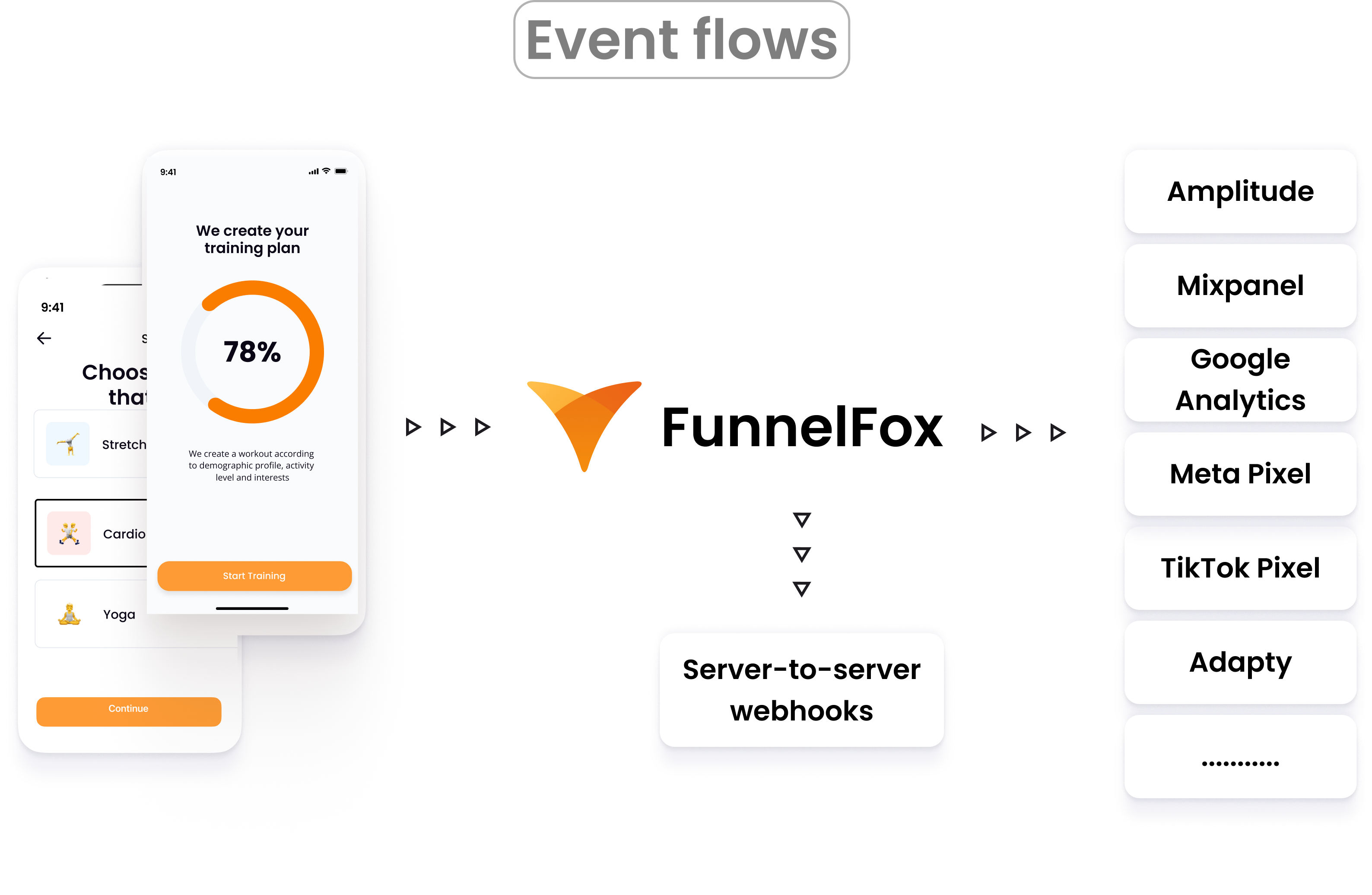
There are two ways to receive FunnelFox events:
* **Event-based integrations**: FunnelFox can forward standard events directly to popular analytics and attribution platforms.
* **Server-to-server webhooks**: FunnelFox can POST each event to your backend in near real time. Learn about [FunnelFox webhooks](/develop/webhooks).
In this article, you'll learn about event-based integrations.
 ## Events lifecycle
You can use browser extensions like [TagHound](https://chromewebstore.google.com/detail/taghound-analyticsgtmpixe/canpneabbfipaelecfibpmmjbdkiaolf?hl=en) to validate client-side event tracking.
All events are automatically sent once you connect a desired integration, which can be done in a few clicks.
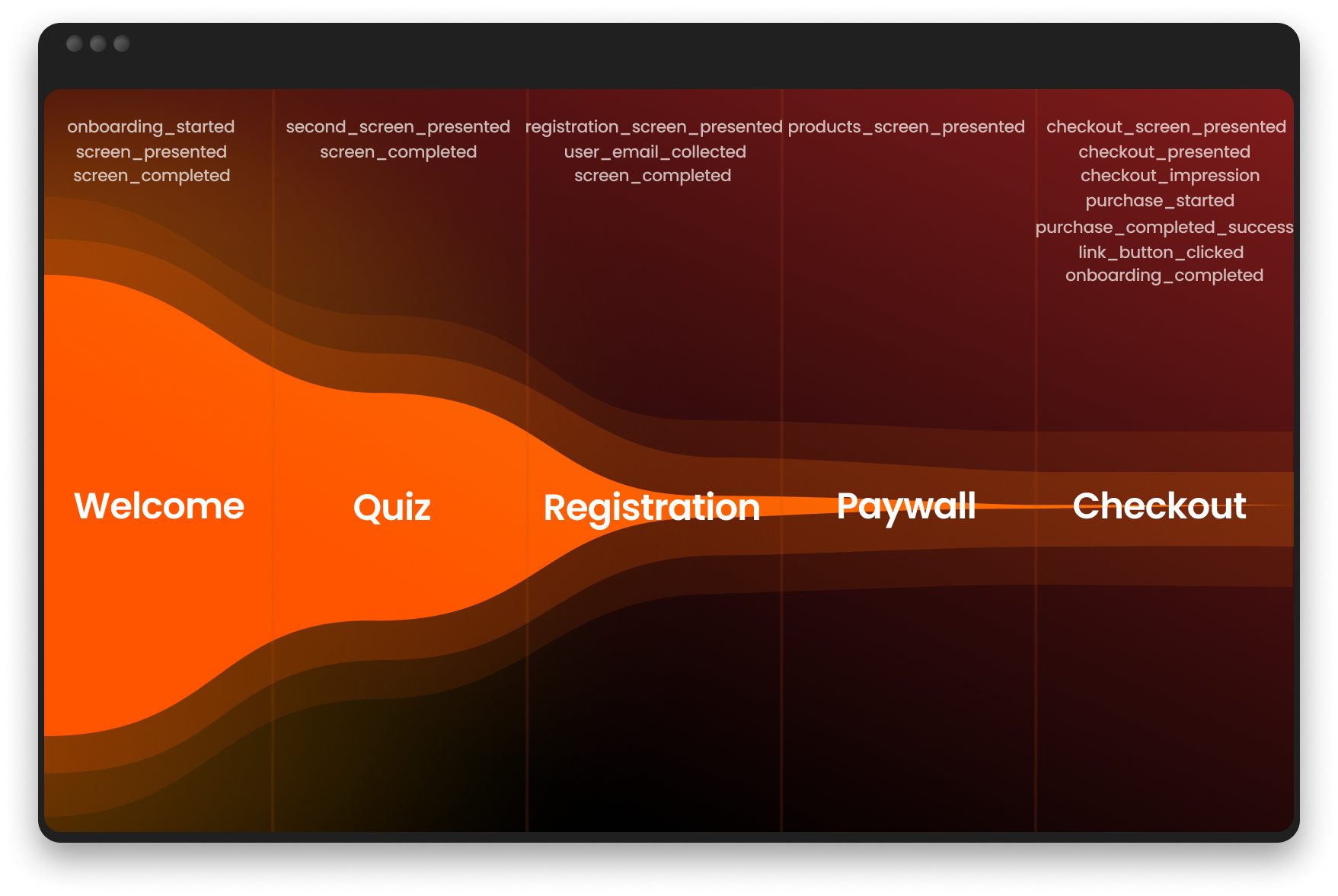
FunnelFox sends events to connected integrations during the whole customer journey through your funnels:
## Events lifecycle
You can use browser extensions like [TagHound](https://chromewebstore.google.com/detail/taghound-analyticsgtmpixe/canpneabbfipaelecfibpmmjbdkiaolf?hl=en) to validate client-side event tracking.
All events are automatically sent once you connect a desired integration, which can be done in a few clicks.
FunnelFox sends events to connected integrations during the whole customer journey through your funnels:
 After successful purchase, FunnelFox also sends post-funnel events related to subscription:
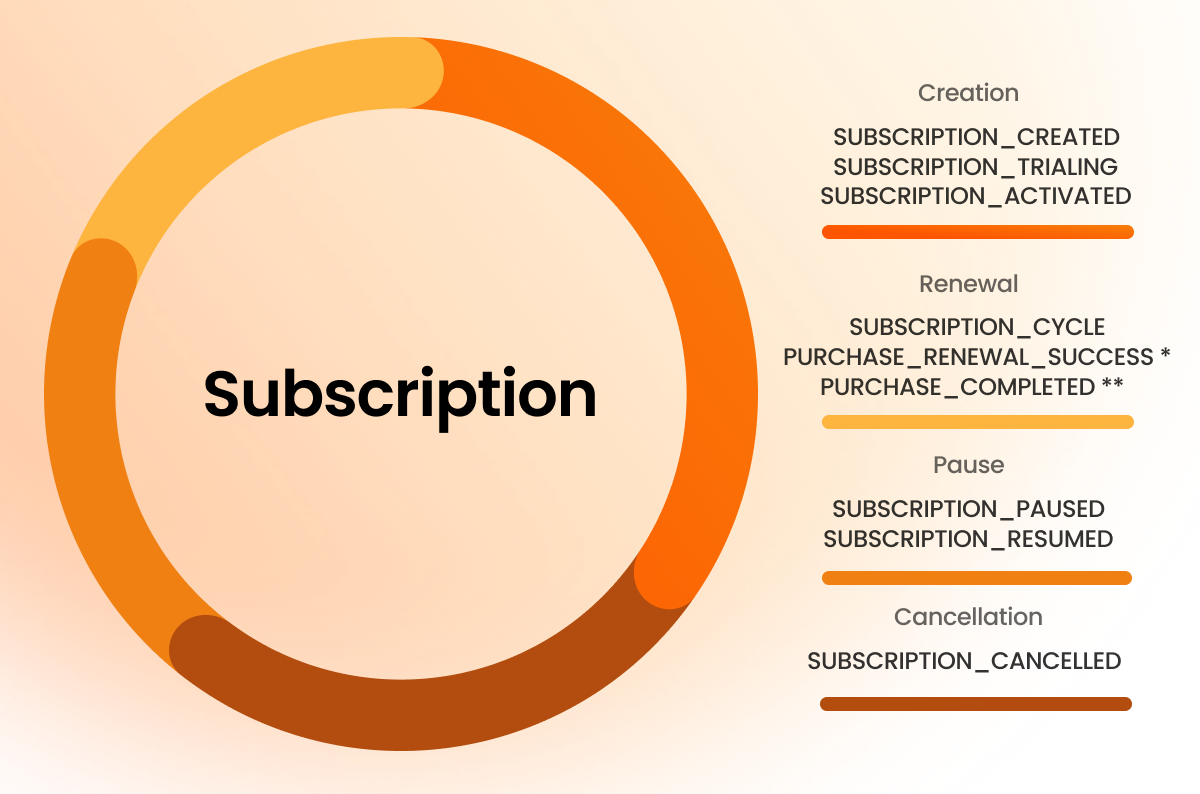 \* For renewals tracked in [Amplitude](/integrations/analytics/amplitude).
\*\* For renewals tracked in [Mixpanel](/integrations/analytics/mixpanel).
## Events
This is a complete reference of all FunnelFox events. To see which events a specific integration receives with examples, refer to the documentation for that integration.
| Event type | Description |
| ------------------------------- | --------------------------------------------------------------------------------------------------- |
| **Funnel navigation** | |
| onboarding\_started | User begins the funnel experience |
| onboarding\_completed | User reaches a screen with `final` ID |
| screen\_presented | User views a screen |
| screen\_completed | User navigates away from a screen |
| second\_screen\_presented | User views the second screen |
| products\_screen\_presented | User views paywall with Price Picker or Plan Picker elements |
| registration\_screen\_presented | User views a screen with Email input or authentication |
| user\_email\_collected | User entered a valid email |
| link\_button\_clicked | External link is clicked |
| **Authentication** | |
| auth\_button\_clicked | User taps an OAuth button to start authentication |
| auth\_success | Authentication provider returns a successful result |
| auth\_fail | Authentication fails or the provider returns an error |
| **Purchases** | |
| checkout\_screen\_presented | User views a screen with Checkout element |
| checkout\_presented | User views a Checkout element (can fire multiple times) |
| checkout\_impression | Checkout is shown for the first time (once per session) |
| purchase\_started | User entered payment details and tapped Pay, or tapped one-click purchase button (Apple/Google Pay) |
| purchase\_completed\_success | Payment succeeds. For Mixpanel, this event also indicates renewals. |
| purchase\_renewal\_success | Renewal payment succeeds |
| purchase\_completed\_fail | Payment fails |
| **Subscriptions** | |
| subscription\_created | Subscription is created for user |
| subscription\_trialing | Subscription enters trial period |
| subscription\_activated | Subscription enters a paid period after trial |
| subscription\_cycle | Recurrent payment is paid for subscription |
| subscription\_paused | Subscription billing was paused in PSP |
| subscription\_resumed | Subscription billing was resumed in PSP |
| subscription\_cancelled | Subscription was cancelled |
| subscription\_unpaid | Recurring subscription payment was not charged |
| **Technical** | |
| checkout\_init\_error | Checkout initialization fails, except for digital wallets on devices that don't support them |
| variable\_not\_found | Variable placeholder has no assigned value |
## Payment flow events
When customers purchase subscriptions, the event flow varies depending on the PSP and analytics integration.
Select your platform below to see how each payment type triggers events throughout the full subscription cycle.
* [Amplitude](/integrations/analytics/amplitude#payment-flow-events)
* [Mixpanel](/integrations/analytics/mixpanel#payment-flow-events)
* [Meta Pixel](/integrations/tracking/meta-pixel#payment-flow-events)
## Next steps
* [Connect payments](/integrations/payments)
* [Add analytics](/integrations/analytics)
* [Track conversion](/integrations/tracking/meta-pixel)
* [Sync subscriptions](/integrations/subscription-management)
* [Set up authentication](/integrations/authorization/firebase)
\* For renewals tracked in [Amplitude](/integrations/analytics/amplitude).
\*\* For renewals tracked in [Mixpanel](/integrations/analytics/mixpanel).
## Events
This is a complete reference of all FunnelFox events. To see which events a specific integration receives with examples, refer to the documentation for that integration.
| Event type | Description |
| ------------------------------- | --------------------------------------------------------------------------------------------------- |
| **Funnel navigation** | |
| onboarding\_started | User begins the funnel experience |
| onboarding\_completed | User reaches a screen with `final` ID |
| screen\_presented | User views a screen |
| screen\_completed | User navigates away from a screen |
| second\_screen\_presented | User views the second screen |
| products\_screen\_presented | User views paywall with Price Picker or Plan Picker elements |
| registration\_screen\_presented | User views a screen with Email input or authentication |
| user\_email\_collected | User entered a valid email |
| link\_button\_clicked | External link is clicked |
| **Authentication** | |
| auth\_button\_clicked | User taps an OAuth button to start authentication |
| auth\_success | Authentication provider returns a successful result |
| auth\_fail | Authentication fails or the provider returns an error |
| **Purchases** | |
| checkout\_screen\_presented | User views a screen with Checkout element |
| checkout\_presented | User views a Checkout element (can fire multiple times) |
| checkout\_impression | Checkout is shown for the first time (once per session) |
| purchase\_started | User entered payment details and tapped Pay, or tapped one-click purchase button (Apple/Google Pay) |
| purchase\_completed\_success | Payment succeeds. For Mixpanel, this event also indicates renewals. |
| purchase\_renewal\_success | Renewal payment succeeds |
| purchase\_completed\_fail | Payment fails |
| **Subscriptions** | |
| subscription\_created | Subscription is created for user |
| subscription\_trialing | Subscription enters trial period |
| subscription\_activated | Subscription enters a paid period after trial |
| subscription\_cycle | Recurrent payment is paid for subscription |
| subscription\_paused | Subscription billing was paused in PSP |
| subscription\_resumed | Subscription billing was resumed in PSP |
| subscription\_cancelled | Subscription was cancelled |
| subscription\_unpaid | Recurring subscription payment was not charged |
| **Technical** | |
| checkout\_init\_error | Checkout initialization fails, except for digital wallets on devices that don't support them |
| variable\_not\_found | Variable placeholder has no assigned value |
## Payment flow events
When customers purchase subscriptions, the event flow varies depending on the PSP and analytics integration.
Select your platform below to see how each payment type triggers events throughout the full subscription cycle.
* [Amplitude](/integrations/analytics/amplitude#payment-flow-events)
* [Mixpanel](/integrations/analytics/mixpanel#payment-flow-events)
* [Meta Pixel](/integrations/tracking/meta-pixel#payment-flow-events)
## Next steps
* [Connect payments](/integrations/payments)
* [Add analytics](/integrations/analytics)
* [Track conversion](/integrations/tracking/meta-pixel)
* [Sync subscriptions](/integrations/subscription-management)
* [Set up authentication](/integrations/authorization/firebase)