> ## Documentation Index
> Fetch the complete documentation index at: https://funnelfox.com/docs/llms.txt
> Use this file to discover all available pages before exploring further.
# RudderStack integration
> Connect RudderStack to FunnelFox for event streaming. Route funnel data to your data warehouse and downstream analytics tools.
RudderStack integration routes FunnelFox events to all your analytics and
marketing destinations through a single connection.
 ## Features
* **Single Integration**: Connect once, send everywhere
* **Data Transformation**: Clean and enrich events in-flight
* **Warehouse First**: Direct streaming to your data warehouse
* **Privacy Compliant**: GDPR and CCPA ready
* **Event Replay**: Replay events to new destinations
* **Real-time Streaming**: Sub-second event delivery
## Configuration
### Prerequisites
* RudderStack account with configured source
* Write Key from RudderStack
* Data Plane URL (for self-hosted or EU region)
* Configured destinations in RudderStack
### Setup Steps
1. Log into [RudderStack](https://app.rudderstack.com)
2. Go to **Sources** → **New Source**
3. Select **JavaScript SDK**
4. Name your source (e.g., "FunnelFox Funnels")
5. Copy the **Write Key**
Find your Data Plane URL:
* **RudderStack Cloud (US)**: `https://yourdomain.dataplane.rudderstack.com`
* **RudderStack Cloud (EU)**: `https://yourdomain.eu-dataplane.rudderstack.com`
* **Self-hosted**: Your custom URL
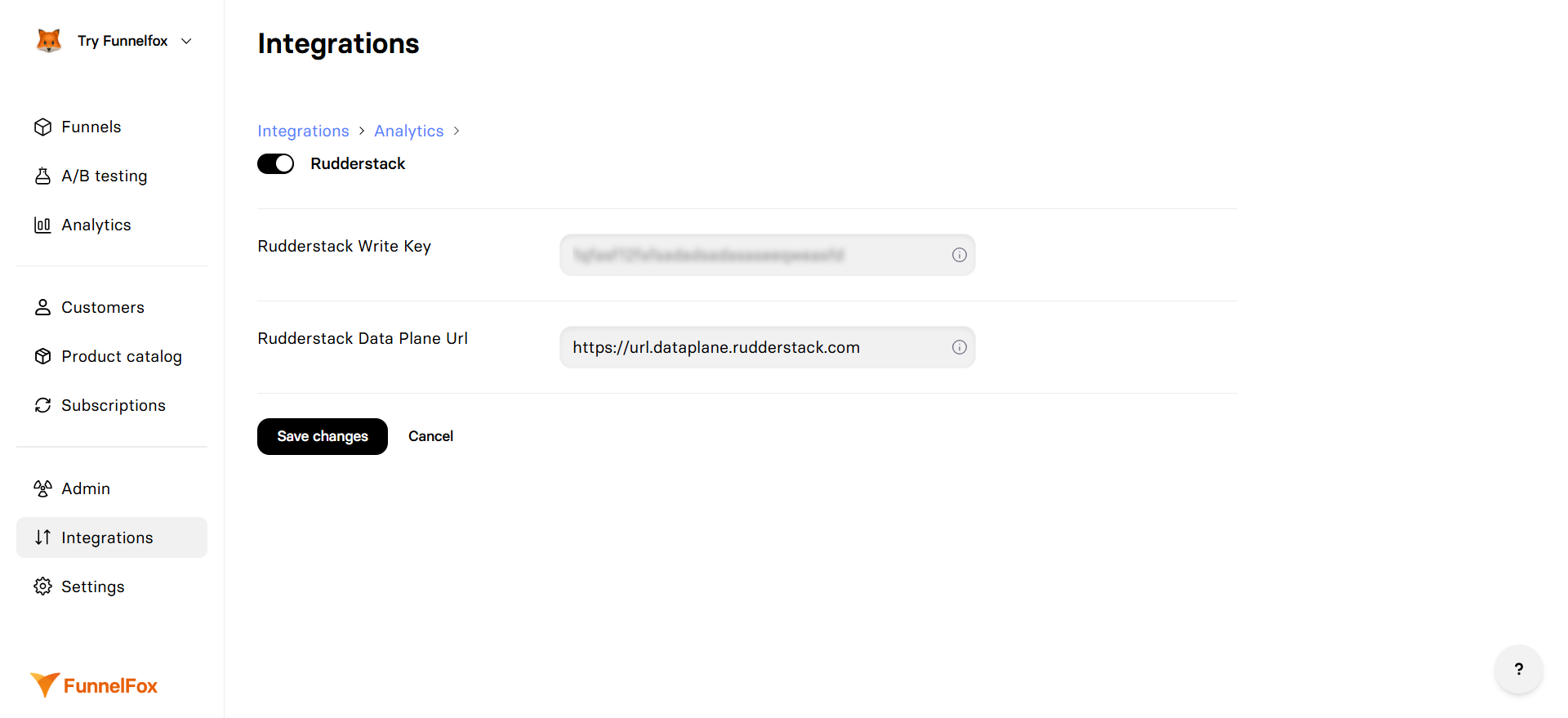
1. Go to **Integrations** → **RudderStack**
2. Toggle **RudderStack** on
3. Paste your **Write Key**
4. Enter your **Data Plane URL**
5. Click **Save changes**
In RudderStack, connect destinations:
* Analytics tools (Amplitude, Mixpanel, GA4)
* Data warehouses (BigQuery, Snowflake, Redshift)
* Marketing tools (Braze, Customer.io, Mailchimp)
* CRMs (Salesforce, HubSpot)
[Republish your funnels](/editor/publishing) to activate tracking
## Event Structure
RudderStack receives all [standard events](/integrations/analytics#standard-events)
automatically from FunnelFox.
Here's what FunnelFox sends automatically:
```javascript theme={null}
// This is sent automatically by FunnelFox when a user views a page:
rudderanalytics.track('screen_presented', {
funnel_id: 'welcome-flow',
funnel_alias: 'Welcome Flow',
page_index: 0,
page_id: 'intro',
profile_id: 'abc123',
session_id: 'xyz789',
sandbox: false
});
// When email is collected, FunnelFox automatically sends:
rudderanalytics.identify('fnlfx_abc123', {
email: 'user@example.com',
createdAt: '2024-01-01T00:00:00Z'
});
```
## Destination Mapping
RudderStack automatically maps events to destination-specific formats:
| FunnelFox Event | Amplitude | Mixpanel | GA4 |
| ---------------------------- | --------- | ----------- | ---------- |
| `screen_presented` | Page View | Page Viewed | page\_view |
| `purchase_completed_success` | Revenue | Revenue | purchase |
| `user_email_collected` | Identify | \$identify | sign\_up |
## Transformations
### Built-in Transformations
RudderStack provides transformations for:
* PII masking and hashing
* Event filtering and sampling
* Property renaming and enrichment
* Custom event routing
### Example Transformation
```javascript theme={null}
// Filter test events
export function transformEvent(event) {
if (event.properties?.sandbox === true) {
return null; // Drop test events
}
return event;
}
```
## Warehouse Destinations
### Schema Design
RudderStack creates tables for:
* **tracks**: All event data
* **identifies**: User profile updates
* **pages**: Page view events
* **users**: Consolidated user profiles
### Column Mapping
| FunnelFox Property | Warehouse Column |
| ------------------ | ----------------------- |
| `profile_id` | `user_id` |
| `funnel_id` | `context_funnel_id` |
| `page_index` | `properties_page_index` |
| `sandbox` | `properties_sandbox` |
## Advanced Features
### Event Replay
Replay historical events to new destinations:
1. Add new destination in RudderStack
2. Use Event Replay feature
3. Select date range
4. Events are re-sent to new destination
### Live Events
Monitor events in real-time:
1. Go to **Live Events** in RudderStack
2. Select your source
3. Watch events flow through
4. Debug transformations and mappings
### User Groups
For organization-level tracking in your custom code:
```javascript theme={null}
// Add this to your funnel's custom code if needed:
rudderanalytics.group('company_123', {
name: 'Acme Corp',
plan: 'enterprise',
employees: 1000
});
```
## Troubleshooting
* Verify Write Key is correct
* Check Data Plane URL includes protocol (https\://)
* Ensure funnels were republished
* Look in RudderStack Live Events
* Check browser console for errors
* Verify destination is connected and enabled
* Check destination configuration (API keys, etc.)
* Look at destination delivery status
* Review transformation logs for errors
* Check destination-specific requirements
* Verify URL format is correct
* Check for CORS issues if self-hosted
* Ensure SSL certificate is valid
* Try default cloud URL first
* Ensure identify() is called when email collected
* Check transformation isn't dropping properties
* Verify destination supports user properties
* Look at raw events in Live Events
## Performance Considerations
### Batching
* Events are batched for efficiency
* Default batch size: 10 events
* Default flush interval: 10 seconds
### Queue Management
* Events queued if connection fails
* Automatic retry with exponential backoff
* Queue persisted in localStorage
### Page Load Impact
* Asynchronous loading (\~30KB SDK)
* Non-blocking event sending
* Minimal impact on page performance
## Cost Optimization
To optimize your RudderStack usage:
* Filter unnecessary events with transformations
* Sample high-volume events
* Batch similar events
* Use warehouse as primary destination
## Testing & Debugging
Use RudderStack's Live Events feature to monitor events in real-time.
This is the primary debugging tool for verifying your integration.
### Best Practices
* Use Live Events to verify event flow
* Test with preview mode first
* Document event mappings for each destination
* Set up alerts for delivery failures
* Apply transformations to clean data
## Next Steps
* [Connect destinations](https://www.rudderstack.com/docs/destinations/) in RudderStack
* [Set up transformations](https://www.rudderstack.com/docs/features/transformations/) for data cleaning
* [Configure warehouse sync](https://www.rudderstack.com/docs/data-warehouse-integrations/) for analysis
## Features
* **Single Integration**: Connect once, send everywhere
* **Data Transformation**: Clean and enrich events in-flight
* **Warehouse First**: Direct streaming to your data warehouse
* **Privacy Compliant**: GDPR and CCPA ready
* **Event Replay**: Replay events to new destinations
* **Real-time Streaming**: Sub-second event delivery
## Configuration
### Prerequisites
* RudderStack account with configured source
* Write Key from RudderStack
* Data Plane URL (for self-hosted or EU region)
* Configured destinations in RudderStack
### Setup Steps
1. Log into [RudderStack](https://app.rudderstack.com)
2. Go to **Sources** → **New Source**
3. Select **JavaScript SDK**
4. Name your source (e.g., "FunnelFox Funnels")
5. Copy the **Write Key**
Find your Data Plane URL:
* **RudderStack Cloud (US)**: `https://yourdomain.dataplane.rudderstack.com`
* **RudderStack Cloud (EU)**: `https://yourdomain.eu-dataplane.rudderstack.com`
* **Self-hosted**: Your custom URL
1. Go to **Integrations** → **RudderStack**
2. Toggle **RudderStack** on
3. Paste your **Write Key**
4. Enter your **Data Plane URL**
5. Click **Save changes**
In RudderStack, connect destinations:
* Analytics tools (Amplitude, Mixpanel, GA4)
* Data warehouses (BigQuery, Snowflake, Redshift)
* Marketing tools (Braze, Customer.io, Mailchimp)
* CRMs (Salesforce, HubSpot)
[Republish your funnels](/editor/publishing) to activate tracking
## Event Structure
RudderStack receives all [standard events](/integrations/analytics#standard-events)
automatically from FunnelFox.
Here's what FunnelFox sends automatically:
```javascript theme={null}
// This is sent automatically by FunnelFox when a user views a page:
rudderanalytics.track('screen_presented', {
funnel_id: 'welcome-flow',
funnel_alias: 'Welcome Flow',
page_index: 0,
page_id: 'intro',
profile_id: 'abc123',
session_id: 'xyz789',
sandbox: false
});
// When email is collected, FunnelFox automatically sends:
rudderanalytics.identify('fnlfx_abc123', {
email: 'user@example.com',
createdAt: '2024-01-01T00:00:00Z'
});
```
## Destination Mapping
RudderStack automatically maps events to destination-specific formats:
| FunnelFox Event | Amplitude | Mixpanel | GA4 |
| ---------------------------- | --------- | ----------- | ---------- |
| `screen_presented` | Page View | Page Viewed | page\_view |
| `purchase_completed_success` | Revenue | Revenue | purchase |
| `user_email_collected` | Identify | \$identify | sign\_up |
## Transformations
### Built-in Transformations
RudderStack provides transformations for:
* PII masking and hashing
* Event filtering and sampling
* Property renaming and enrichment
* Custom event routing
### Example Transformation
```javascript theme={null}
// Filter test events
export function transformEvent(event) {
if (event.properties?.sandbox === true) {
return null; // Drop test events
}
return event;
}
```
## Warehouse Destinations
### Schema Design
RudderStack creates tables for:
* **tracks**: All event data
* **identifies**: User profile updates
* **pages**: Page view events
* **users**: Consolidated user profiles
### Column Mapping
| FunnelFox Property | Warehouse Column |
| ------------------ | ----------------------- |
| `profile_id` | `user_id` |
| `funnel_id` | `context_funnel_id` |
| `page_index` | `properties_page_index` |
| `sandbox` | `properties_sandbox` |
## Advanced Features
### Event Replay
Replay historical events to new destinations:
1. Add new destination in RudderStack
2. Use Event Replay feature
3. Select date range
4. Events are re-sent to new destination
### Live Events
Monitor events in real-time:
1. Go to **Live Events** in RudderStack
2. Select your source
3. Watch events flow through
4. Debug transformations and mappings
### User Groups
For organization-level tracking in your custom code:
```javascript theme={null}
// Add this to your funnel's custom code if needed:
rudderanalytics.group('company_123', {
name: 'Acme Corp',
plan: 'enterprise',
employees: 1000
});
```
## Troubleshooting
* Verify Write Key is correct
* Check Data Plane URL includes protocol (https\://)
* Ensure funnels were republished
* Look in RudderStack Live Events
* Check browser console for errors
* Verify destination is connected and enabled
* Check destination configuration (API keys, etc.)
* Look at destination delivery status
* Review transformation logs for errors
* Check destination-specific requirements
* Verify URL format is correct
* Check for CORS issues if self-hosted
* Ensure SSL certificate is valid
* Try default cloud URL first
* Ensure identify() is called when email collected
* Check transformation isn't dropping properties
* Verify destination supports user properties
* Look at raw events in Live Events
## Performance Considerations
### Batching
* Events are batched for efficiency
* Default batch size: 10 events
* Default flush interval: 10 seconds
### Queue Management
* Events queued if connection fails
* Automatic retry with exponential backoff
* Queue persisted in localStorage
### Page Load Impact
* Asynchronous loading (\~30KB SDK)
* Non-blocking event sending
* Minimal impact on page performance
## Cost Optimization
To optimize your RudderStack usage:
* Filter unnecessary events with transformations
* Sample high-volume events
* Batch similar events
* Use warehouse as primary destination
## Testing & Debugging
Use RudderStack's Live Events feature to monitor events in real-time.
This is the primary debugging tool for verifying your integration.
### Best Practices
* Use Live Events to verify event flow
* Test with preview mode first
* Document event mappings for each destination
* Set up alerts for delivery failures
* Apply transformations to clean data
## Next Steps
* [Connect destinations](https://www.rudderstack.com/docs/destinations/) in RudderStack
* [Set up transformations](https://www.rudderstack.com/docs/features/transformations/) for data cleaning
* [Configure warehouse sync](https://www.rudderstack.com/docs/data-warehouse-integrations/) for analysis