> ## Documentation Index
> Fetch the complete documentation index at: https://funnelfox.com/docs/llms.txt
> Use this file to discover all available pages before exploring further.

# Raw HTML element

> Add custom HTML, CSS, and JavaScript to extend your funnel's capabilities

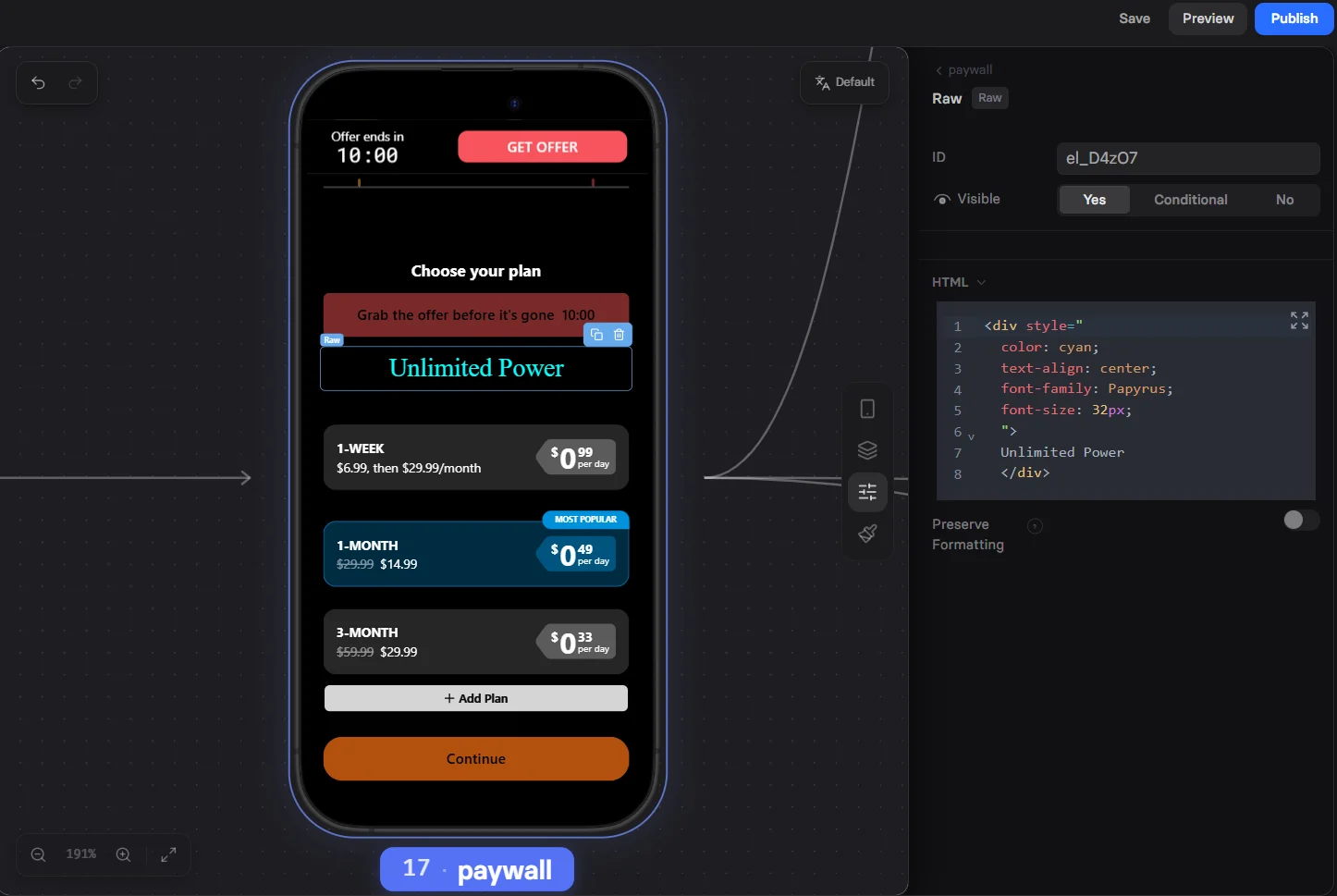
The raw HTML element is your escape hatch for unlimited customization. When FunnelFox's built-in elements don't fit your needs, RAW lets you write custom code to create exactly what you want.

<Frame>
  <img src="https://mintcdn.com/funnelfox/cxG6YKcN6wJiSnp-/assets/element-raw-element-tab.png?fit=max&auto=format&n=cxG6YKcN6wJiSnp-&q=85&s=771f7c19d2bd0c09ed4b0f43d3e863e0" alt="RAW element in Editor" width="1446" height="969" data-path="assets/element-raw-element-tab.png" />
</Frame>

## Use cases

Most raw HTML element implementations combine several capabilities: rendering custom HTML/CSS UI, running custom logic, animations, or timers, saving values to hidden fields, and more.

Here are the most common visual experience categories you can build:

* <Tooltip tip="Build inputs and widgets not available natively, like sliders and scales, date pickers, signature pads, custom selection cards">Custom UI Components</Tooltip>
* <Tooltip tip="Scratch-to-reveal panels, spin-to-win wheels, swipe choice interactions, 'unlock' experiences">Gamification & Interactive Mechanics</Tooltip>
* <Tooltip tip="Generate personalized text from answers, like predictions, summaries, formatted phrases, conditional result blocks">Personalization & Dynamic Copy</Tooltip>
* <Tooltip tip="Calculations, derived fields, input validation, unit conversion, label-to-value mapping, answer normalization and typing">Data Logic & Transformation</Tooltip>
* <Tooltip tip="Custom result screens and charts, like radar charts, scoring dashboards, ranked outputs like 'superpower' or 'growth area'">Results & Visualization</Tooltip>
* <Tooltip tip="Custom audio and video players, preview-and-select media, video carousels, guided audio snippets">Media Experiences</Tooltip>
* <Tooltip tip="Programmatic progression and routing with goNext/goToId, hub screens, non-linear jumps, auto-advance on condition">Navigation & Flow Control</Tooltip>
* <Tooltip tip="Store and reuse answers across screens using localStorage, window variables, or hidden inputs. Build multi-step state machines within a single screen">Persistence & State Management</Tooltip>
* <Tooltip tip="Visual effects like blur, confetti, and overlays. Performance patterns like IntersectionObserver and pausing offscreen media">Animation, Effects & Performance</Tooltip>
* <Tooltip tip="Fetch data from external APIs (e.g. geo enrichment), load external libraries like Chart.js, embed assets from CDNs">Integrations & External Resources</Tooltip>
* <Tooltip tip="Camera and webcam capture, file uploads, canvas drawing, touch and pointer events, scroll-snap UX, browser dialogs">Device Features & Advanced Browser APIs</Tooltip>

<Tip>
  Learn [how to use the Fox API](/editor/coding) inside raw HTML elements to capture emails from URLs, calculate values from user inputs, route users with dynamic navigation logic, and send custom tracking events.
</Tip>

## Create raw HTML

<Steps>
  <Step title="Add element">
    Prompt the AI Chat in Editor to add a Raw HTML element.

    Or add it manually:

    1. Open the **Layers** tab.
    2. Click **+ Add element** and go to **Media & Display**.
    3. Select **Raw HTML**.
  </Step>

  <Step title="Add HTML code">
    Go to the **Parameters** tab and add your code in the **HTML Content** editor. It supports full HTML5 syntax with embedded styles and scripts.

    ```html theme={null}
    <script>
    const url = new URL(window.location.href);
    const emailParamValue = url.searchParams.get('email');
    if (!!emailParamValue) {
      fox.inputs.setEmail(emailParamValue);
    }
    </script>
    ```
  </Step>

  <Step title="Preserve formatting">
    Use the **Preserve Formatting** setting to control how the element inherits your funnel's theme:

    * **No** (default): The element renders with its own isolated styling.
    * **Yes**: Inherits theme styles (fonts, colors) from your funnel settings.
  </Step>
</Steps>

<Warning>
  Due to element limitations:

  * No server-side execution: All code runs in the browser.
  * No file system access: Can't read or write local files.
  * No Node.js: Browser JavaScript only.
</Warning>

## Examples

<AccordionGroup>
  <Accordion title="BMI calculator with typed hidden field write">
    Subscribes to weight and height inputs, recalculates BMI on every change, and writes the result both as a named variable and as a typed number write to a hidden field. Handles metric and imperial unit systems, converts inputs to a common base, and clears the output for unrealistic values.

    ```html BMI calculator theme={null}
    <script>
    const BMI_HIDDEN_ID = 'el_FnbIP'; // your hidden input id

    const WATCH_INPUTS = [
      'measurement_system',
      'current_weight_kgs',
      'current_weight_lbs',
      'height_cm',
      'height_ft',
      'height_in',
    ];

    fox.inputs.subscribe((name) => {
      if (WATCH_INPUTS.includes(name)) updateBMI();
    });

    updateBMI();

    function toMetricWeight(weight, system) {
      const w = parseFloat(weight);
      if (!Number.isFinite(w)) return null;
      return system === 'imperial' ? w * 0.453592 : w;
    }

    function toMetricHeight(height, inches, system) {
      if (system === 'imperial') {
        const ft = parseFloat(height);
        const inch = parseFloat(inches);
        const totalIn = (Number.isFinite(ft) ? ft : 0) * 12 + (Number.isFinite(inch) ? inch : 0);
        if (totalIn <= 0) return null;
        return totalIn * 2.54; // cm
      } else {
        const cm = parseFloat(height);
        return Number.isFinite(cm) && cm > 0 ? cm : null;
      }
    }

    function calcBMI(kg, cm) {
      const m = cm / 100;
      if (!Number.isFinite(kg) || !Number.isFinite(m) || m <= 0) return null;
      return Math.round((kg / (m * m)) * 10) / 10; // 1 decimal
    }

    function setBMIValue(val) {
      // keep both primitive + typed write
      fox.inputs.set('bmi', val === null ? '' : val);
      fox.inputs.set(BMI_HIDDEN_ID, val === null ? '' : val);
    }

    function updateBMI() {
      const system = fox.inputs.get('measurement_system')?.value === 'imperial' ? 'imperial' : 'metric';

      const weightRaw = system === 'metric'
        ? fox.inputs.get('current_weight_kgs')?.value
        : fox.inputs.get('current_weight_lbs')?.value;

      const heightRaw = system === 'metric'
        ? fox.inputs.get('height_cm')?.value
        : fox.inputs.get('height_ft')?.value;

      const inchesRaw = fox.inputs.get('height_in')?.value;

      const kg = toMetricWeight(weightRaw, system);
      const cm = toMetricHeight(heightRaw, inchesRaw, system);

      if (!kg || !cm) {
        setBMIValue(null);
        return;
      }

      const bmi = calcBMI(kg, cm);

      // guardrails: unrealistic values -> clear
      if (!bmi || bmi < 10 || bmi > 80) {
        setBMIValue(null);
        return;
      }

      setBMIValue(bmi);
      fox.inputs.set(BMI_HIDDEN_ID, { value: bmi, type: 'number' }); // typed write for hidden field
    }
    </script>
    ```
  </Accordion>

  <Accordion title="Geolocation-based personalization">
    Fetches the visitor's country from the ipinfo.io API and renders the country name inline using `Intl.DisplayNames`. If the request fails or returns no data, falls back to a CSS-blurred placeholder so the screen still looks intentional.

    ```html Geolocation personalization theme={null}
    <span id="country" style="color:#2DD285;font-family:Roboto, sans-serif;font-size:18px;font-weight:500;line-height:150%;">...</span>

    <style>
      .ffx-blur { 
        filter: blur(var(--ffx-blur, 6px)); 
        transition: filter .2s; 
      }
    </style>

    <script>
    (async function () {
      const el = document.getElementById("country");
      try {
        const res = await fetch("https://ipinfo.io/json?token=YOUR_IPINFO_TOKEN", { headers: { "Accept": "application/json" } });
        if (!res.ok) throw new Error("HTTP " + res.status);
        const data = await res.json();
        const code = (data && data.country) || "";
        if (code) {
          const name = new Intl.DisplayNames(["en"], { type: "region" }).of(code) || code;
          el.textContent = name;
          return;
        }
      } catch (e) {
        console.warn("ipinfo country error:", e);
      }
      // fallback: show blurred placeholder text
      el.innerHTML = '<span class="ffx-blur" style="--ffx-blur:6px">location</span>';
    })();
    </script>

    <style>
      .ffx-blur { filter: blur(var(--ffx-blur, 6px)); transition: filter .2s; }
    </style>

    <p> <span class="ffx-blur" style="--ffx-blur:6px">location</span>
    </p>
    ```
  </Accordion>

  <Accordion title="Signature pad with commitment popup and screen jump">
    Renders a canvas-based signature pad with clear and confirm buttons. Once the user draws their signature, a celebration popup appears. Confirming the popup navigates to a specific screen using `fox.navigation.goToId`. Replace `screen_lbtuWI7r` with your target screen ID.

    ```html Signature pad theme={null}
    <!DOCTYPE html>
    <html lang="en">
    <head>
        <meta charset="UTF-8">
        <meta name="viewport" content="width=device-width, initial-scale=1.0">
        <title>Sign Your Commitment</title>
        <style>
            * {
                margin: 0;
                padding: 0;
                box-sizing: border-box;
            }

            body {
                font-family: -apple-system, BlinkMacSystemFont, 'SF Pro Display', sans-serif;
                background: linear-gradient(135deg, #FFF5E6 0%, #FFE4B5 100%);
                min-height: 100vh;
                display: flex;
                flex-direction: column;
                align-items: center;
                justify-content: center;
                padding: 2rem;
            }

            .container {
                max-width: 500px;
                width: 100%;
                text-align: center;
            }

            .headline {
                font-size: 2rem;
                font-weight: 700;
                color: #1a1a1a;
                margin-bottom: 0.5rem;
            }

            .subtext {
                font-size: 1.1rem;
                color: #666;
                margin-bottom: 3rem;
            }

            .signature-container {
                background: white;
                border-radius: 16px;
                padding: 2rem;
                box-shadow: 0 4px 20px rgba(0, 0, 0, 0.1);
                margin-bottom: 2rem;
                position: relative;
            }

            .instruction {
                font-size: 0.9rem;
                color: #999;
                margin-bottom: 1rem;
                display: flex;
                align-items: center;
                justify-content: center;
                gap: 0.5rem;
            }

            .pen-icon {
                font-size: 1.2rem;
                animation: float 2s ease-in-out infinite;
            }

            @keyframes float {
                0%, 100% { transform: translateY(0px); }
                50% { transform: translateY(-10px); }
            }

            #signature-canvas {
                border: 2px dashed #ddd;
                border-radius: 12px;
                cursor: crosshair;
                touch-action: none;
                width: 100%;
                max-width: 400px;
                height: 200px;
                display: block;
                margin: 0 auto;
                background: #fafafa;
            }

            .buttons {
                display: flex;
                gap: 1rem;
                justify-content: center;
                margin-top: 1.5rem;
            }

            .btn {
                padding: 0.75rem 2rem;
                border: none;
                border-radius: 50px;
                font-size: 1rem;
                font-weight: 600;
                cursor: pointer;
                transition: all 0.2s;
            }

            .btn-clear {
                background: #f0f0f0;
                color: #666;
            }

            .btn-clear:hover {
                background: #e0e0e0;
            }

            .btn-continue {
                background: #6B7FFF;
                color: white;
                opacity: 0.5;
                pointer-events: none;
            }

            .btn-continue.active {
                opacity: 1;
                pointer-events: all;
            }

            .btn-continue.active:hover {
                transform: translateY(-2px);
                box-shadow: 0 10px 25px rgba(107, 127, 255, 0.3);
            }

            /* Popup overlay */
            .popup-overlay {
                display: none;
                position: fixed;
                top: 0;
                left: 0;
                right: 0;
                bottom: 0;
                background: rgba(0, 0, 0, 0.8);
                z-index: 1000;
                align-items: center;
                justify-content: center;
                animation: fadeIn 0.3s;
            }

            .popup-overlay.show {
                display: flex;
            }

            @keyframes fadeIn {
                from { opacity: 0; }
                to { opacity: 1; }
            }

            .popup-content {
                background: white;
                border-radius: 20px;
                padding: 2rem;
                max-width: 400px;
                width: 90%;
                text-align: center;
                animation: slideUp 0.3s;
            }

            @keyframes slideUp {
                from { 
                    opacity: 0;
                    transform: translateY(50px);
                }
                to { 
                    opacity: 1;
                    transform: translateY(0);
                }
            }

            .popup-image {
                width: 100%;
                max-width: 300px;
                height: auto;
                border-radius: 12px;
                margin: 1rem 0;
            }

            .popup-text {
                font-size: 1.2rem;
                font-weight: 600;
                color: #1a1a1a;
                margin-bottom: 1.5rem;
            }

            .popup-btn {
                background: #6B7FFF;
                color: white;
                padding: 1rem 3rem;
                border: none;
                border-radius: 50px;
                font-size: 1.1rem;
                font-weight: 600;
                cursor: pointer;
                transition: all 0.2s;
            }

            .popup-btn:hover {
                transform: translateY(-2px);
                box-shadow: 0 10px 25px rgba(107, 127, 255, 0.3);
            }

            @media (max-width: 480px) {
                .headline {
                    font-size: 1.6rem;
                }
                .subtext {
                    font-size: 1rem;
                }
                #signature-canvas {
                    height: 150px;
                }
            }
        </style>
    </head>
    <body>
        <div class="container">

            <div class="signature-container">
                <div class="instruction">
                    <span class="pen-icon">✍️</span>
                    <span>Draw your signature below</span>
                </div>
                
                <canvas id="signature-canvas"></canvas>

                <div class="buttons">
                    <button class="btn btn-clear" id="clear-btn">Clear</button>
                    <button class="btn btn-continue" id="continue-btn">I'm Committed</button>
                </div>
            </div>
        </div>

        <!-- Popup -->
        <div class="popup-overlay" id="popup">
            <div class="popup-content">
                <img 
                    src="https://assets.fnlfx.com/01K7QWS36ZFETYPT7QCXWCHP2H/AOzXXTWT.webp" 
                    alt="Commitment celebration" 
                    class="popup-image"
                />
                <p class="popup-text">Your journey to sobriety starts now! 🌻</p>
                <button class="popup-btn" id="close-popup">Continue to Your Plan</button>
            </div>
        </div>

        <script>
            const canvas = document.getElementById('signature-canvas');
            const ctx = canvas.getContext('2d');
            const clearBtn = document.getElementById('clear-btn');
            const continueBtn = document.getElementById('continue-btn');
            const popup = document.getElementById('popup');
            const closePopupBtn = document.getElementById('close-popup');

            // Set canvas size
            function resizeCanvas() {
                const rect = canvas.getBoundingClientRect();
                canvas.width = rect.width;
                canvas.height = rect.height;
            }
            resizeCanvas();
            window.addEventListener('resize', resizeCanvas);

            // Drawing variables
            let isDrawing = false;
            let hasDrawn = false;

            // Drawing settings
            ctx.strokeStyle = '#1a1a1a';
            ctx.lineWidth = 2;
            ctx.lineCap = 'round';
            ctx.lineJoin = 'round';

            // Get coordinates
            function getCoordinates(e) {
                const rect = canvas.getBoundingClientRect();
                if (e.touches) {
                    return {
                        x: e.touches[0].clientX - rect.left,
                        y: e.touches[0].clientY - rect.top
                    };
                }
                return {
                    x: e.clientX - rect.left,
                    y: e.clientY - rect.top
                };
            }

            // Start drawing
            function startDrawing(e) {
                isDrawing = true;
                hasDrawn = true;
                const coords = getCoordinates(e);
                ctx.beginPath();
                ctx.moveTo(coords.x, coords.y);
                
                // Enable continue button
                continueBtn.classList.add('active');
            }

            // Draw
            function draw(e) {
                if (!isDrawing) return;
                e.preventDefault();
                
                const coords = getCoordinates(e);
                ctx.lineTo(coords.x, coords.y);
                ctx.stroke();
            }

            // Stop drawing
            function stopDrawing() {
                isDrawing = false;
            }

            // Mouse events
            canvas.addEventListener('mousedown', startDrawing);
            canvas.addEventListener('mousemove', draw);
            canvas.addEventListener('mouseup', stopDrawing);
            canvas.addEventListener('mouseout', stopDrawing);

            // Touch events
            canvas.addEventListener('touchstart', startDrawing);
            canvas.addEventListener('touchmove', draw);
            canvas.addEventListener('touchend', stopDrawing);

            // Clear button
            clearBtn.addEventListener('click', () => {
                ctx.clearRect(0, 0, canvas.width, canvas.height);
                hasDrawn = false;
                continueBtn.classList.remove('active');
            });

            // Continue button - show popup
            continueBtn.addEventListener('click', () => {
                if (hasDrawn) {
                    popup.classList.add('show');
                }
            });

            // Close popup and navigate to next screen
            closePopupBtn.addEventListener('click', () => {
                popup.classList.remove('show');
                
                // Navigate using fox.navigation
                if (typeof fox !== 'undefined' && fox.navigation) {
                    fox.navigation.goToId('screen_lbtuWI7r');
                } else {
                    console.error('Fox navigation not available');
                    alert('Navigation would go to: screen_lbtuWI7r');
                }
            });

            // Close popup on overlay click
            popup.addEventListener('click', (e) => {
                if (e.target === popup) {
                    popup.classList.remove('show');
                }
            });
        </script>
    </body>
    </html>
    ```
  </Accordion>

  <Accordion title="Video carousel with scroll-snap, dots, and active slide observer">
    Builds a circular video carousel using CSS scroll-snap for smooth swiping. An `IntersectionObserver` detects the centered slide, marks it active, and pauses any video that scrolls out of view. Navigation dots are generated automatically and scroll the matching slide into view on click.

    ```html Video carousel theme={null}
    <style>
      /* Main container */
      .mv-carousel-container {
        width: 100%;
        max-width: 600px; 
        margin: 20px auto;
        position: relative;
        font-family: sans-serif;
      }

      /* Scroll viewport */
      .mv-carousel-viewport {
        display: flex;
        overflow-x: auto;
        scroll-snap-type: x mandatory; 
        -webkit-overflow-scrolling: touch; 
        scroll-behavior: smooth;
        gap: 25px;
        
        /* Centering: 30px top/bottom, 12.5% sides (to center the 75% wide slide) */
        padding: 30px 12.5%; 
        box-sizing: border-box; 
        
        -ms-overflow-style: none;
        scrollbar-width: none; 
        align-items: center;
        touch-action: pan-x pan-y;
      }

      .mv-carousel-viewport::-webkit-scrollbar {
        display: none;
      }

      /* Player card */
      .mv-player {
        position: relative;
        flex: 0 0 75%; 
        aspect-ratio: 1 / 1; 
        border-radius: 50%; 
        scroll-snap-align: center; 
        overflow: hidden;
        background: #000; /* Background while video loads */
        transition: transform 0.4s cubic-bezier(0.25, 1, 0.5, 1), opacity 0.4s ease;
        transform: scale(0.85);
        opacity: 0.5;
        display: flex;
        cursor: pointer; 
        -webkit-tap-highlight-color: transparent;
      }

      /* Active slide */
      .mv-player.is-active {
        transform: scale(1);
        opacity: 1;
        z-index: 2;
      }

      /* Video */
      .mv-video {
        width: 100%;
        height: 100%; 
        display: block;
        object-fit: cover; 
        pointer-events: none; 
        background-color: #000;
      }

      /* Play button */
      .mv-play-overlay {
        position: absolute;
        inset: 0;
        display: flex;
        align-items: center;
        justify-content: center;
        border: none;
        background: transparent;
        cursor: pointer;
        transition: opacity 0.3s;
        z-index: 3;
        pointer-events: none;
      }
      
      .mv-player:not(.is-playing) .mv-play-overlay {
          pointer-events: none; 
      }

      .mv-player.is-playing .mv-play-overlay {
        opacity: 0;
      }

      .mv-play-circle {
        width: 70px;
        height: 70px;
        border-radius: 50%;
        background: rgba(0, 0, 0, 0.6);
        backdrop-filter: blur(4px);
        display: flex;
        align-items: center;
        justify-content: center;
        border: 2px solid rgba(255,255,255,0.1); 
      }

      .mv-play-triangle {
        width: 0;
        height: 0;
        border-left: 22px solid #fff;
        border-top: 14px solid transparent;
        border-bottom: 14px solid transparent;
        margin-left: 6px;
      }

      /* Dots */
      .mv-dots {
        display: flex;
        justify-content: center;
        gap: 12px;
        margin-top: 20px;
      }

      .mv-dot {
        width: 10px;
        height: 10px;
        border-radius: 50%;
        background: #ddd;
        border: none;
        padding: 0;
        cursor: pointer;
        transition: all 0.3s ease;
      }

      .mv-dot.active {
        background: #222;
        transform: scale(1.4);
      }
    </style>

    <div class="mv-carousel-container">
      <div class="mv-carousel-viewport" id="carouselViewport">
        
        <div class="mv-player">
          <video class="mv-video" src="https://github.com/abogatykh/ff-animations/raw/refs/heads/main/GEN012_CH_Start_Reading2.mp4#t=0.001" playsinline loop preload="metadata"></video>
          <div class="mv-play-overlay"><span class="mv-play-circle"><span class="mv-play-triangle"></span></span></div>
        </div>

        <div class="mv-player">
          <video class="mv-video" src="https://github.com/abogatykh/ff-animations/raw/refs/heads/main/3333.mp4#t=0.001" playsinline loop preload="metadata"></video>
          <div class="mv-play-overlay"><span class="mv-play-circle"><span class="mv-play-triangle"></span></span></div>
        </div>

         <div class="mv-player">
           <video class="mv-video" src="https://github.com/abogatykh/ff-animations/raw/refs/heads/main/333321.mp4#t=0.001" playsinline loop preload="metadata"></video>
          <div class="mv-play-overlay"><span class="mv-play-circle"><span class="mv-play-triangle"></span></span></div>
        </div>

      </div>

      <div class="mv-dots" id="dotsContainer"></div>
    </div>

    <script>
      (function () {
        const viewport = document.getElementById('carouselViewport');
        const players = document.querySelectorAll('.mv-player');
        const dotsContainer = document.getElementById('dotsContainer');
        
        // 1. Create dots
        players.forEach((_, i) => {
          const dot = document.createElement('button');
          dot.classList.add('mv-dot');
          if (i === 0) dot.classList.add('active');
          
          dot.addEventListener('click', () => {
            players[i].scrollIntoView({ behavior: 'smooth', block: 'nearest', inline: 'center' });
          });
          dotsContainer.appendChild(dot);
        });

        const dots = document.querySelectorAll('.mv-dot');

        // 2. Video playback controls
        players.forEach((player) => {
          const video = player.querySelector('.mv-video');

          const togglePlay = () => {
            if (video.paused) {
              video.muted = false;
              video.play().catch(e => console.log('Autoplay prevented', e));
            } else {
              video.pause();
            }
          };

          player.addEventListener('click', (e) => {
            togglePlay();
          });

          video.addEventListener('play', () => player.classList.add('is-playing'));
          video.addEventListener('pause', () => player.classList.remove('is-playing'));
        });

        // 3. IntersectionObserver
        const observerOptions = {
          root: viewport,
          threshold: 0.65 
        };

        const observer = new IntersectionObserver((entries) => {
          entries.forEach(entry => {
            const index = Array.from(players).indexOf(entry.target);
            const video = entry.target.querySelector('.mv-video');
            const dot = dots[index];

            if (entry.isIntersecting) {
              entry.target.classList.add('is-active');
              if(dot) dot.classList.add('active');
            } else {
              entry.target.classList.remove('is-active');
              if(dot) dot.classList.remove('active');
              video.pause();
              entry.target.classList.remove('is-playing');
              
              // Optionally reset to start when slide scrolls out (uncomment for cleaner re-entry)
              // video.currentTime = 0;
            }
          });
        }, observerOptions);

        players.forEach(player => observer.observe(player));
      })();
    </script>
    ```
  </Accordion>
</AccordionGroup>

## Next steps

* [Custom Code & Fox API](/editor/coding) - Complete Fox API reference