> ## Documentation Index
> Fetch the complete documentation index at: https://funnelfox.com/docs/llms.txt
> Use this file to discover all available pages before exploring further.
# Processing element
> Multi-step progress indicators for complex personalization illusion
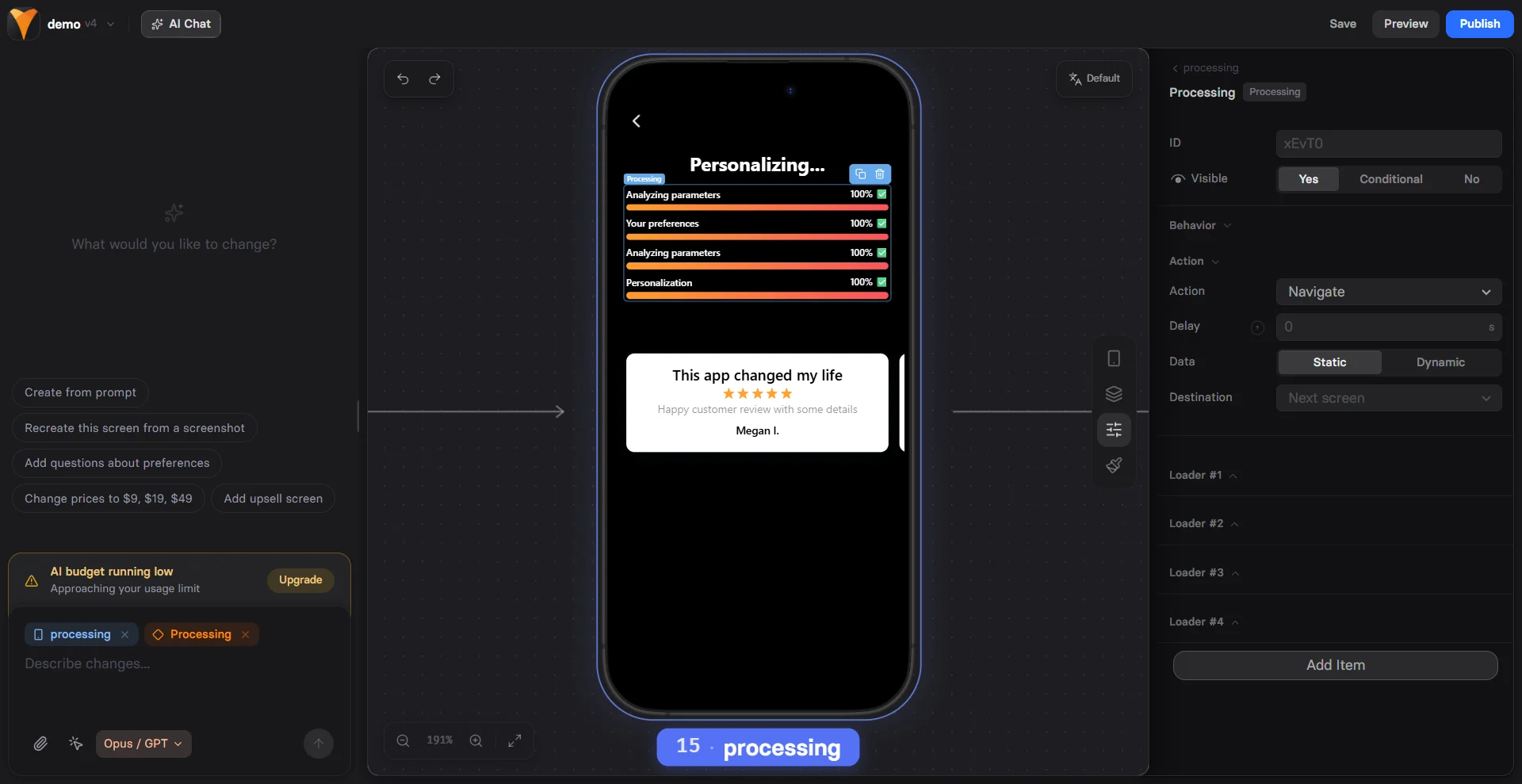
The Processing element creates a sophisticated multi-loader experience that
builds anticipation through sequential progress steps. Each loader represents
a different "processing" stage, making users feel like significant
personalized work is happening.
 ## When to Use
Perfect for:
* **Complex calculations** - "Analyzing profile... Matching preferences... Finding deals..."
* **Account setup** - "Creating account... Setting preferences... Loading dashboard..."
* **Quiz results** - "Scoring answers... Comparing results... Generating report..."
* **Personalization** - "Reading goals... Building plan... Customizing experience..."
* **Pre-checkout** - "Checking inventory... Applying discounts... Reserving items..."
Processing elements increase perceived value by 60% compared to single
loaders. Users assume more work = better results.
## How It Works
Multiple loaders run in sequence:
1. First loader starts and completes
2. Shows ✓ when done
3. Next loader begins
4. Process continues through all steps
5. Triggers action when all complete
This creates a story of progressive work being done.
## Configuration
### Adding Loaders
Each processing step needs:
**Label**
What's being processed:
* "Analyzing your responses"
* "Calculating best matches"
* "Preparing recommendations"
**Duration**
Time for this step (milliseconds):
* 1000-2000ms: Quick steps
* 2000-4000ms: Important steps
* 4000-6000ms: Complex operations
**Done Text**
Success message when complete:
* "✓ Analysis complete"
* "✓ Matches found"
* "✓ Ready!"
Vary durations slightly (2s, 3s, 2.5s) to feel more realistic than
uniform timing (2s, 2s, 2s).
### Optimal Sequences
**3-Step Process** (Most Common)
```
1. Quick scan (2s)
2. Main processing (3s)
3. Final preparation (2s)
Total: 7 seconds
```
**5-Step Process** (Complex Feel)
```
1. Initial check (1.5s)
2. Data analysis (2.5s)
3. Comparison (3s)
4. Optimization (2s)
5. Finalization (1.5s)
Total: 10.5 seconds
```
## Triggers
### On Complete
Actions when all loaders finish:
* Navigate to results page
* Show personalized offer
* Reveal hidden content
* Start animation sequence
### Individual Loader Triggers
Trigger actions per step:
* After step 1: Update message
* After step 2: Show preview
* After step 3: Final reveal
If a popup appears during processing, it pauses the progress. Close the
popup to resume. Plan your flow accordingly.
## Effective Messaging
### Progressive Storytelling
Tell a story with your labels:
**Weight Loss Journey**
```
1. "Analyzing your current habits..."
2. "Calculating calorie needs..."
3. "Finding perfect meal plans..."
4. "Customizing workout routine..."
5. "Preparing your program..."
```
**Financial Analysis**
```
1. "Reviewing spending patterns..."
2. "Identifying savings opportunities..."
3. "Calculating potential returns..."
4. "Building investment strategy..."
```
### Value Building
Each step adds perceived value:
```
"Checking 500+ products..." → Scale
"Comparing 50 providers..." → Thoroughness
"Applying exclusive discounts..." → Special treatment
"Personalizing for you..." → Individual attention
```
### Technical Feel
Create sophistication:
```
"Initializing algorithm..."
"Processing data points..."
"Running optimization..."
"Generating results..."
```
## Common Patterns
### Quiz to Results
```
Quiz completion →
Processing:
1. "Scoring your answers..." (2s)
2. "Analyzing personality type..." (3s)
3. "Matching with database..." (2.5s)
4. "Preparing detailed report..." (2s)
→ Personalized results page
```
### Price Calculator
```
Input preferences →
Processing:
1. "Analyzing requirements..." (2s)
2. "Checking current rates..." (3s)
3. "Applying discounts..." (2s)
4. "Calculating final price..." (1.5s)
→ Custom pricing page
```
### Matchmaking
```
Profile complete →
Processing:
1. "Reading your preferences..." (2s)
2. "Scanning potential matches..." (4s)
3. "Scoring compatibility..." (3s)
4. "Selecting best matches..." (2s)
5. "Preparing introductions..." (1.5s)
→ Match results
```
## Mobile Optimization
Processing works beautifully on mobile:
**Vertical Layout**
* Loaders stack vertically
* Clear progress visibility
* Smooth animations
* No horizontal scrolling
**Performance**
* Lightweight animations
* Battery efficient
* Works on slow connections
* No heavy graphics
**Readability**
* Large progress bars
* Clear labels
* Visible checkmarks
* Good contrast
## Psychology of Multi-Step Processing
### Investment Principle
More steps = more investment:
* 1 loader: Basic processing
* 3 loaders: Significant work
* 5+ loaders: Complex operation
Users value results more after waiting.
### Competence Signal
Multiple steps suggest:
* Thoroughness
* Sophistication
* Attention to detail
* Personalization
### Anticipation Building
Each completed step:
* Builds excitement
* Shows progress
* Maintains engagement
* Prevents abandonment
## Best Practices
### Duration Guidelines
* **Total time**: 6-12 seconds optimal
* **Individual steps**: 1.5-4 seconds
* **Variation**: Mix durations
* **Never exceed**: 15 seconds total
### Message Guidelines
* Use active verbs (analyzing, calculating)
* Include specifics (500+ options)
* Show progression (step 1 → 2 → 3)
* End positively (Ready! Complete!)
### Visual Guidelines
* Consistent loader style
* Clear completion indicators
* Sufficient spacing
* Mobile-friendly size
## Common Mistakes
### Too Many Steps
* 3-5 steps ideal
* More becomes tedious
* Test user patience
### Uniform Timing
* Feels mechanical
* Vary durations slightly
* More realistic
### Vague Messages
* Be specific about actions
* Build value with details
* Avoid generic "Processing..."
### Too Long Total
* Over 15 seconds loses users
* Break into pages if needed
* Test optimal duration
## Combining with Other Elements
### Processing + Variables
```
"Analyzing {{user-name}}'s profile..."
"Finding plans near {{user-city}}..."
Increases personalization feeling
```
### Processing + Timer
```
Processing: Setting up account
Result: "Account expires in {{timer}}"
Investment + Urgency
```
### Processing + Reviews
```
Processing: Finding matches
Result: Show testimonials
"Others like you succeeded"
```
## Testing Variables
A/B test these elements:
1. **Number of steps** - 3 vs 5
2. **Total duration** - 6s vs 10s
3. **Message style** - Technical vs friendly
4. **Completion indicators** - Checkmarks vs percentage
5. **Step order** - Quick-slow vs slow-quick
## Troubleshooting
* Check all durations are set
* Verify no JavaScript errors
* Look for popup interference
* Test in preview mode
* Ensure all steps complete
* Check trigger configuration
* Verify target elements exist
* Look for conflicting actions
* Check label text is set
* Verify done text configured
* Look for CSS conflicts
* Test different browsers
* Reduce total duration
* Improve messaging
* Add fewer steps
* Test shorter process
## Conversion Impact
Strategic processing increases conversion:
| Use Case | Typical Increase |
| --------------------- | ---------------- |
| After complex quiz | +35-45% |
| Before pricing reveal | +25-30% |
| Account creation | +20-25% |
| Pre-results | +30-40% |
The key is matching complexity to perceived value. Higher-value outcomes
justify longer processing sequences.
## Next Steps
* [Show results](/elements/text) after processing
* [Add single loaders](/elements/loader) for simple waits
* [Track completion](/integrations/analytics) with analytics
* [Test sequences](/dashboard/experiments) with A/B tests
## When to Use
Perfect for:
* **Complex calculations** - "Analyzing profile... Matching preferences... Finding deals..."
* **Account setup** - "Creating account... Setting preferences... Loading dashboard..."
* **Quiz results** - "Scoring answers... Comparing results... Generating report..."
* **Personalization** - "Reading goals... Building plan... Customizing experience..."
* **Pre-checkout** - "Checking inventory... Applying discounts... Reserving items..."
Processing elements increase perceived value by 60% compared to single
loaders. Users assume more work = better results.
## How It Works
Multiple loaders run in sequence:
1. First loader starts and completes
2. Shows ✓ when done
3. Next loader begins
4. Process continues through all steps
5. Triggers action when all complete
This creates a story of progressive work being done.
## Configuration
### Adding Loaders
Each processing step needs:
**Label**
What's being processed:
* "Analyzing your responses"
* "Calculating best matches"
* "Preparing recommendations"
**Duration**
Time for this step (milliseconds):
* 1000-2000ms: Quick steps
* 2000-4000ms: Important steps
* 4000-6000ms: Complex operations
**Done Text**
Success message when complete:
* "✓ Analysis complete"
* "✓ Matches found"
* "✓ Ready!"
Vary durations slightly (2s, 3s, 2.5s) to feel more realistic than
uniform timing (2s, 2s, 2s).
### Optimal Sequences
**3-Step Process** (Most Common)
```
1. Quick scan (2s)
2. Main processing (3s)
3. Final preparation (2s)
Total: 7 seconds
```
**5-Step Process** (Complex Feel)
```
1. Initial check (1.5s)
2. Data analysis (2.5s)
3. Comparison (3s)
4. Optimization (2s)
5. Finalization (1.5s)
Total: 10.5 seconds
```
## Triggers
### On Complete
Actions when all loaders finish:
* Navigate to results page
* Show personalized offer
* Reveal hidden content
* Start animation sequence
### Individual Loader Triggers
Trigger actions per step:
* After step 1: Update message
* After step 2: Show preview
* After step 3: Final reveal
If a popup appears during processing, it pauses the progress. Close the
popup to resume. Plan your flow accordingly.
## Effective Messaging
### Progressive Storytelling
Tell a story with your labels:
**Weight Loss Journey**
```
1. "Analyzing your current habits..."
2. "Calculating calorie needs..."
3. "Finding perfect meal plans..."
4. "Customizing workout routine..."
5. "Preparing your program..."
```
**Financial Analysis**
```
1. "Reviewing spending patterns..."
2. "Identifying savings opportunities..."
3. "Calculating potential returns..."
4. "Building investment strategy..."
```
### Value Building
Each step adds perceived value:
```
"Checking 500+ products..." → Scale
"Comparing 50 providers..." → Thoroughness
"Applying exclusive discounts..." → Special treatment
"Personalizing for you..." → Individual attention
```
### Technical Feel
Create sophistication:
```
"Initializing algorithm..."
"Processing data points..."
"Running optimization..."
"Generating results..."
```
## Common Patterns
### Quiz to Results
```
Quiz completion →
Processing:
1. "Scoring your answers..." (2s)
2. "Analyzing personality type..." (3s)
3. "Matching with database..." (2.5s)
4. "Preparing detailed report..." (2s)
→ Personalized results page
```
### Price Calculator
```
Input preferences →
Processing:
1. "Analyzing requirements..." (2s)
2. "Checking current rates..." (3s)
3. "Applying discounts..." (2s)
4. "Calculating final price..." (1.5s)
→ Custom pricing page
```
### Matchmaking
```
Profile complete →
Processing:
1. "Reading your preferences..." (2s)
2. "Scanning potential matches..." (4s)
3. "Scoring compatibility..." (3s)
4. "Selecting best matches..." (2s)
5. "Preparing introductions..." (1.5s)
→ Match results
```
## Mobile Optimization
Processing works beautifully on mobile:
**Vertical Layout**
* Loaders stack vertically
* Clear progress visibility
* Smooth animations
* No horizontal scrolling
**Performance**
* Lightweight animations
* Battery efficient
* Works on slow connections
* No heavy graphics
**Readability**
* Large progress bars
* Clear labels
* Visible checkmarks
* Good contrast
## Psychology of Multi-Step Processing
### Investment Principle
More steps = more investment:
* 1 loader: Basic processing
* 3 loaders: Significant work
* 5+ loaders: Complex operation
Users value results more after waiting.
### Competence Signal
Multiple steps suggest:
* Thoroughness
* Sophistication
* Attention to detail
* Personalization
### Anticipation Building
Each completed step:
* Builds excitement
* Shows progress
* Maintains engagement
* Prevents abandonment
## Best Practices
### Duration Guidelines
* **Total time**: 6-12 seconds optimal
* **Individual steps**: 1.5-4 seconds
* **Variation**: Mix durations
* **Never exceed**: 15 seconds total
### Message Guidelines
* Use active verbs (analyzing, calculating)
* Include specifics (500+ options)
* Show progression (step 1 → 2 → 3)
* End positively (Ready! Complete!)
### Visual Guidelines
* Consistent loader style
* Clear completion indicators
* Sufficient spacing
* Mobile-friendly size
## Common Mistakes
### Too Many Steps
* 3-5 steps ideal
* More becomes tedious
* Test user patience
### Uniform Timing
* Feels mechanical
* Vary durations slightly
* More realistic
### Vague Messages
* Be specific about actions
* Build value with details
* Avoid generic "Processing..."
### Too Long Total
* Over 15 seconds loses users
* Break into pages if needed
* Test optimal duration
## Combining with Other Elements
### Processing + Variables
```
"Analyzing {{user-name}}'s profile..."
"Finding plans near {{user-city}}..."
Increases personalization feeling
```
### Processing + Timer
```
Processing: Setting up account
Result: "Account expires in {{timer}}"
Investment + Urgency
```
### Processing + Reviews
```
Processing: Finding matches
Result: Show testimonials
"Others like you succeeded"
```
## Testing Variables
A/B test these elements:
1. **Number of steps** - 3 vs 5
2. **Total duration** - 6s vs 10s
3. **Message style** - Technical vs friendly
4. **Completion indicators** - Checkmarks vs percentage
5. **Step order** - Quick-slow vs slow-quick
## Troubleshooting
* Check all durations are set
* Verify no JavaScript errors
* Look for popup interference
* Test in preview mode
* Ensure all steps complete
* Check trigger configuration
* Verify target elements exist
* Look for conflicting actions
* Check label text is set
* Verify done text configured
* Look for CSS conflicts
* Test different browsers
* Reduce total duration
* Improve messaging
* Add fewer steps
* Test shorter process
## Conversion Impact
Strategic processing increases conversion:
| Use Case | Typical Increase |
| --------------------- | ---------------- |
| After complex quiz | +35-45% |
| Before pricing reveal | +25-30% |
| Account creation | +20-25% |
| Pre-results | +30-40% |
The key is matching complexity to perceived value. Higher-value outcomes
justify longer processing sequences.
## Next Steps
* [Show results](/elements/text) after processing
* [Add single loaders](/elements/loader) for simple waits
* [Track completion](/integrations/analytics) with analytics
* [Test sequences](/dashboard/experiments) with A/B tests