> ## Documentation Index
> Fetch the complete documentation index at: https://funnelfox.com/docs/llms.txt
> Use this file to discover all available pages before exploring further.
# Price picker element
> Single price selection optimized for paid trials and willingness-to-pay collection
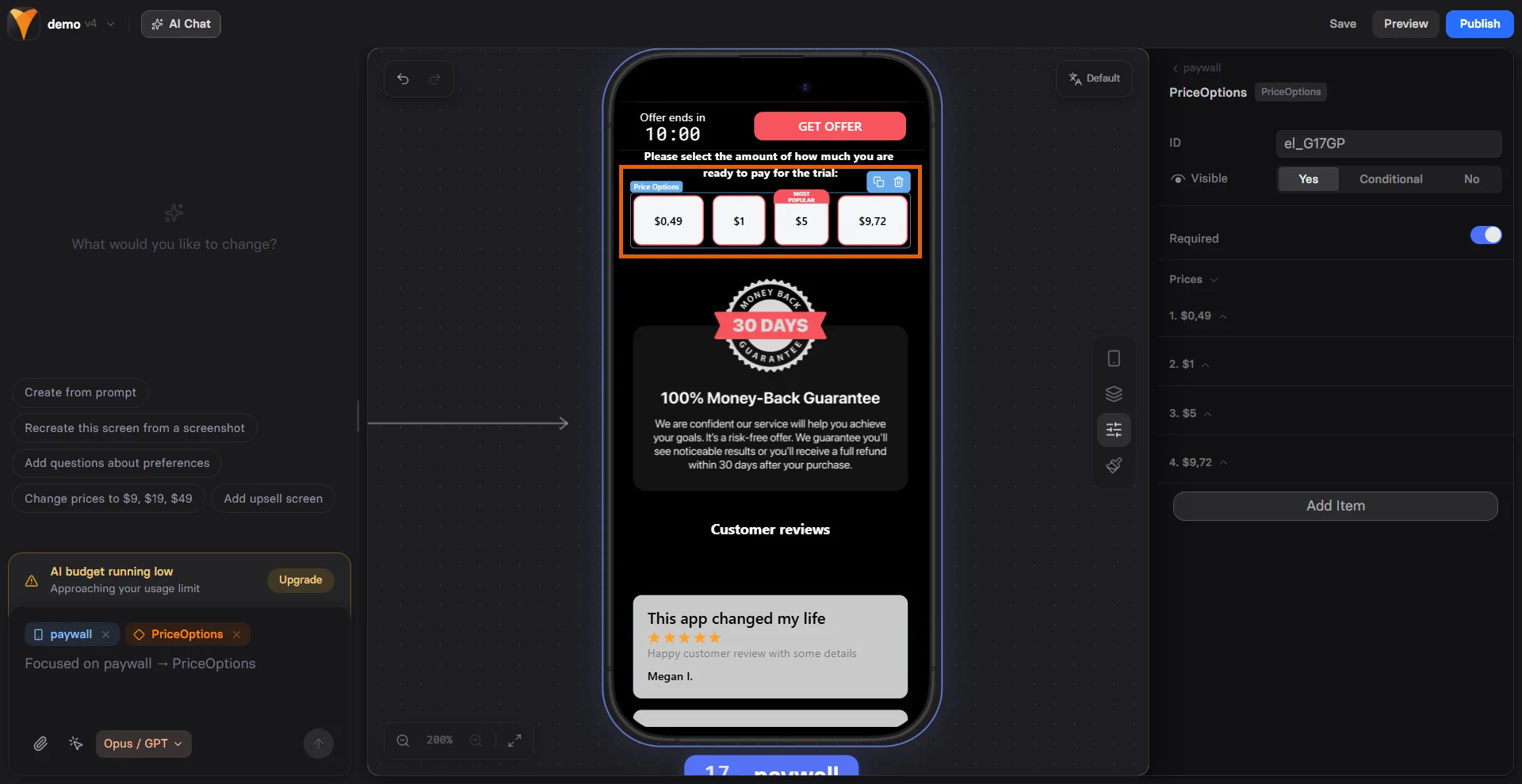
The Price Picker element helps you understand what users are willing to pay
while creating commitment through choice. It's perfect for paid trials, price
testing, and gathering pricing insights before showing your actual offer.
 ## When to Use
Strategic applications:
* **Paid trial selection** - "Start your \$1 trial"
* **Willingness-to-pay research** - "What would you pay?"
* **Donation amounts** - "Choose your contribution"
* **Service tiers** - "Select your budget"
* **Price anchoring** - Show range before real price
Price Picker differs from Plan Picker by focusing on single price points
rather than full subscription plans. Use it when price is the primary
differentiator.
## Configuration
### Required Field
Make selection mandatory:
* Forces user to choose
* Can't proceed without selection
* Increases commitment psychology
### Price Options
Each price option includes:
**Custom ID**
Unique identifier for tracking:
* Used in variables
* Analytics tracking
* Conditional logic
**Price Text**
Display format:
```
"$1 trial"
"$4.99/week"
"$97 one-time"
"Pay what you want"
```
**Badge (Optional)**
Highlight specific options:
* "MOST POPULAR"
* "BEST VALUE"
* "LIMITED TIME"
Pre-select the middle option to leverage anchoring bias. Users tend to
stick with defaults, especially in the middle of a range.
## Pricing Psychology
### The Goldilocks Effect
Three-option strategy:
```
$0.99 - Too cheap (seems low quality)
$2.99 - Just right (most will choose)
$4.99 - Too expensive (makes middle look good)
```
### Anchoring Strategy
Start high to make real price seem reasonable:
```
"What would you pay for this?"
$197
$97
$47
Next page: "Great news! It's only $27!"
```
### Commitment Escalation
Small commitment leads to larger:
```
Page 1: "$1 trial" (Price Picker)
Page 2: "After trial: $19/month"
Result: 50% higher trial-to-paid conversion
```
## Common Patterns
### Paid Trial Funnel
```
Price Picker:
- $1 for 7 days
- $3 for 14 days
- $7 for 30 days
Most pick middle option
All convert at similar rates
Higher revenue from longer trials
```
### Donation Flow
```
"Support our mission:"
- $10 - Coffee supporter
- $25 - Lunch supporter
- $50 - Dinner supporter
- Other amount
Personal labels increase giving
```
### Price Testing
```
"How much would you pay monthly?"
- $9
- $19
- $29
- $39
Collect data before showing real price
Understand price sensitivity
```
### Budget Qualification
```
"Select your monthly budget:"
- Under $50
- $50-$100
- $100-$250
- Over $250
Route to appropriate offers
Personalize follow-up
```
## Mobile Optimization
Price Picker excels on mobile:
**Touch-Friendly Selection**
* Large tap targets
* Radio button clarity
* Clear selection state
* Easy to change choice
**Readable Pricing**
* Large price display
* Clear currency symbols
* Badge visibility
* Proper spacing
**Quick Selection**
* Single tap to choose
* Visual feedback
* Smooth transitions
* No typing needed
## Using Price Data
### Variable Access
Selected price available as variable:
```
Element ID: trial-price
User selects: "$3 option"
{{trial-price}} = "3-dollar-trial"
```
### Conditional Logic
Route based on selection:
```
If {{trial-price}} = "1-dollar":
Show: Basic onboarding
If {{trial-price}} = "7-dollar":
Show: Premium onboarding
```
### Price-Based Offers
Customize follow-up:
```
Low price selected:
Offer: Budget plan
High price selected:
Offer: Premium plan
```
## Conversion Optimization
### Reduce Friction
* **Few options** - 3-4 maximum
* **Clear prices** - No mental math
* **One currency** - User's local currency
* **Round numbers** - $10 not $9.97
### Build Value
* **Price context** - "Less than coffee"
* **Value props** - What they get
* **Guarantees** - Money-back promise
* **Social proof** - "Most popular"
### Create Urgency
* **Limited slots** - "Only 10 left at this price"
* **Timer** - Price increases in `{{timer}}`
* **Bonus** - Extra value for quick decision
* **Scarcity** - "Trial price ends today"
## Best Practices
### Pricing Display
* Include currency symbol
* Show billing period clearly
* Use consistent formatting
* Highlight savings if any
### Option Order
1. **Ascending** - Low to high (builds up)
2. **Descending** - High to low (anchoring)
3. **Random** - For true price testing
### Visual Hierarchy
* Recommended option stands out
* Equal spacing between options
* Clear selection indicators
* Readable on all devices
## Testing Strategies
### A/B Test Variables
1. **Number of options** - 2 vs 3 vs 4
2. **Price points** - Different ranges
3. **Default selection** - Which pre-selected
4. **Badge text** - Different persuasion
5. **Order** - Ascending vs descending
### Price Sensitivity Testing
```
Version A: $1, $3, $5
Version B: $2, $5, $8
Version C: $5, $10, $15
Measure: Selection distribution
Learn: Optimal price point
```
## Common Mistakes
### Too Many Options
* Causes decision paralysis
* Limit to 3-4 choices
* Focus on clear differences
### Unclear Value
* Show what each tier includes
* Explain price differences
* Highlight best value
### Poor Mobile Experience
* Test on actual devices
* Ensure easy selection
* Check text readability
## Troubleshooting
* Element needs an ID
* Check for duplicate IDs
* Verify no JavaScript errors
* Ensure radio buttons work
* ID must match exactly
* Use correct syntax `{{element-ID}}`
* Check variable is set before use
* Test with console logging
* Badge text must be set
* Check visibility settings
* Verify no CSS conflicts
* Test in preview mode
* Required field is enabled
* This is intended behavior
* Add default selection if needed
* Clear messaging about requirement
## Integration Examples
### With Checkout
```
Page 1: Price Picker (trial selection)
Page 2: Checkout (processes selected trial)
Variable passes price to checkout
```
### With Quiz
```
Quiz: Assess user needs
Price Picker: Based on quiz results
Personalized pricing shown
```
### With Timer
```
Timer: "Trial price expires in {{timer}}"
Price Picker: Select before time runs out
Creates urgency for decision
```
## Next Steps
* [Process payment](/elements/checkout) with selected price
* [Track selections](/integrations/analytics) in analytics
* [Add urgency](/elements/timer) with countdown timers
* [Test price points](/dashboard/experiments) with A/B tests
## When to Use
Strategic applications:
* **Paid trial selection** - "Start your \$1 trial"
* **Willingness-to-pay research** - "What would you pay?"
* **Donation amounts** - "Choose your contribution"
* **Service tiers** - "Select your budget"
* **Price anchoring** - Show range before real price
Price Picker differs from Plan Picker by focusing on single price points
rather than full subscription plans. Use it when price is the primary
differentiator.
## Configuration
### Required Field
Make selection mandatory:
* Forces user to choose
* Can't proceed without selection
* Increases commitment psychology
### Price Options
Each price option includes:
**Custom ID**
Unique identifier for tracking:
* Used in variables
* Analytics tracking
* Conditional logic
**Price Text**
Display format:
```
"$1 trial"
"$4.99/week"
"$97 one-time"
"Pay what you want"
```
**Badge (Optional)**
Highlight specific options:
* "MOST POPULAR"
* "BEST VALUE"
* "LIMITED TIME"
Pre-select the middle option to leverage anchoring bias. Users tend to
stick with defaults, especially in the middle of a range.
## Pricing Psychology
### The Goldilocks Effect
Three-option strategy:
```
$0.99 - Too cheap (seems low quality)
$2.99 - Just right (most will choose)
$4.99 - Too expensive (makes middle look good)
```
### Anchoring Strategy
Start high to make real price seem reasonable:
```
"What would you pay for this?"
$197
$97
$47
Next page: "Great news! It's only $27!"
```
### Commitment Escalation
Small commitment leads to larger:
```
Page 1: "$1 trial" (Price Picker)
Page 2: "After trial: $19/month"
Result: 50% higher trial-to-paid conversion
```
## Common Patterns
### Paid Trial Funnel
```
Price Picker:
- $1 for 7 days
- $3 for 14 days
- $7 for 30 days
Most pick middle option
All convert at similar rates
Higher revenue from longer trials
```
### Donation Flow
```
"Support our mission:"
- $10 - Coffee supporter
- $25 - Lunch supporter
- $50 - Dinner supporter
- Other amount
Personal labels increase giving
```
### Price Testing
```
"How much would you pay monthly?"
- $9
- $19
- $29
- $39
Collect data before showing real price
Understand price sensitivity
```
### Budget Qualification
```
"Select your monthly budget:"
- Under $50
- $50-$100
- $100-$250
- Over $250
Route to appropriate offers
Personalize follow-up
```
## Mobile Optimization
Price Picker excels on mobile:
**Touch-Friendly Selection**
* Large tap targets
* Radio button clarity
* Clear selection state
* Easy to change choice
**Readable Pricing**
* Large price display
* Clear currency symbols
* Badge visibility
* Proper spacing
**Quick Selection**
* Single tap to choose
* Visual feedback
* Smooth transitions
* No typing needed
## Using Price Data
### Variable Access
Selected price available as variable:
```
Element ID: trial-price
User selects: "$3 option"
{{trial-price}} = "3-dollar-trial"
```
### Conditional Logic
Route based on selection:
```
If {{trial-price}} = "1-dollar":
Show: Basic onboarding
If {{trial-price}} = "7-dollar":
Show: Premium onboarding
```
### Price-Based Offers
Customize follow-up:
```
Low price selected:
Offer: Budget plan
High price selected:
Offer: Premium plan
```
## Conversion Optimization
### Reduce Friction
* **Few options** - 3-4 maximum
* **Clear prices** - No mental math
* **One currency** - User's local currency
* **Round numbers** - $10 not $9.97
### Build Value
* **Price context** - "Less than coffee"
* **Value props** - What they get
* **Guarantees** - Money-back promise
* **Social proof** - "Most popular"
### Create Urgency
* **Limited slots** - "Only 10 left at this price"
* **Timer** - Price increases in `{{timer}}`
* **Bonus** - Extra value for quick decision
* **Scarcity** - "Trial price ends today"
## Best Practices
### Pricing Display
* Include currency symbol
* Show billing period clearly
* Use consistent formatting
* Highlight savings if any
### Option Order
1. **Ascending** - Low to high (builds up)
2. **Descending** - High to low (anchoring)
3. **Random** - For true price testing
### Visual Hierarchy
* Recommended option stands out
* Equal spacing between options
* Clear selection indicators
* Readable on all devices
## Testing Strategies
### A/B Test Variables
1. **Number of options** - 2 vs 3 vs 4
2. **Price points** - Different ranges
3. **Default selection** - Which pre-selected
4. **Badge text** - Different persuasion
5. **Order** - Ascending vs descending
### Price Sensitivity Testing
```
Version A: $1, $3, $5
Version B: $2, $5, $8
Version C: $5, $10, $15
Measure: Selection distribution
Learn: Optimal price point
```
## Common Mistakes
### Too Many Options
* Causes decision paralysis
* Limit to 3-4 choices
* Focus on clear differences
### Unclear Value
* Show what each tier includes
* Explain price differences
* Highlight best value
### Poor Mobile Experience
* Test on actual devices
* Ensure easy selection
* Check text readability
## Troubleshooting
* Element needs an ID
* Check for duplicate IDs
* Verify no JavaScript errors
* Ensure radio buttons work
* ID must match exactly
* Use correct syntax `{{element-ID}}`
* Check variable is set before use
* Test with console logging
* Badge text must be set
* Check visibility settings
* Verify no CSS conflicts
* Test in preview mode
* Required field is enabled
* This is intended behavior
* Add default selection if needed
* Clear messaging about requirement
## Integration Examples
### With Checkout
```
Page 1: Price Picker (trial selection)
Page 2: Checkout (processes selected trial)
Variable passes price to checkout
```
### With Quiz
```
Quiz: Assess user needs
Price Picker: Based on quiz results
Personalized pricing shown
```
### With Timer
```
Timer: "Trial price expires in {{timer}}"
Price Picker: Select before time runs out
Creates urgency for decision
```
## Next Steps
* [Process payment](/elements/checkout) with selected price
* [Track selections](/integrations/analytics) in analytics
* [Add urgency](/elements/timer) with countdown timers
* [Test price points](/dashboard/experiments) with A/B tests