> ## Documentation Index
> Fetch the complete documentation index at: https://funnelfox.com/docs/llms.txt
> Use this file to discover all available pages before exploring further.
# Popup element
> Add popups to your FunnelFox funnels. Configure triggers, animations, overlay settings, and conversion-focused popup designs.
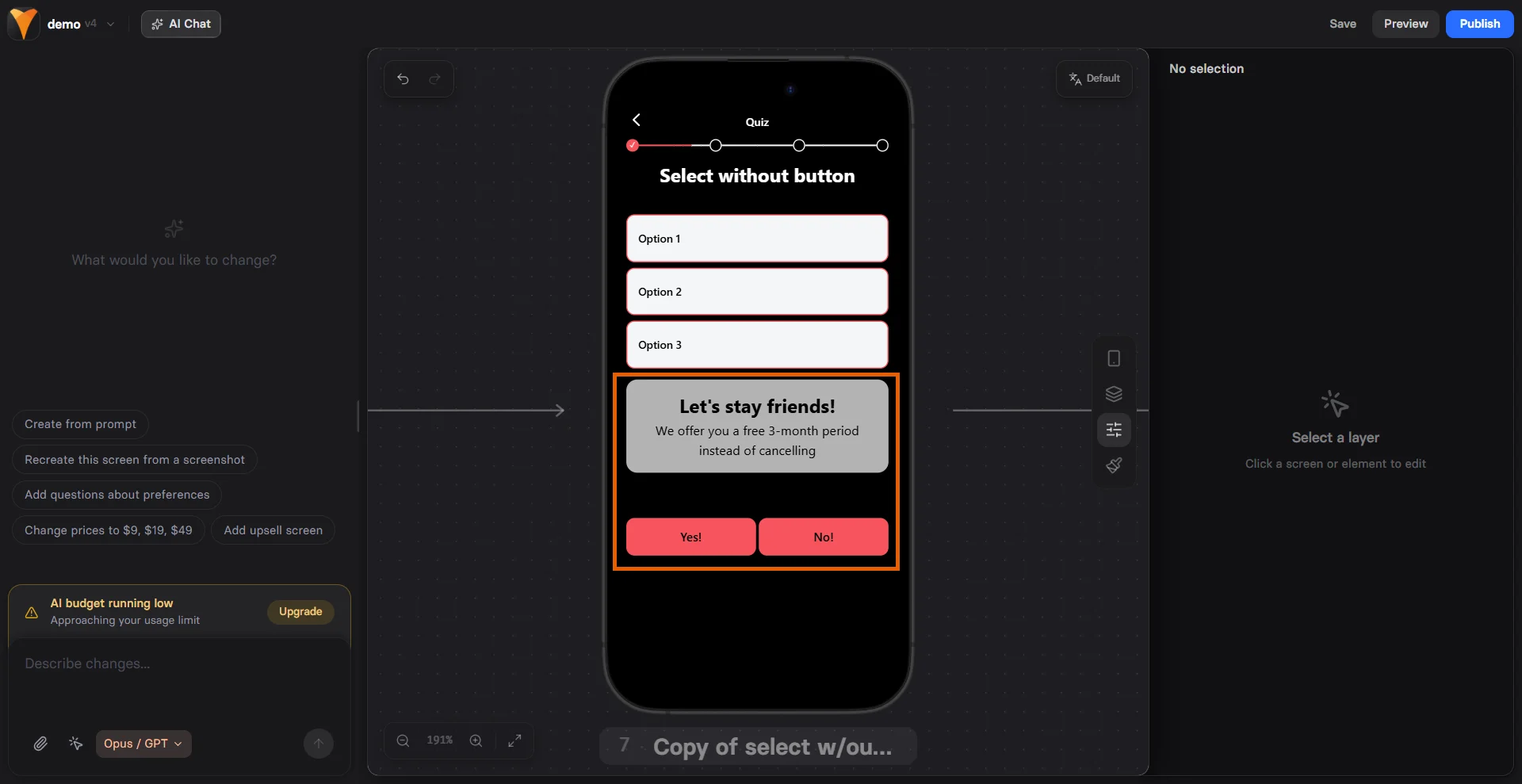
The Popup element creates modal overlays that capture user attention and guide
them through focused interactions. Unlike inline content, popups create a
dedicated space for important messages, forms, or mini-funnels within your
main flow.
 ## When to Use
Strategic popup moments:
* **Email capture** - Exit intent or timed popups
* **Special offers** - Limited-time deals
* **Confirmations** - "Are you sure?" dialogs
* **Mini-funnels** - Multi-step processes
* **Notifications** - Success/error messages
* **Content gates** - "Sign up to continue"
Use popups sparingly. Too many interruptions frustrate users and
increase abandonment. One well-timed popup beats three random ones.
## How Popups Work
Popups are containers that:
1. Start hidden by default
2. Triggered by user actions or conditions
3. Overlay the main content
4. Can contain any other elements
5. Dismissed by close button or actions
```
Main Page
└── Popup (hidden)
├── Headline
├── Text Input
└── Submit Button
Trigger: Show popup after 5 seconds
```
## Configuration
### Display Options
**Show Close Button**
Toggle the X button:
* **Yes** - Users can dismiss
* **No** - Force interaction
Removing the close button increases completion but can frustrate users.
Use only for critical flows like payment confirmation.
**Modal Behavior**
* **True** - Blocks page interaction
* **False** - Allows background clicks
### Animation Type
Choose entrance style:
| Animation | Effect | Use Case |
| --------- | ---------------- | -------------------- |
| **Fade** | Smooth opacity | Professional, subtle |
| **Slide** | Slides from edge | Modern, dynamic |
| **None** | Instant appear | Fast, simple |
### Placement
Control popup position:
| Position | Location | Best For |
| ---------- | ---------------- | -------------- |
| **Auto** | Browser decides | General use |
| **Top** | Top of viewport | Notifications |
| **Center** | Middle of screen | Forms, offers |
| **Bottom** | Bottom edge | Cookie consent |
## Triggering Popups
### Show/Hide Actions
Popups require triggers to appear:
**Common Triggers**
* **On page load** - After X seconds
* **On scroll** - At certain depth
* **On exit intent** - Mouse leaving
* **On click** - Button press
* **On form submit** - After action
Set up triggers on other elements:
```
Button element:
- On Click → Show → Select popup ID
```
### Timing Strategies
**Immediate (0-3 seconds)**
* Welcome messages
* Important notices
* Gate content
**Delayed (5-10 seconds)**
* Newsletter signup
* Special offers
* Engagement check
**Exit Intent**
* Last chance offers
* Abandonment prevention
* Feedback request
Test popup timing with your audience. B2C can handle earlier popups
(5-10s) while B2B prefers later (15-30s) or exit-intent only.
## Popup Content
### Email Capture Popup
```
Container: Popup
├── Headline: "Get 10% Off Your First Order"
├── Text: "Join 50,000+ smart shoppers"
├── Text Input: Email (required)
├── Button: "Get My Discount"
└── Text: "No spam, unsubscribe anytime"
```
### Confirmation Dialog
```
Container: Popup (No close button)
├── Headline: "Are You Sure?"
├── Text: "You'll lose your progress"
├── Container (Row)
│ ├── Button: "Stay" (closes popup)
│ └── Button: "Leave" (navigates away)
```
### Multi-Step Mini-Funnel
```
Container: Popup
├── Page 1: Email capture
├── Page 2: Preferences
└── Page 3: Success message
```
### Offer Announcement
```
Container: Popup
├── Image: Product photo
├── Headline: "Flash Sale - 50% Off"
├── Timer: {{timer}} remaining
├── Button: "Shop Now"
└── Text: "Limited quantity available"
```
## Mobile Optimization
Popups adapt to mobile:
**Full-Screen Mobile**
* Popups expand to full width
* Better for forms
* Clear close button
* Touch-friendly spacing
**Responsive Content**
* Stack elements vertically
* Larger text and buttons
* Simplified layouts
* Scroll if needed
**Performance**
* Lightweight overlays
* Smooth animations
* Fast loading
* Touch gestures
On mobile, consider using full-page overlays instead of small popups.
They're easier to interact with and less likely to be dismissed accidentally.
## Design Best Practices
### Visual Hierarchy
* **Contrast** - Stand out from background
* **Focus** - One clear message
* **Whitespace** - Don't overcrowd
* **Brand** - Match your style
### Content Guidelines
* **Headline** - Clear value proposition
* **Body** - Minimal, benefit-focused
* **CTA** - Single, obvious action
* **Trust** - Privacy, guarantees
### Size Recommendations
* **Desktop** - 400-600px wide
* **Mobile** - Full width or 90%
* **Height** - Auto (content-based)
* **Max height** - 80% viewport
## Common Patterns
### Exit-Intent Offer
```
Trigger: Mouse leaves viewport
Popup: "Wait! Here's 15% off"
Contains: Discount code
Result: 10-15% abandonment recovery
```
### Two-Step Opt-In
```
Step 1: "Want free tips?" [Yes] [No]
Step 2: Email input form
Result: 30% higher quality leads
```
### Quiz in Popup
```
Trigger: After 30 seconds
Popup: 3-question quiz
Result: Personalized recommendation
Benefit: Higher engagement
```
### Countdown Timer
```
Trigger: On page load
Popup: "Sale ends in {{timer}}"
Auto-close: After 5 seconds
Result: Creates urgency
```
## Conversion Psychology
### Interruption Theory
* Breaks pattern (increases attention)
* Creates micro-commitment
* Focuses on single action
* Removes distractions
### Scarcity/Urgency
* Limited time offers
* Exclusive access
* One-time opportunities
* Fear of missing out
### Social Proof
* "Join 10,000+ subscribers"
* Customer testimonials
* Trust badges
* Recent activity
## Testing Variables
A/B test these elements:
1. **Timing** - 5s vs 10s vs exit
2. **Message** - Discount vs value
3. **Close button** - Yes vs no
4. **Animation** - Fade vs slide
5. **Size** - Small vs full-screen
## Common Mistakes
### Too Many Popups
* One per session maximum
* Space them out
* Different purposes only
### Poor Timing
* Too early = annoying
* Too late = missed opportunity
* Test optimal moment
### Weak Value Prop
* Generic "Subscribe" = low conversion
* Specific benefit = high conversion
### Mobile Issues
* Too small to interact
* Blocks critical content
* Can't close easily
## Troubleshooting
* Check trigger configuration
* Verify popup ID matches
* Ensure visibility not set to "No"
* Look for JavaScript errors
* Enable close button
* Check modal settings
* Verify no CSS blocking
* Test touch targets on mobile
* Reduce content amount
* Check max-height settings
* Enable scrolling
* Test on small screens
* Enable modal behavior
* Check z-index values
* Verify overlay present
* Test across browsers
## Analytics & Tracking
Track popup performance:
* **Show rate** - How often triggered
* **Interaction rate** - Clicks/submissions
* **Close rate** - Dismissals
* **Conversion rate** - Completed goals
Key metrics:
* Time to interaction
* Device differences
* Source/medium impact
* A/B test results
## Next Steps
* [Add triggers](/editor/actions) to show popups
* [Include forms](/elements/textinput) for data capture
* [Track conversions](/integrations/analytics) with analytics
* [Test variations](/dashboard/experiments) with A/B tests
## When to Use
Strategic popup moments:
* **Email capture** - Exit intent or timed popups
* **Special offers** - Limited-time deals
* **Confirmations** - "Are you sure?" dialogs
* **Mini-funnels** - Multi-step processes
* **Notifications** - Success/error messages
* **Content gates** - "Sign up to continue"
Use popups sparingly. Too many interruptions frustrate users and
increase abandonment. One well-timed popup beats three random ones.
## How Popups Work
Popups are containers that:
1. Start hidden by default
2. Triggered by user actions or conditions
3. Overlay the main content
4. Can contain any other elements
5. Dismissed by close button or actions
```
Main Page
└── Popup (hidden)
├── Headline
├── Text Input
└── Submit Button
Trigger: Show popup after 5 seconds
```
## Configuration
### Display Options
**Show Close Button**
Toggle the X button:
* **Yes** - Users can dismiss
* **No** - Force interaction
Removing the close button increases completion but can frustrate users.
Use only for critical flows like payment confirmation.
**Modal Behavior**
* **True** - Blocks page interaction
* **False** - Allows background clicks
### Animation Type
Choose entrance style:
| Animation | Effect | Use Case |
| --------- | ---------------- | -------------------- |
| **Fade** | Smooth opacity | Professional, subtle |
| **Slide** | Slides from edge | Modern, dynamic |
| **None** | Instant appear | Fast, simple |
### Placement
Control popup position:
| Position | Location | Best For |
| ---------- | ---------------- | -------------- |
| **Auto** | Browser decides | General use |
| **Top** | Top of viewport | Notifications |
| **Center** | Middle of screen | Forms, offers |
| **Bottom** | Bottom edge | Cookie consent |
## Triggering Popups
### Show/Hide Actions
Popups require triggers to appear:
**Common Triggers**
* **On page load** - After X seconds
* **On scroll** - At certain depth
* **On exit intent** - Mouse leaving
* **On click** - Button press
* **On form submit** - After action
Set up triggers on other elements:
```
Button element:
- On Click → Show → Select popup ID
```
### Timing Strategies
**Immediate (0-3 seconds)**
* Welcome messages
* Important notices
* Gate content
**Delayed (5-10 seconds)**
* Newsletter signup
* Special offers
* Engagement check
**Exit Intent**
* Last chance offers
* Abandonment prevention
* Feedback request
Test popup timing with your audience. B2C can handle earlier popups
(5-10s) while B2B prefers later (15-30s) or exit-intent only.
## Popup Content
### Email Capture Popup
```
Container: Popup
├── Headline: "Get 10% Off Your First Order"
├── Text: "Join 50,000+ smart shoppers"
├── Text Input: Email (required)
├── Button: "Get My Discount"
└── Text: "No spam, unsubscribe anytime"
```
### Confirmation Dialog
```
Container: Popup (No close button)
├── Headline: "Are You Sure?"
├── Text: "You'll lose your progress"
├── Container (Row)
│ ├── Button: "Stay" (closes popup)
│ └── Button: "Leave" (navigates away)
```
### Multi-Step Mini-Funnel
```
Container: Popup
├── Page 1: Email capture
├── Page 2: Preferences
└── Page 3: Success message
```
### Offer Announcement
```
Container: Popup
├── Image: Product photo
├── Headline: "Flash Sale - 50% Off"
├── Timer: {{timer}} remaining
├── Button: "Shop Now"
└── Text: "Limited quantity available"
```
## Mobile Optimization
Popups adapt to mobile:
**Full-Screen Mobile**
* Popups expand to full width
* Better for forms
* Clear close button
* Touch-friendly spacing
**Responsive Content**
* Stack elements vertically
* Larger text and buttons
* Simplified layouts
* Scroll if needed
**Performance**
* Lightweight overlays
* Smooth animations
* Fast loading
* Touch gestures
On mobile, consider using full-page overlays instead of small popups.
They're easier to interact with and less likely to be dismissed accidentally.
## Design Best Practices
### Visual Hierarchy
* **Contrast** - Stand out from background
* **Focus** - One clear message
* **Whitespace** - Don't overcrowd
* **Brand** - Match your style
### Content Guidelines
* **Headline** - Clear value proposition
* **Body** - Minimal, benefit-focused
* **CTA** - Single, obvious action
* **Trust** - Privacy, guarantees
### Size Recommendations
* **Desktop** - 400-600px wide
* **Mobile** - Full width or 90%
* **Height** - Auto (content-based)
* **Max height** - 80% viewport
## Common Patterns
### Exit-Intent Offer
```
Trigger: Mouse leaves viewport
Popup: "Wait! Here's 15% off"
Contains: Discount code
Result: 10-15% abandonment recovery
```
### Two-Step Opt-In
```
Step 1: "Want free tips?" [Yes] [No]
Step 2: Email input form
Result: 30% higher quality leads
```
### Quiz in Popup
```
Trigger: After 30 seconds
Popup: 3-question quiz
Result: Personalized recommendation
Benefit: Higher engagement
```
### Countdown Timer
```
Trigger: On page load
Popup: "Sale ends in {{timer}}"
Auto-close: After 5 seconds
Result: Creates urgency
```
## Conversion Psychology
### Interruption Theory
* Breaks pattern (increases attention)
* Creates micro-commitment
* Focuses on single action
* Removes distractions
### Scarcity/Urgency
* Limited time offers
* Exclusive access
* One-time opportunities
* Fear of missing out
### Social Proof
* "Join 10,000+ subscribers"
* Customer testimonials
* Trust badges
* Recent activity
## Testing Variables
A/B test these elements:
1. **Timing** - 5s vs 10s vs exit
2. **Message** - Discount vs value
3. **Close button** - Yes vs no
4. **Animation** - Fade vs slide
5. **Size** - Small vs full-screen
## Common Mistakes
### Too Many Popups
* One per session maximum
* Space them out
* Different purposes only
### Poor Timing
* Too early = annoying
* Too late = missed opportunity
* Test optimal moment
### Weak Value Prop
* Generic "Subscribe" = low conversion
* Specific benefit = high conversion
### Mobile Issues
* Too small to interact
* Blocks critical content
* Can't close easily
## Troubleshooting
* Check trigger configuration
* Verify popup ID matches
* Ensure visibility not set to "No"
* Look for JavaScript errors
* Enable close button
* Check modal settings
* Verify no CSS blocking
* Test touch targets on mobile
* Reduce content amount
* Check max-height settings
* Enable scrolling
* Test on small screens
* Enable modal behavior
* Check z-index values
* Verify overlay present
* Test across browsers
## Analytics & Tracking
Track popup performance:
* **Show rate** - How often triggered
* **Interaction rate** - Clicks/submissions
* **Close rate** - Dismissals
* **Conversion rate** - Completed goals
Key metrics:
* Time to interaction
* Device differences
* Source/medium impact
* A/B test results
## Next Steps
* [Add triggers](/editor/actions) to show popups
* [Include forms](/elements/textinput) for data capture
* [Track conversions](/integrations/analytics) with analytics
* [Test variations](/dashboard/experiments) with A/B tests