> ## Documentation Index
> Fetch the complete documentation index at: https://funnelfox.com/docs/llms.txt
> Use this file to discover all available pages before exploring further.
# Loader element
> Progress indicators that build anticipation and create personalization illusion
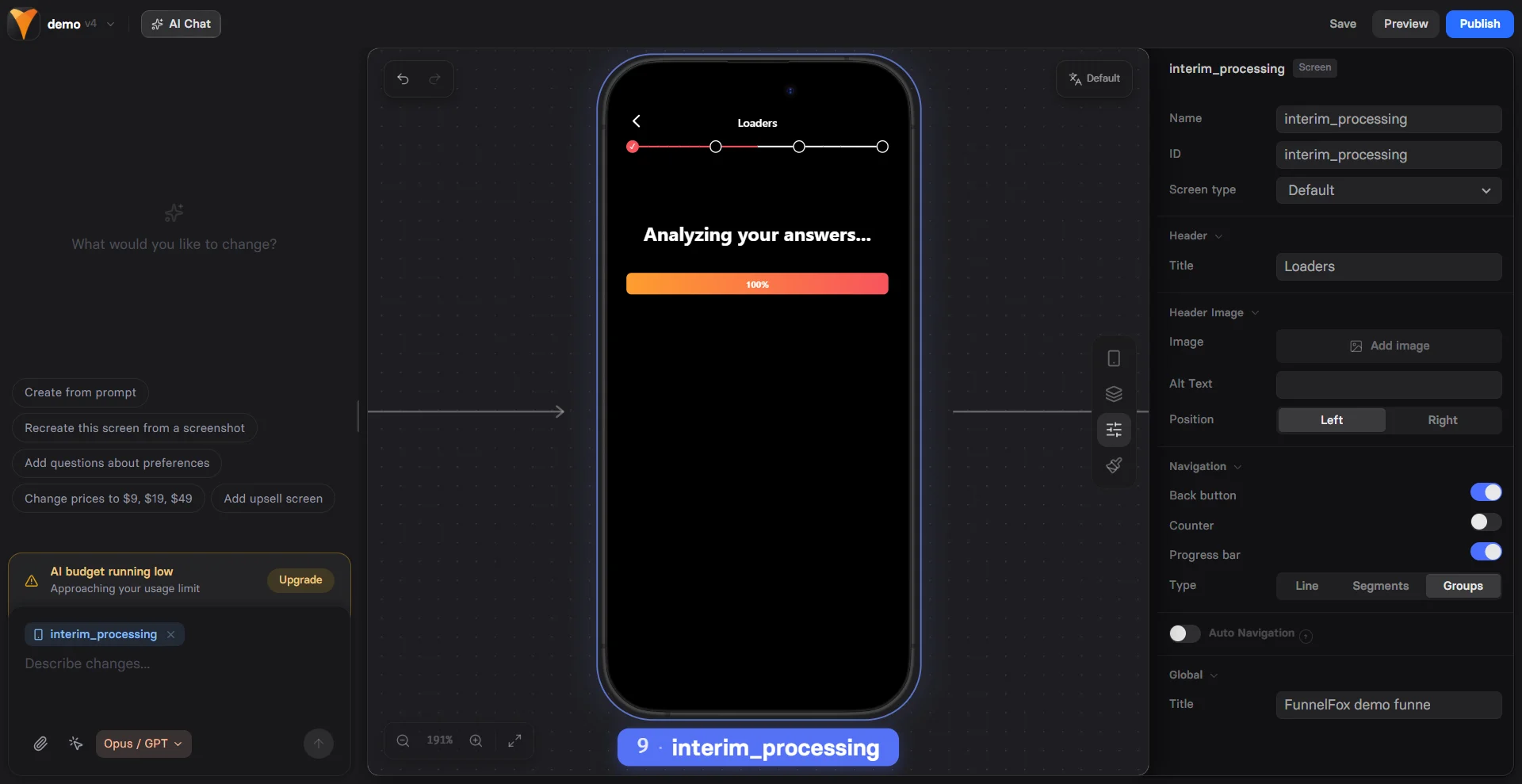
The Loader element creates the powerful illusion that your funnel is doing
personalized work for the user. This brief "processing" moment builds
anticipation and increases perceived value of the outcome.
 ## When to Use
Strategic moments for loaders:
* **After quizzes** - "Analyzing your answers..."
* **Before results** - "Calculating your score..."
* **Pre-paywall** - "Preparing your personalized plan..."
* **Before offers** - "Finding best deals for you..."
* **Post-signup** - "Creating your account..."
Loaders create a psychological commitment. Users who wait for "personalized"
results are 40% more likely to convert than those shown immediate offers.
## How It Works
The loader runs for a set duration, then triggers actions:
1. User completes quiz/form
2. Loader appears with message
3. Progress bar fills over time
4. At 100%, trigger next action
5. User sees "personalized" result
This creates the feeling that real work happened.
## Configuration
### Loader Type
Choose your visualization:
| Type | Visual | Best For |
| ------------ | --------------- | --------------- |
| **Linear** | Horizontal bar | Clear progress |
| **Circular** | Spinning circle | Indefinite wait |
**Linear Progress**
* Shows clear start to finish
* Users see time remaining
* Best for 3-10 second waits
**Circular Spinner**
* No defined endpoint
* Continuous motion
* Best for quick loads
### Duration
Set processing time:
* **1-2 seconds** - Quick transition
* **3-5 seconds** - Build anticipation
* **5-8 seconds** - Create investment
* **8+ seconds** - Risk abandonment
Keep loaders under 8 seconds. Longer waits significantly increase
drop-off rates unless paired with engaging copy.
### Progress Display
**Show Percentage**
Toggle percentage display:
* Shows: "45% complete"
* Creates: Clear expectation
* Best for: Longer durations
Without percentage:
* Cleaner appearance
* Less pressure
* Better for short waits
## Messaging Strategy
### Processing Messages
Build anticipation with smart copy:
**Generic Processing**
```
"Processing..."
"Please wait..."
"Loading..."
```
**Personalization Illusion**
```
"Analyzing your responses..."
"Calculating your results..."
"Finding perfect match..."
```
**Value Building**
```
"Reviewing 10,000+ options..."
"Comparing 50+ plans..."
"Checking exclusive deals..."
```
### Progressive Messaging
Change message during load:
```
0-33%: "Analyzing your profile..."
34-66%: "Matching preferences..."
67-100%: "Preparing results..."
```
## Triggers
### On Complete (100%)
Common actions when loader finishes:
* **Navigate** - Go to results page
* **Show element** - Reveal hidden content
* **Trigger popup** - Display outcome
* **Start animation** - Dramatic reveal
### On Progress
Trigger at specific percentages:
* At 25%: Update message
* At 50%: Show preview
* At 75%: Build excitement
* At 100%: Final action
Combine multiple triggers to create dynamic experiences. Update messaging
at 33% and 66% to maintain engagement during longer loads.
## Psychology of Waiting
### The IKEA Effect
Users value things more when effort is involved:
* Waiting = Investment
* Investment = Commitment
* Commitment = Higher conversion
### Anticipation Building
The wait creates excitement:
```
Quiz → Loader → Result
Effort → Process → Reward
```
### Personalization Theater
Even fake personalization increases value:
* "Analyzing YOUR answers"
* "Based on YOUR profile"
* "Customized for YOU"
## Common Patterns
### Quiz to Results
```
Page 1: Quiz questions
Page 2: Loader (5 seconds)
"Analyzing your answers..."
"Calculating personality type..."
"Preparing your profile..."
Page 3: Personalized results
```
### Price Calculator
```
Input: User preferences
Loader: "Calculating best price..."
Show: "Checking 50+ options..."
Progress: Linear with percentage
Result: "Your price: $X/month"
```
### Match Finding
```
Profile: User details
Loader: "Finding perfect matches..."
Duration: 4 seconds
Type: Circular
Results: "We found 3 perfect options!"
```
### Account Creation
```
Signup: Email/password
Loader: "Setting up your account..."
Show percentage: Yes
Duration: 3 seconds
Dashboard: Welcome screen
```
## Mobile Optimization
Loaders work perfectly on mobile:
**Visual Clarity**
* Large progress bars
* Clear percentages
* Readable messages
* Smooth animations
**Performance**
* Lightweight animations
* No heavy graphics
* Battery efficient
* Works on slow connections
**Touch Prevention**
* Blocks interaction during load
* Prevents accidental taps
* Clear visual feedback
## Combining with Other Elements
### Loader + Processing
```
Multiple loaders in sequence:
1. "Analyzing profile..." ✓
2. "Checking availability..." ✓
3. "Applying discounts..." ✓
Result: Comprehensive process feeling
```
### Loader + Timer
```
Loader: "Reserving your spot..."
Result page: "Spot reserved for {{timer}}"
Creates urgency after investment
```
### Loader + Variables
```
"Analyzing {{user-name}}'s responses..."
"Finding plans in {{user-city}}..."
Increases personalization feeling
```
## Best Practices
### Duration Guidelines
* **After simple form**: 2-3 seconds
* **After quiz**: 4-6 seconds
* **Before paywall**: 3-5 seconds
* **Complex calculation**: 5-8 seconds
### Message Guidelines
* Use action verbs (analyzing, calculating)
* Include specifics (500+ options)
* Reference user input
* Build value proposition
### Visual Guidelines
* Match brand colors
* Sufficient contrast
* Smooth animations
* Clear completion
## Common Mistakes
### Too Long
* Over 8 seconds loses users
* Test optimal duration
* Err on shorter side
### No Value Message
* Don't just say "Loading..."
* Explain what's happening
* Build anticipation
### Fake Errors
* Never show fake failures
* Always deliver on promise
* Maintain trust
## Testing Variables
A/B test these elements:
1. **Duration** - 3 vs 5 vs 7 seconds
2. **Type** - Linear vs circular
3. **Messages** - Generic vs specific
4. **Percentage** - Show vs hide
5. **Placement** - When to use loader
## Troubleshooting
* Check duration is set
* Verify trigger configuration
* Look for JavaScript errors
* Test in preview mode
* Enable "Show percentage"
* Check loader type supports it
* Verify no CSS hiding it
* Test different browsers
* Confirm 100% completion
* Check action configuration
* Verify target elements exist
* Look for conflicting triggers
* Reduce duration
* Improve messaging
* Add progress percentage
* Test shorter waits
## Conversion Impact
Strategic loaders increase conversion:
| Placement | Typical Increase |
| -------------- | ---------------- |
| After quiz | +25-35% |
| Before results | +15-20% |
| Pre-paywall | +20-30% |
| Before offers | +10-15% |
The key is matching loader duration to perceived value. Higher value
outcomes can sustain longer waits.
## Next Steps
* [Add Processing element](/elements/processing) for multi-step loads
* [Show results](/elements/text) after loader
* [Track completion](/integrations/analytics) with analytics
* [Test durations](/dashboard/experiments) with A/B tests
## When to Use
Strategic moments for loaders:
* **After quizzes** - "Analyzing your answers..."
* **Before results** - "Calculating your score..."
* **Pre-paywall** - "Preparing your personalized plan..."
* **Before offers** - "Finding best deals for you..."
* **Post-signup** - "Creating your account..."
Loaders create a psychological commitment. Users who wait for "personalized"
results are 40% more likely to convert than those shown immediate offers.
## How It Works
The loader runs for a set duration, then triggers actions:
1. User completes quiz/form
2. Loader appears with message
3. Progress bar fills over time
4. At 100%, trigger next action
5. User sees "personalized" result
This creates the feeling that real work happened.
## Configuration
### Loader Type
Choose your visualization:
| Type | Visual | Best For |
| ------------ | --------------- | --------------- |
| **Linear** | Horizontal bar | Clear progress |
| **Circular** | Spinning circle | Indefinite wait |
**Linear Progress**
* Shows clear start to finish
* Users see time remaining
* Best for 3-10 second waits
**Circular Spinner**
* No defined endpoint
* Continuous motion
* Best for quick loads
### Duration
Set processing time:
* **1-2 seconds** - Quick transition
* **3-5 seconds** - Build anticipation
* **5-8 seconds** - Create investment
* **8+ seconds** - Risk abandonment
Keep loaders under 8 seconds. Longer waits significantly increase
drop-off rates unless paired with engaging copy.
### Progress Display
**Show Percentage**
Toggle percentage display:
* Shows: "45% complete"
* Creates: Clear expectation
* Best for: Longer durations
Without percentage:
* Cleaner appearance
* Less pressure
* Better for short waits
## Messaging Strategy
### Processing Messages
Build anticipation with smart copy:
**Generic Processing**
```
"Processing..."
"Please wait..."
"Loading..."
```
**Personalization Illusion**
```
"Analyzing your responses..."
"Calculating your results..."
"Finding perfect match..."
```
**Value Building**
```
"Reviewing 10,000+ options..."
"Comparing 50+ plans..."
"Checking exclusive deals..."
```
### Progressive Messaging
Change message during load:
```
0-33%: "Analyzing your profile..."
34-66%: "Matching preferences..."
67-100%: "Preparing results..."
```
## Triggers
### On Complete (100%)
Common actions when loader finishes:
* **Navigate** - Go to results page
* **Show element** - Reveal hidden content
* **Trigger popup** - Display outcome
* **Start animation** - Dramatic reveal
### On Progress
Trigger at specific percentages:
* At 25%: Update message
* At 50%: Show preview
* At 75%: Build excitement
* At 100%: Final action
Combine multiple triggers to create dynamic experiences. Update messaging
at 33% and 66% to maintain engagement during longer loads.
## Psychology of Waiting
### The IKEA Effect
Users value things more when effort is involved:
* Waiting = Investment
* Investment = Commitment
* Commitment = Higher conversion
### Anticipation Building
The wait creates excitement:
```
Quiz → Loader → Result
Effort → Process → Reward
```
### Personalization Theater
Even fake personalization increases value:
* "Analyzing YOUR answers"
* "Based on YOUR profile"
* "Customized for YOU"
## Common Patterns
### Quiz to Results
```
Page 1: Quiz questions
Page 2: Loader (5 seconds)
"Analyzing your answers..."
"Calculating personality type..."
"Preparing your profile..."
Page 3: Personalized results
```
### Price Calculator
```
Input: User preferences
Loader: "Calculating best price..."
Show: "Checking 50+ options..."
Progress: Linear with percentage
Result: "Your price: $X/month"
```
### Match Finding
```
Profile: User details
Loader: "Finding perfect matches..."
Duration: 4 seconds
Type: Circular
Results: "We found 3 perfect options!"
```
### Account Creation
```
Signup: Email/password
Loader: "Setting up your account..."
Show percentage: Yes
Duration: 3 seconds
Dashboard: Welcome screen
```
## Mobile Optimization
Loaders work perfectly on mobile:
**Visual Clarity**
* Large progress bars
* Clear percentages
* Readable messages
* Smooth animations
**Performance**
* Lightweight animations
* No heavy graphics
* Battery efficient
* Works on slow connections
**Touch Prevention**
* Blocks interaction during load
* Prevents accidental taps
* Clear visual feedback
## Combining with Other Elements
### Loader + Processing
```
Multiple loaders in sequence:
1. "Analyzing profile..." ✓
2. "Checking availability..." ✓
3. "Applying discounts..." ✓
Result: Comprehensive process feeling
```
### Loader + Timer
```
Loader: "Reserving your spot..."
Result page: "Spot reserved for {{timer}}"
Creates urgency after investment
```
### Loader + Variables
```
"Analyzing {{user-name}}'s responses..."
"Finding plans in {{user-city}}..."
Increases personalization feeling
```
## Best Practices
### Duration Guidelines
* **After simple form**: 2-3 seconds
* **After quiz**: 4-6 seconds
* **Before paywall**: 3-5 seconds
* **Complex calculation**: 5-8 seconds
### Message Guidelines
* Use action verbs (analyzing, calculating)
* Include specifics (500+ options)
* Reference user input
* Build value proposition
### Visual Guidelines
* Match brand colors
* Sufficient contrast
* Smooth animations
* Clear completion
## Common Mistakes
### Too Long
* Over 8 seconds loses users
* Test optimal duration
* Err on shorter side
### No Value Message
* Don't just say "Loading..."
* Explain what's happening
* Build anticipation
### Fake Errors
* Never show fake failures
* Always deliver on promise
* Maintain trust
## Testing Variables
A/B test these elements:
1. **Duration** - 3 vs 5 vs 7 seconds
2. **Type** - Linear vs circular
3. **Messages** - Generic vs specific
4. **Percentage** - Show vs hide
5. **Placement** - When to use loader
## Troubleshooting
* Check duration is set
* Verify trigger configuration
* Look for JavaScript errors
* Test in preview mode
* Enable "Show percentage"
* Check loader type supports it
* Verify no CSS hiding it
* Test different browsers
* Confirm 100% completion
* Check action configuration
* Verify target elements exist
* Look for conflicting triggers
* Reduce duration
* Improve messaging
* Add progress percentage
* Test shorter waits
## Conversion Impact
Strategic loaders increase conversion:
| Placement | Typical Increase |
| -------------- | ---------------- |
| After quiz | +25-35% |
| Before results | +15-20% |
| Pre-paywall | +20-30% |
| Before offers | +10-15% |
The key is matching loader duration to perceived value. Higher value
outcomes can sustain longer waits.
## Next Steps
* [Add Processing element](/elements/processing) for multi-step loads
* [Show results](/elements/text) after loader
* [Track completion](/integrations/analytics) with analytics
* [Test durations](/dashboard/experiments) with A/B tests