> ## Documentation Index
> Fetch the complete documentation index at: https://funnelfox.com/docs/llms.txt
> Use this file to discover all available pages before exploring further.
# List element
> Add list elements to your FunnelFox funnels. Create feature lists, benefit sections, pricing breakdowns, and styled bullet points.
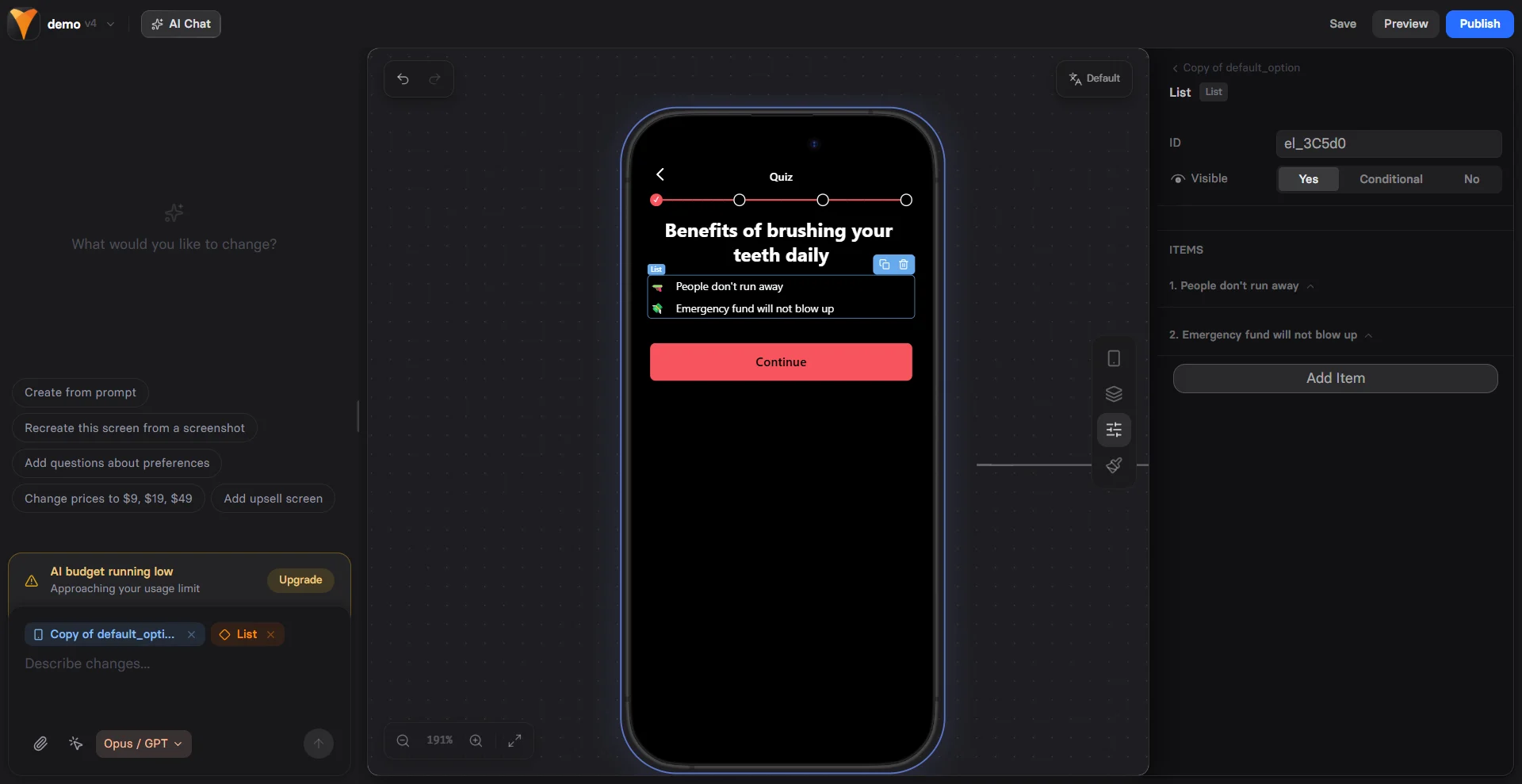
The List element creates visually appealing bullet point lists that help users
quickly scan and understand key information. With customizable markers and
styling, lists break up text and highlight important points.
 ## When to Use
Perfect for:
* **Feature lists** - What's included in your offer
* **Benefits** - Why users should care
* **Process steps** - How something works
* **Guarantees** - What you promise
* **Social proof** - Key achievements
* **Comparisons** - This vs that
Lists increase readability by 40% compared to paragraphs. Users scan
lists quickly, making them perfect for highlighting value propositions.
## Creating List Items
Each list item consists of:
### Text Content
The actual list point:
* Keep concise (1-2 lines ideal)
* Start with action verbs
* Focus on benefits
* Use parallel structure
### Marker Options
Choose your bullet style:
| Marker Type | Visual | Use Case |
| ------------ | ----------- | ----------------- |
| **Disc** | • | Standard lists |
| **Iterator** | 1, 2, 3 | Ordered steps |
| **Emoji** | 🎯 ✅ ⭐ | Engaging, playful |
| **Image** | Custom icon | Branded, unique |
| **None** | (blank) | Clean, minimal |
Use emojis for consumer funnels (B2C) and disc/iterator for professional
audiences (B2B). Match your brand personality.
## Marker Configuration
### Emoji Markers
Add personality with emojis:
```
✅ Complete solution
🚀 Fast implementation
💰 Money-back guarantee
🔒 Secure & private
⭐ 5-star support
```
Popular emoji choices:
* ✓ ✅ ☑ - Checkmarks
* 🎯 🎪 🏆 - Achievement
* 💡 🔥 ⚡ - Energy
* 🛡 🔒 🔐 - Security
* ⭐ 🌟 ✨ - Quality
### Image Markers
Custom icons for branding:
* Upload small images (24-48px)
* Use consistent style
* Consider loading time
* Match brand colors
**Size Control**
Adjust image marker dimensions:
* Small: 16px
* Medium: 24px
* Large: 32px
### Iterator Markers
Numbered or lettered lists:
1. First step
2. Second step
3. Third step
Or:
A. Option one
B. Option two
C. Option three
## List Patterns
### Feature List
```
What's Included:
✅ Lifetime access
✅ All future updates
✅ Priority support
✅ 30-day guarantee
✅ Bonus materials
```
### Benefit Stack
```
You'll Learn How To:
🎯 Increase conversions by 50%
🎯 Reduce cart abandonment
🎯 Optimize pricing strategy
🎯 Build trust quickly
🎯 Create urgency ethically
```
### Process Steps
```
How It Works:
1. Sign up in 30 seconds
2. Complete your profile
3. Get instant matches
4. Start connecting today
```
### Comparison List
```
Unlike competitors, we offer:
⭐ No hidden fees (they charge extra)
⭐ 24/7 support (they're 9-5 only)
⭐ Instant setup (they take days)
⭐ Free updates (they charge annually)
```
### Social Proof Points
```
Why 50,000+ Choose Us:
🏆 Industry leader since 2015
🏆 4.9/5 average rating
🏆 Featured in TechCrunch
🏆 A+ BBB Rating
🏆 30-day money back guarantee
```
## Mobile Optimization
Lists are naturally mobile-friendly:
**Responsive Layout**
* Full-width text
* Proper line spacing
* Touch-friendly gaps
* Clear markers
**Readability**
* Optimal font size
* High contrast
* Sufficient padding
* Clean alignment
**Performance**
* Text loads instantly
* Emoji markers = no downloads
* Lightweight HTML
* No JavaScript needed
## Psychology of Lists
### Cognitive Load Reduction
* Easier to process than paragraphs
* Clear visual hierarchy
* Natural scanning pattern
* Quick comprehension
### Value Stacking
Each item adds perceived value:
```
$97 value - Course materials
$47 value - Worksheet templates
$197 value - Group coaching
$97 value - Lifetime updates
= $438 Total Value
Your Price: Just $97
```
### Pattern Interrupts
Break monotony with lists:
* After long text sections
* Before important CTAs
* Between testimonials
* At decision points
## Styling Lists
### Container Styles
* **Gap** - Space between items
* **Padding** - Internal spacing
* **Background** - Highlight entire list
### Text Styling
* **Size** - Match importance
* **Weight** - Bold key words
* **Color** - Brand consistency
### Marker Styling
* **Size** - Proportional to text
* **Color** - Accent or match
* **Alignment** - Top, middle, baseline
## Conversion Optimization
### Benefit-Focused Copy
❌ "PDF included"
✅ "Get the 47-page action guide"
❌ "Email support"
✅ "Get answers within 2 hours"
❌ "Video content"
✅ "Watch 12 step-by-step tutorials"
### Order Matters
1. **Most valuable first** - Hook attention
2. **Supporting benefits** - Build value
3. **Bonuses last** - Pleasant surprise
### Specificity Wins
❌ "Save time"
✅ "Save 3 hours per week"
❌ "Make more money"
✅ "Increase revenue by 25%"
❌ "Easy to use"
✅ "Set up in 5 minutes"
## Common Mistakes
### Too Many Items
* Limit to 5-7 points
* More overwhelms users
* Focus on best benefits
### Inconsistent Structure
* Start each with same part of speech
* Keep similar length
* Maintain parallel format
### Feature-Focused
* Don't just list features
* Explain the benefit
* Answer "So what?"
## Combining with Other Elements
### List + Button
```
Here's what you get:
• Point 1
• Point 2
• Point 3
[Get Started Now] - Button
```
### List + Timer
```
Today only, you'll receive:
⏰ {{timer}} remaining
• Bonus 1
• Bonus 2
• Bonus 3
```
### List + Testimonial
```
"Best purchase ever because:"
• Reason 1
• Reason 2
• Reason 3
- Happy Customer
```
## Testing Variables
A/B test these elements:
1. **Marker style** - Emoji vs disc
2. **Number of items** - 3 vs 5 vs 7
3. **Order** - Most important first vs last
4. **Copy style** - Features vs benefits
5. **Visual weight** - Bold vs regular
## Troubleshooting
* Check marker type is selected
* Verify emoji is supported
* Upload image if using custom
* Look for CSS conflicts
* Check marker alignment setting
* Verify consistent marker sizes
* Look for padding problems
* Test different markers
* Adjust container width
* Check responsive settings
* Verify line height
* Test on mobile
* Adjust size setting
* Upload appropriate resolution
* Check aspect ratio
* Use consistent dimensions
## Best Practices
### Do's
✅ Keep items concise
✅ Use parallel structure
✅ Focus on benefits
✅ Match brand voice
✅ Test different markers
### Don'ts
❌ Create walls of bullets
❌ Mix structures
❌ Use vague language
❌ Overuse emojis
❌ Forget mobile testing
## Next Steps
* [Add CTAs](/elements/button) after value lists
* [Include testimonials](/elements/reviews) for proof
* [Create urgency](/elements/timer) with limited offers
* [Track engagement](/integrations/analytics) with analytics
## When to Use
Perfect for:
* **Feature lists** - What's included in your offer
* **Benefits** - Why users should care
* **Process steps** - How something works
* **Guarantees** - What you promise
* **Social proof** - Key achievements
* **Comparisons** - This vs that
Lists increase readability by 40% compared to paragraphs. Users scan
lists quickly, making them perfect for highlighting value propositions.
## Creating List Items
Each list item consists of:
### Text Content
The actual list point:
* Keep concise (1-2 lines ideal)
* Start with action verbs
* Focus on benefits
* Use parallel structure
### Marker Options
Choose your bullet style:
| Marker Type | Visual | Use Case |
| ------------ | ----------- | ----------------- |
| **Disc** | • | Standard lists |
| **Iterator** | 1, 2, 3 | Ordered steps |
| **Emoji** | 🎯 ✅ ⭐ | Engaging, playful |
| **Image** | Custom icon | Branded, unique |
| **None** | (blank) | Clean, minimal |
Use emojis for consumer funnels (B2C) and disc/iterator for professional
audiences (B2B). Match your brand personality.
## Marker Configuration
### Emoji Markers
Add personality with emojis:
```
✅ Complete solution
🚀 Fast implementation
💰 Money-back guarantee
🔒 Secure & private
⭐ 5-star support
```
Popular emoji choices:
* ✓ ✅ ☑ - Checkmarks
* 🎯 🎪 🏆 - Achievement
* 💡 🔥 ⚡ - Energy
* 🛡 🔒 🔐 - Security
* ⭐ 🌟 ✨ - Quality
### Image Markers
Custom icons for branding:
* Upload small images (24-48px)
* Use consistent style
* Consider loading time
* Match brand colors
**Size Control**
Adjust image marker dimensions:
* Small: 16px
* Medium: 24px
* Large: 32px
### Iterator Markers
Numbered or lettered lists:
1. First step
2. Second step
3. Third step
Or:
A. Option one
B. Option two
C. Option three
## List Patterns
### Feature List
```
What's Included:
✅ Lifetime access
✅ All future updates
✅ Priority support
✅ 30-day guarantee
✅ Bonus materials
```
### Benefit Stack
```
You'll Learn How To:
🎯 Increase conversions by 50%
🎯 Reduce cart abandonment
🎯 Optimize pricing strategy
🎯 Build trust quickly
🎯 Create urgency ethically
```
### Process Steps
```
How It Works:
1. Sign up in 30 seconds
2. Complete your profile
3. Get instant matches
4. Start connecting today
```
### Comparison List
```
Unlike competitors, we offer:
⭐ No hidden fees (they charge extra)
⭐ 24/7 support (they're 9-5 only)
⭐ Instant setup (they take days)
⭐ Free updates (they charge annually)
```
### Social Proof Points
```
Why 50,000+ Choose Us:
🏆 Industry leader since 2015
🏆 4.9/5 average rating
🏆 Featured in TechCrunch
🏆 A+ BBB Rating
🏆 30-day money back guarantee
```
## Mobile Optimization
Lists are naturally mobile-friendly:
**Responsive Layout**
* Full-width text
* Proper line spacing
* Touch-friendly gaps
* Clear markers
**Readability**
* Optimal font size
* High contrast
* Sufficient padding
* Clean alignment
**Performance**
* Text loads instantly
* Emoji markers = no downloads
* Lightweight HTML
* No JavaScript needed
## Psychology of Lists
### Cognitive Load Reduction
* Easier to process than paragraphs
* Clear visual hierarchy
* Natural scanning pattern
* Quick comprehension
### Value Stacking
Each item adds perceived value:
```
$97 value - Course materials
$47 value - Worksheet templates
$197 value - Group coaching
$97 value - Lifetime updates
= $438 Total Value
Your Price: Just $97
```
### Pattern Interrupts
Break monotony with lists:
* After long text sections
* Before important CTAs
* Between testimonials
* At decision points
## Styling Lists
### Container Styles
* **Gap** - Space between items
* **Padding** - Internal spacing
* **Background** - Highlight entire list
### Text Styling
* **Size** - Match importance
* **Weight** - Bold key words
* **Color** - Brand consistency
### Marker Styling
* **Size** - Proportional to text
* **Color** - Accent or match
* **Alignment** - Top, middle, baseline
## Conversion Optimization
### Benefit-Focused Copy
❌ "PDF included"
✅ "Get the 47-page action guide"
❌ "Email support"
✅ "Get answers within 2 hours"
❌ "Video content"
✅ "Watch 12 step-by-step tutorials"
### Order Matters
1. **Most valuable first** - Hook attention
2. **Supporting benefits** - Build value
3. **Bonuses last** - Pleasant surprise
### Specificity Wins
❌ "Save time"
✅ "Save 3 hours per week"
❌ "Make more money"
✅ "Increase revenue by 25%"
❌ "Easy to use"
✅ "Set up in 5 minutes"
## Common Mistakes
### Too Many Items
* Limit to 5-7 points
* More overwhelms users
* Focus on best benefits
### Inconsistent Structure
* Start each with same part of speech
* Keep similar length
* Maintain parallel format
### Feature-Focused
* Don't just list features
* Explain the benefit
* Answer "So what?"
## Combining with Other Elements
### List + Button
```
Here's what you get:
• Point 1
• Point 2
• Point 3
[Get Started Now] - Button
```
### List + Timer
```
Today only, you'll receive:
⏰ {{timer}} remaining
• Bonus 1
• Bonus 2
• Bonus 3
```
### List + Testimonial
```
"Best purchase ever because:"
• Reason 1
• Reason 2
• Reason 3
- Happy Customer
```
## Testing Variables
A/B test these elements:
1. **Marker style** - Emoji vs disc
2. **Number of items** - 3 vs 5 vs 7
3. **Order** - Most important first vs last
4. **Copy style** - Features vs benefits
5. **Visual weight** - Bold vs regular
## Troubleshooting
* Check marker type is selected
* Verify emoji is supported
* Upload image if using custom
* Look for CSS conflicts
* Check marker alignment setting
* Verify consistent marker sizes
* Look for padding problems
* Test different markers
* Adjust container width
* Check responsive settings
* Verify line height
* Test on mobile
* Adjust size setting
* Upload appropriate resolution
* Check aspect ratio
* Use consistent dimensions
## Best Practices
### Do's
✅ Keep items concise
✅ Use parallel structure
✅ Focus on benefits
✅ Match brand voice
✅ Test different markers
### Don'ts
❌ Create walls of bullets
❌ Mix structures
❌ Use vague language
❌ Overuse emojis
❌ Forget mobile testing
## Next Steps
* [Add CTAs](/elements/button) after value lists
* [Include testimonials](/elements/reviews) for proof
* [Create urgency](/elements/timer) with limited offers
* [Track engagement](/integrations/analytics) with analytics