> ## Documentation Index
> Fetch the complete documentation index at: https://funnelfox.com/docs/llms.txt
> Use this file to discover all available pages before exploring further.
# Date picker element
> User-friendly date selection for birthdays, appointments, and event scheduling
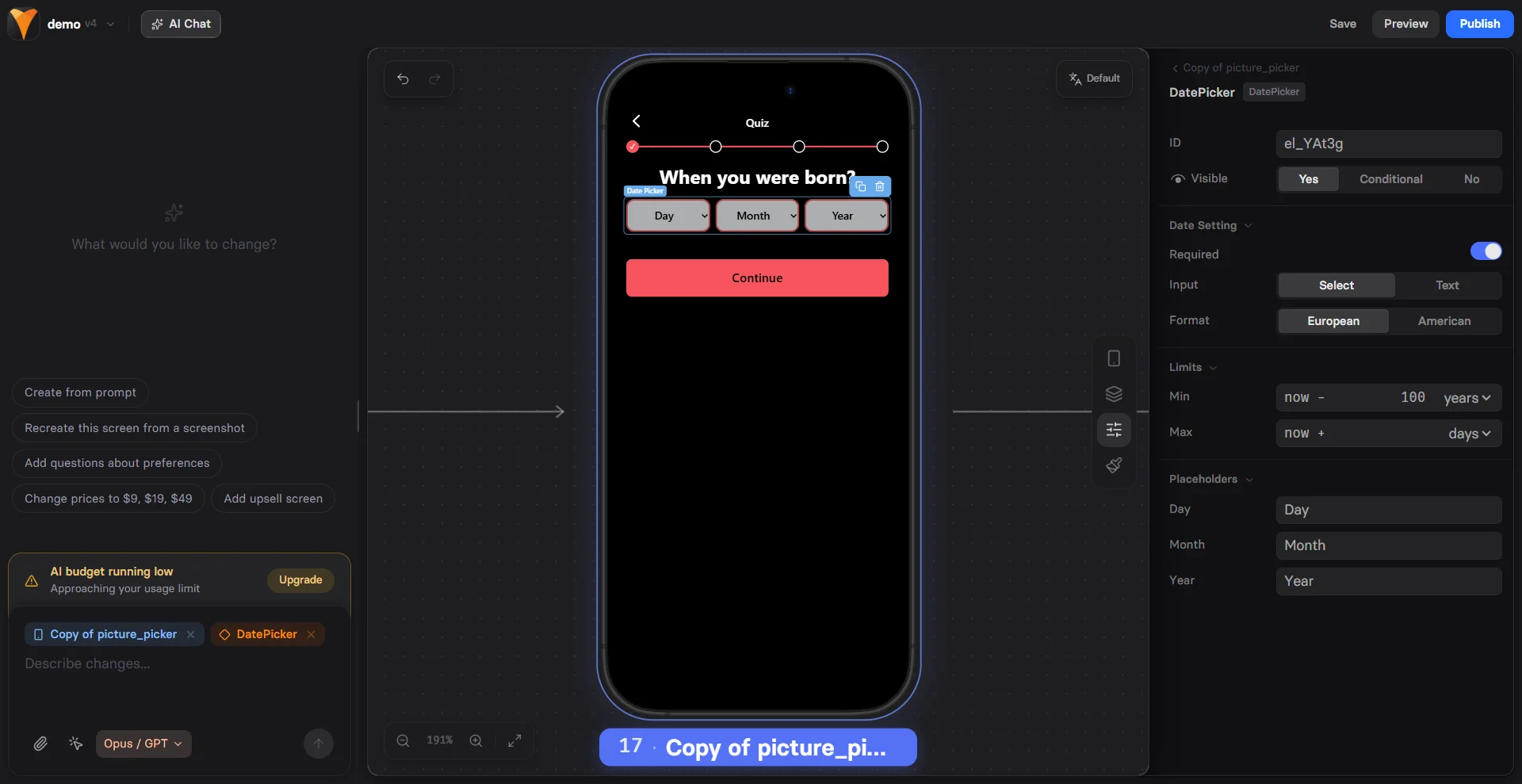
The Date Picker element provides an intuitive way to collect dates from users.
It's stateful, meaning selected dates are saved and accessible throughout your
funnel for personalization and logic.
 ## When to Use
Perfect for:
* **Birthday collection** - Age verification, personalized offers
* **Appointment booking** - Schedule consultations or demos
* **Event registration** - Webinars, workshops, launches
* **Delivery scheduling** - Preferred delivery dates
* **Travel planning** - Departure and return dates
* **Age-gated content** - Verify minimum age requirements
## Configuration
### Input Type
Choose the selection method:
| Type | User Experience | Best For |
| ---------- | --------------- | -------------------------- |
| **Select** | Dropdown menus | Birthdays, past dates |
| **Input** | Calendar widget | Future dates, appointments |
**Select Type** (Dropdowns)
* Three dropdowns: Day, Month, Year
* Quick for known dates
* No calendar navigation needed
* Mobile-friendly dropdowns
**Input Type** (Calendar)
* Visual calendar interface
* Better for future dates
* Click to pick dates
* Native mobile date pickers
Use Select for birthdays (users know the date).
Use Input for appointments (users need to see availability).
### Date Format
Choose display format:
| Format | Example | Region |
| ------------ | ---------- | ---------- |
| **European** | DD/MM/YYYY | 31/12/2024 |
| **American** | MM/DD/YYYY | 12/31/2024 |
Match your audience's expectations for better usability.
### Date Constraints
**Min Date**
Set earliest selectable date:
* Birthday: 100 years ago
* Appointment: Today
* Event: Specific start date
**Max Date**
Set latest selectable date:
* Birthday: 18 years ago (age gate)
* Appointment: 30 days from now
* Event: Registration deadline
```
Age verification example:
Min: 01/01/1920
Max: [Today - 18 years]
```
### Required Field
Make date selection mandatory:
* Prevents continuing without selection
* Shows validation message
* Adds asterisk (\*) indicator
## Using Date Values
### Accessing Selected Dates
Date values become variables:
```
Element ID: birth-date
User selects: 15/03/1990
Variable: {{birth-date}}
Format: Based on configuration (DD/MM/YYYY or MM/DD/YYYY)
```
### Age Calculations
Calculate age for personalization:
```
Birthday collected: {{birth-date}}
Use in conditions:
If age > 25: Show premium plans
If age < 18: Show parental consent
```
### Date-Based Logic
Route users based on dates:
```
Event date: {{preferred-date}}
If date is weekend: Show weekend pricing
If date is > 30 days: Show early bird discount
```
## Common Use Cases
### Birthday Collection
**E-commerce Personalization**
```
"When's your birthday?"
"We'll send you a special gift!"
Later: Email with birthday discount
```
**Age Verification**
```
"Please confirm your date of birth"
Max date: 21 years ago
If under 21: "Sorry, you must be 21+"
If valid: Continue to purchase
```
### Appointment Booking
**Consultation Scheduling**
```
"Pick your preferred consultation date"
Min: Tomorrow
Max: 30 days ahead
Follow up: Time slot selection
Confirmation: "See you on {{appointment-date}}"
```
**Demo Requests**
```
"When would you like your demo?"
Type: Input (calendar)
Min: Next business day
Max: 14 days out
Trigger: Send to calendar integration
```
### Event Registration
**Webinar Signup**
```
Fixed date shown: "March 15, 2024"
Date picker: Hidden (used for logic)
Default: Event date
Email: "Webinar on {{webinar-date}}"
```
**Workshop Series**
```
"Choose your preferred session:"
Multiple date pickers for options
Conditional visibility based on availability
```
## Mobile Optimization
Date pickers excel on mobile:
**Native Controls**
* iOS: Drum roller picker
* Android: Calendar dialog
* Optimized for touch
**Smart Defaults**
* Today's date highlighted
* Scroll to current year
* Large touch targets
**Input Methods**
* Select: Native dropdowns
* Input: Native date picker
* No typing required
Mobile browsers provide native date pickers that users are familiar with,
increasing completion rates by 25%.
## Validation & Formatting
### Input Validation
Automatic validation includes:
* Valid date format
* Within min/max range
* Real dates only (no Feb 31)
* Leap year handling
### Display Formatting
Dates display consistently:
* Leading zeros (01 vs 1)
* Proper separators (/ or -)
* Localized month names
* Clear year format (4 digits)
### Error Messages
Clear feedback for users:
* "Please select a valid date"
* "Date must be after today"
* "You must be 18 or older"
* "Date no longer available"
## Advanced Patterns
### Multi-Date Selection
Travel booking example:
```
Page 1: "Departure date" {{departure}}
Page 2: "Return date" {{return}}
Min return: {{departure}} + 1 day
Calculate: Trip duration
Show: Total pricing
```
### Blackout Dates
For appointment booking:
```
Base calendar: Mon-Fri available
Blackout: Holidays, full days
Logic: Route to waitlist if unavailable
```
### Birthday Rewards
Progressive offers:
```
Collect: {{birthday}}
Calculate: Days until birthday
If < 30 days: "Birthday month special!"
If = 0: "Happy Birthday! 50% off"
```
### Age-Based Funnels
Content customization:
```
Age 18-24: Student discounts
Age 25-34: Professional plans
Age 35-44: Family packages
Age 45+: Senior benefits
```
## Combining with Other Elements
### Date + Time Selection
```
Date Picker: Select day
Options element: Choose time slot
Confirmation: "{{date}} at {{time}}"
```
### Date + Text Input
```
Date: Birthday
Text: Email
Send: Birthday reminders
```
### Date + Conditional Content
```
If date is in past: "Tell us about your experience"
If date is future: "What are you looking forward to?"
```
## Troubleshooting
* Element must have an ID
* User must complete selection
* Check for JavaScript errors
* Verify no duplicate IDs
* Check format setting (EU vs US)
* Verify browser locale settings
* Test with different browsers
* Look for custom formatting code
* Input type must be "Input"
* Check browser compatibility
* Verify no CSS hiding it
* Test on actual devices
* Set min/max dates correctly
* Dates must be valid format
* Check required field setting
* Test edge cases (leap years)
## Conversion Tips
### Reduce Friction
* **Pre-select common dates** - Today, tomorrow
* **Smart defaults** - Most likely selection
* **Clear labels** - "Your birthday (for special offers)"
* **Optional when possible** - Only require if essential
### Build Trust
* **Explain why** - "For age verification"
* **Privacy note** - "We'll never share your birthday"
* **Benefit focus** - "Get birthday rewards"
* **No surprises** - Clear about usage
### Optimize Selection
* **Right type** - Select for past, Input for future
* **Appropriate range** - Don't show 100 years if unnecessary
* **Mobile-first** - Test on actual devices
* **Quick selection** - Minimize taps/clicks
## Next Steps
* [Use date variables](/editor/variables) in your funnel
* [Add conditional logic](/elements/overview#conditional-visibility) based on dates
* [Track selections](/integrations/analytics) with analytics
* [Create age-gated content](/editor/actions) with actions
## When to Use
Perfect for:
* **Birthday collection** - Age verification, personalized offers
* **Appointment booking** - Schedule consultations or demos
* **Event registration** - Webinars, workshops, launches
* **Delivery scheduling** - Preferred delivery dates
* **Travel planning** - Departure and return dates
* **Age-gated content** - Verify minimum age requirements
## Configuration
### Input Type
Choose the selection method:
| Type | User Experience | Best For |
| ---------- | --------------- | -------------------------- |
| **Select** | Dropdown menus | Birthdays, past dates |
| **Input** | Calendar widget | Future dates, appointments |
**Select Type** (Dropdowns)
* Three dropdowns: Day, Month, Year
* Quick for known dates
* No calendar navigation needed
* Mobile-friendly dropdowns
**Input Type** (Calendar)
* Visual calendar interface
* Better for future dates
* Click to pick dates
* Native mobile date pickers
Use Select for birthdays (users know the date).
Use Input for appointments (users need to see availability).
### Date Format
Choose display format:
| Format | Example | Region |
| ------------ | ---------- | ---------- |
| **European** | DD/MM/YYYY | 31/12/2024 |
| **American** | MM/DD/YYYY | 12/31/2024 |
Match your audience's expectations for better usability.
### Date Constraints
**Min Date**
Set earliest selectable date:
* Birthday: 100 years ago
* Appointment: Today
* Event: Specific start date
**Max Date**
Set latest selectable date:
* Birthday: 18 years ago (age gate)
* Appointment: 30 days from now
* Event: Registration deadline
```
Age verification example:
Min: 01/01/1920
Max: [Today - 18 years]
```
### Required Field
Make date selection mandatory:
* Prevents continuing without selection
* Shows validation message
* Adds asterisk (\*) indicator
## Using Date Values
### Accessing Selected Dates
Date values become variables:
```
Element ID: birth-date
User selects: 15/03/1990
Variable: {{birth-date}}
Format: Based on configuration (DD/MM/YYYY or MM/DD/YYYY)
```
### Age Calculations
Calculate age for personalization:
```
Birthday collected: {{birth-date}}
Use in conditions:
If age > 25: Show premium plans
If age < 18: Show parental consent
```
### Date-Based Logic
Route users based on dates:
```
Event date: {{preferred-date}}
If date is weekend: Show weekend pricing
If date is > 30 days: Show early bird discount
```
## Common Use Cases
### Birthday Collection
**E-commerce Personalization**
```
"When's your birthday?"
"We'll send you a special gift!"
Later: Email with birthday discount
```
**Age Verification**
```
"Please confirm your date of birth"
Max date: 21 years ago
If under 21: "Sorry, you must be 21+"
If valid: Continue to purchase
```
### Appointment Booking
**Consultation Scheduling**
```
"Pick your preferred consultation date"
Min: Tomorrow
Max: 30 days ahead
Follow up: Time slot selection
Confirmation: "See you on {{appointment-date}}"
```
**Demo Requests**
```
"When would you like your demo?"
Type: Input (calendar)
Min: Next business day
Max: 14 days out
Trigger: Send to calendar integration
```
### Event Registration
**Webinar Signup**
```
Fixed date shown: "March 15, 2024"
Date picker: Hidden (used for logic)
Default: Event date
Email: "Webinar on {{webinar-date}}"
```
**Workshop Series**
```
"Choose your preferred session:"
Multiple date pickers for options
Conditional visibility based on availability
```
## Mobile Optimization
Date pickers excel on mobile:
**Native Controls**
* iOS: Drum roller picker
* Android: Calendar dialog
* Optimized for touch
**Smart Defaults**
* Today's date highlighted
* Scroll to current year
* Large touch targets
**Input Methods**
* Select: Native dropdowns
* Input: Native date picker
* No typing required
Mobile browsers provide native date pickers that users are familiar with,
increasing completion rates by 25%.
## Validation & Formatting
### Input Validation
Automatic validation includes:
* Valid date format
* Within min/max range
* Real dates only (no Feb 31)
* Leap year handling
### Display Formatting
Dates display consistently:
* Leading zeros (01 vs 1)
* Proper separators (/ or -)
* Localized month names
* Clear year format (4 digits)
### Error Messages
Clear feedback for users:
* "Please select a valid date"
* "Date must be after today"
* "You must be 18 or older"
* "Date no longer available"
## Advanced Patterns
### Multi-Date Selection
Travel booking example:
```
Page 1: "Departure date" {{departure}}
Page 2: "Return date" {{return}}
Min return: {{departure}} + 1 day
Calculate: Trip duration
Show: Total pricing
```
### Blackout Dates
For appointment booking:
```
Base calendar: Mon-Fri available
Blackout: Holidays, full days
Logic: Route to waitlist if unavailable
```
### Birthday Rewards
Progressive offers:
```
Collect: {{birthday}}
Calculate: Days until birthday
If < 30 days: "Birthday month special!"
If = 0: "Happy Birthday! 50% off"
```
### Age-Based Funnels
Content customization:
```
Age 18-24: Student discounts
Age 25-34: Professional plans
Age 35-44: Family packages
Age 45+: Senior benefits
```
## Combining with Other Elements
### Date + Time Selection
```
Date Picker: Select day
Options element: Choose time slot
Confirmation: "{{date}} at {{time}}"
```
### Date + Text Input
```
Date: Birthday
Text: Email
Send: Birthday reminders
```
### Date + Conditional Content
```
If date is in past: "Tell us about your experience"
If date is future: "What are you looking forward to?"
```
## Troubleshooting
* Element must have an ID
* User must complete selection
* Check for JavaScript errors
* Verify no duplicate IDs
* Check format setting (EU vs US)
* Verify browser locale settings
* Test with different browsers
* Look for custom formatting code
* Input type must be "Input"
* Check browser compatibility
* Verify no CSS hiding it
* Test on actual devices
* Set min/max dates correctly
* Dates must be valid format
* Check required field setting
* Test edge cases (leap years)
## Conversion Tips
### Reduce Friction
* **Pre-select common dates** - Today, tomorrow
* **Smart defaults** - Most likely selection
* **Clear labels** - "Your birthday (for special offers)"
* **Optional when possible** - Only require if essential
### Build Trust
* **Explain why** - "For age verification"
* **Privacy note** - "We'll never share your birthday"
* **Benefit focus** - "Get birthday rewards"
* **No surprises** - Clear about usage
### Optimize Selection
* **Right type** - Select for past, Input for future
* **Appropriate range** - Don't show 100 years if unnecessary
* **Mobile-first** - Test on actual devices
* **Quick selection** - Minimize taps/clicks
## Next Steps
* [Use date variables](/editor/variables) in your funnel
* [Add conditional logic](/elements/overview#conditional-visibility) based on dates
* [Track selections](/integrations/analytics) with analytics
* [Create age-gated content](/editor/actions) with actions