> ## Documentation Index
> Fetch the complete documentation index at: https://funnelfox.com/docs/llms.txt
> Use this file to discover all available pages before exploring further.
# FunnelFox billing API
> Complete REST API for checkout orchestration, subscription lifecycle management, price point configuration, and payment operations including refunds and discounts
The Billing API lets you model products as price points, orchestrate checkout with your PSPs, and manage subscriptions end-to-end — including pausing/resuming, discounts, migrations, and refunds.
This doc covers the **FunnelFox Billing API** only. If you’re using the **FunnelFox API**, go to the [FunnelFox API section](/develop/api).
## Base URL
All API requests should be made to:
```
https://billing.funnelfox.com/{org_id}/v1
```
Replace `{org_id}` with your [organization ID](https://app.funnelfox.com/settings/billing) provided by your Customer Success Manager when your FunnelFox Billing account was created.
Don't confuse `{org_id}` with your [FunnelFox Project ID](/dashboard/settings#project-information) found in your [FunnelFox General settings](https://app.funnelfox.com/settings).
## Authentication
Authenticate your API requests by including your secret key in the `ff-secret-key` header. Some endpoints are public and don't require authentication.
* `/payment/refund`
* `/payment/cancel`
* `/subscription/enable_autorenew`
* `/subscription/disable_autorenew`
* `/subscription/migration`
* `/discount`
* `/subscription/defer`
* `/subscription/pause`
* `/subscription/resume`
* `/subscription/search`
* `/pp/export_csv`
* `/pp/import_csv`
* `/pp/update`
* `/pp/create`
* `/feature/create`
* `/payments_history`
* `/transaction_report`
* `/search_users`
* `/user/update_email`
* `/checkout/create_client_session`
* `/checkout/create_simple_client_session`
* `/checkout/update_client_session`
* `/checkout/create_payment`
* `/checkout/one_click`
* `/checkout/resume_payment`
* `/my_assets`
* `/price_points`
* `/features`
### Secret key
Request your API secret key from your Solution manager, or set it yourself on the **Settings** page of the FunnelFox Billing dashboard.
To set your API secret key:
1. Go to the **Settings** page of the FunnelFox Billing dashboard.
2. Configure the following fields:
* **ff\_api\_secrets\_new\.first.enabled**: Set to `true` to enable the secret key.
* **ff\_api\_secrets\_new\.first.group**: Define access level group to set API access limitations. Learn more about [access groups](/develop/api-billing#access-groups).
* **ff\_api\_secrets\_new\.first.key**: Enter your secret key value. Store this securely—once saved, the UI will not display it again.
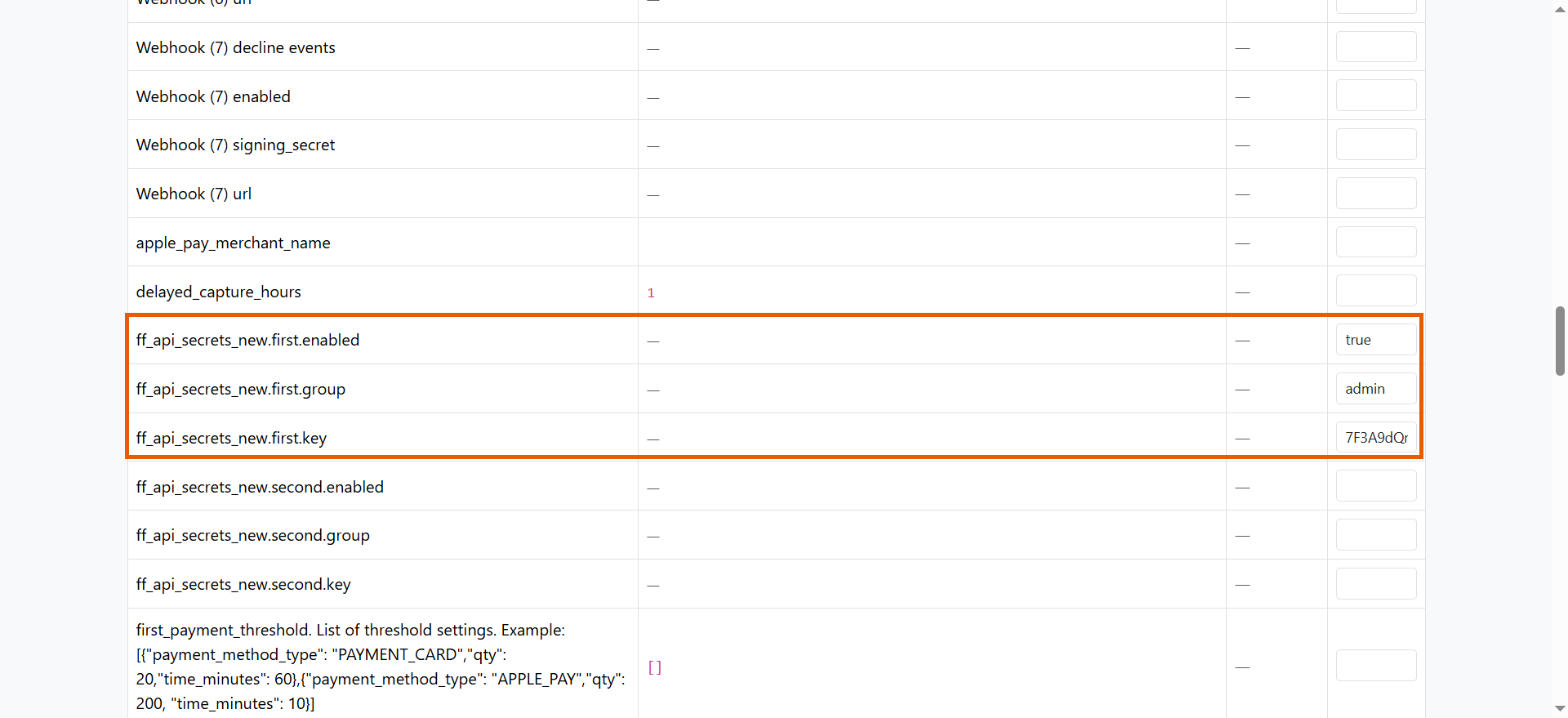 3. Press **Enter** to save changes.
You can set an additional secret key using the `ff_api_secrets_new.second` fields.
### Access groups
The `group` value assigned to each secret key defines endpoints available to the user. There are three access levels: **viewer**,
**support**, and **admin**.
Viewer can only call endpoints that
[don't require authentication](/develop/api-billing#authentication).
Support can call all unprotected endpoints plus the following
authenticated endpoints:
* `POST /payment/refund`
* `POST /payment/cancel`
* `POST /payments_history`
* `POST /transaction_report`
* `POST /search_users`
* `POST /user/update_email`
* `POST /subscription/search`
* `POST /subscription/migration`
* `POST /subscription/enable_autorenew`
* `POST /subscription/disable_autorenew`
* `POST /subscription/defer`
* `POST /subscription/pause`
* `POST /subscription/resume`
* `POST /discount`
Admin can call all unprotected and support endpoints plus the
following:
* `POST /pp/create`
* `POST /pp/update`
* `POST /pp/import_csv`
* `POST /pp/export_csv`
* `POST /feature/create`
## Available endpoints
The FunnelFox Billing API provides the following endpoints, grouped
by function.
* `POST /payment/refund` — Refund an order (full or partial; optional "soft" refund)
* `POST /payment/cancel` — Cancel an order
* `POST /subscription/enable_autorenew` — Turn on autorenew
* `POST /subscription/disable_autorenew` — Turn off autorenew
* `POST /subscription/migration` — Move a sub to another price point (`price_prorate`, `delayed_start`)
* `POST /discount` — Apply a percentage discount for a number of iterations
* `POST /subscription/defer` — Delay the next charge until a time
* `POST /subscription/pause` — Stop billing and access until a time
* `POST /subscription/resume` — Cancel pause and restart billing/access
* `POST /subscription/search` — Search and filter subscriptions
* `POST /price_points` — List price points (filter by `ident`)
* `POST /pp/export_csv` — Export all price points to CSV
* `POST /pp/import_csv` — Bulk-create price points from CSV
* `POST /pp/update` — Update by `ident`
* `POST /pp/create` — Create a price point
* `POST /feature/create` — Create a feature (timebased, lifetime, consumable)
* `POST /features` — List all features
* `POST /user/update_email` — Update the email address associated with a user account
* `POST /my_assets` — Fetch user ownership (subscriptions & one-off purchases)
* `POST /payments_history` — Return successful payments of user
* `POST /transaction_report` — Return all transactions
* `POST /search_users` — Search user
* `POST /checkout/create_client_session` — Get a client token & order for the selected price point
* `POST /checkout/create_simple_client_session` — Start a lightweight checkout session without a price point or user, returning only a client token
* `POST /checkout/update_client_session` — Re-bind an order to a different price point
* `POST /checkout/create_payment` — Charge using a `payment_method_token`
* `POST /checkout/one_click` — One-click purchase by `external_id` + `pp_ident`
* `POST /checkout/resume_payment` — Complete a payment after additional action
Learn more in the [FunnelFox Billing API reference](/api-reference/payment-management/refund-an-order).
## Making requests
### Path parameters
All endpoints defined under `https://billing.funnelfox.com/{org_id}/v1/...` require the `org_id` in the URL path.
### Request body
Most endpoints accept JSON parameters in the request body. Parameters vary by endpoint - see the [API Reference](/api-reference/payment-management/refund-an-order) for details.
### Example request
```bash cURL theme={null}
curl -X POST 'https://billing.funnelfox.com/{org_id}/v1/price_points' \
-H 'accept: application/json' \
-H 'Content-Type: application/json' \
-d '{
"ident": null
}'
```
```javascript Node.js theme={null}
const response = await fetch('https://billing.funnelfox.com/{org_id}/v1/price_points', {
method: 'POST',
headers: {
'accept': 'application/json',
'Content-Type': 'application/json'
},
body: JSON.stringify({
ident: null
})
});
const data = await response.json();
console.log(`Found ${data.data.price_points.length} price points`);
```
```python Python theme={null}
import requests
response = requests.post(
'https://billing.funnelfox.com/{org_id}/v1/price_points',
headers={
'accept': 'application/json',
'Content-Type': 'application/json'
},
json={'ident': None}
)
data = response.json()
print(f"Found {len(data['data']['price_points'])} price points")
```
## Response format
All successful responses follow this structure:
```json theme={null}
{
"data": {
// Response data specific to the endpoint
},
"status": "success"
}
```
### Example response
```json theme={null}
{
"data": {
"price_points": [
{
"ident": "monthly-premium",
"currency": {
"code": "USD",
"minor_units": 2,
"title": "US Dollar",
"symbol": "$"
},
"intro_type": "free_trial",
"lifetime_price": null,
"intro_free_trial_period": 7,
"intro_free_trial_period_duration": "days",
"intro_paid_trial_price": null,
"intro_paid_trial_period": null,
"intro_paid_trial_period_duration": null,
"next_price": "9.99",
"next_period": 1,
"next_period_duration": "months",
"features": [
{
"ident": "premium-access"
}
]
}
]
},
"status": "success"
}
```
## Filtering
The `POST /price_points` endpoint is the only one that supports narrowing results by `ident` to retrieve specific price points.
Pass an `ident` value to retrieve only the matching price point:
```bash theme={null}
curl -X POST 'https://billing.funnelfox.com/{org_id}/v1/price_points' \
-H 'accept: application/json' \
-H 'Content-Type: application/json' \
-d '{
"ident": "pro_monthly_usd"
}'
```
List all price points (no filter):
```bash theme={null}
curl -X POST 'https://billing.funnelfox.com/{org_id}/v1/price_points' \
-H 'accept: application/json' \
-H 'Content-Type: application/json' \
-d '{}'
```
## Error handling
The API returns standard HTTP status codes with detailed error messages.
```json theme={null}
{
"status": "error",
"req_id": "acMMsjP9",
"error": [
{
"msg": "Error description",
"type": "error_type"
}
]
}
```
**Response fields:**
* `status` - Always `"error"` for failed requests
* `req_id` - Unique request identifier for debugging
* `error` - Array of error objects with `msg` (description) and `type` (error category)
3. Press **Enter** to save changes.
You can set an additional secret key using the `ff_api_secrets_new.second` fields.
### Access groups
The `group` value assigned to each secret key defines endpoints available to the user. There are three access levels: **viewer**,
**support**, and **admin**.
Viewer can only call endpoints that
[don't require authentication](/develop/api-billing#authentication).
Support can call all unprotected endpoints plus the following
authenticated endpoints:
* `POST /payment/refund`
* `POST /payment/cancel`
* `POST /payments_history`
* `POST /transaction_report`
* `POST /search_users`
* `POST /user/update_email`
* `POST /subscription/search`
* `POST /subscription/migration`
* `POST /subscription/enable_autorenew`
* `POST /subscription/disable_autorenew`
* `POST /subscription/defer`
* `POST /subscription/pause`
* `POST /subscription/resume`
* `POST /discount`
Admin can call all unprotected and support endpoints plus the
following:
* `POST /pp/create`
* `POST /pp/update`
* `POST /pp/import_csv`
* `POST /pp/export_csv`
* `POST /feature/create`
## Available endpoints
The FunnelFox Billing API provides the following endpoints, grouped
by function.
* `POST /payment/refund` — Refund an order (full or partial; optional "soft" refund)
* `POST /payment/cancel` — Cancel an order
* `POST /subscription/enable_autorenew` — Turn on autorenew
* `POST /subscription/disable_autorenew` — Turn off autorenew
* `POST /subscription/migration` — Move a sub to another price point (`price_prorate`, `delayed_start`)
* `POST /discount` — Apply a percentage discount for a number of iterations
* `POST /subscription/defer` — Delay the next charge until a time
* `POST /subscription/pause` — Stop billing and access until a time
* `POST /subscription/resume` — Cancel pause and restart billing/access
* `POST /subscription/search` — Search and filter subscriptions
* `POST /price_points` — List price points (filter by `ident`)
* `POST /pp/export_csv` — Export all price points to CSV
* `POST /pp/import_csv` — Bulk-create price points from CSV
* `POST /pp/update` — Update by `ident`
* `POST /pp/create` — Create a price point
* `POST /feature/create` — Create a feature (timebased, lifetime, consumable)
* `POST /features` — List all features
* `POST /user/update_email` — Update the email address associated with a user account
* `POST /my_assets` — Fetch user ownership (subscriptions & one-off purchases)
* `POST /payments_history` — Return successful payments of user
* `POST /transaction_report` — Return all transactions
* `POST /search_users` — Search user
* `POST /checkout/create_client_session` — Get a client token & order for the selected price point
* `POST /checkout/create_simple_client_session` — Start a lightweight checkout session without a price point or user, returning only a client token
* `POST /checkout/update_client_session` — Re-bind an order to a different price point
* `POST /checkout/create_payment` — Charge using a `payment_method_token`
* `POST /checkout/one_click` — One-click purchase by `external_id` + `pp_ident`
* `POST /checkout/resume_payment` — Complete a payment after additional action
Learn more in the [FunnelFox Billing API reference](/api-reference/payment-management/refund-an-order).
## Making requests
### Path parameters
All endpoints defined under `https://billing.funnelfox.com/{org_id}/v1/...` require the `org_id` in the URL path.
### Request body
Most endpoints accept JSON parameters in the request body. Parameters vary by endpoint - see the [API Reference](/api-reference/payment-management/refund-an-order) for details.
### Example request
```bash cURL theme={null}
curl -X POST 'https://billing.funnelfox.com/{org_id}/v1/price_points' \
-H 'accept: application/json' \
-H 'Content-Type: application/json' \
-d '{
"ident": null
}'
```
```javascript Node.js theme={null}
const response = await fetch('https://billing.funnelfox.com/{org_id}/v1/price_points', {
method: 'POST',
headers: {
'accept': 'application/json',
'Content-Type': 'application/json'
},
body: JSON.stringify({
ident: null
})
});
const data = await response.json();
console.log(`Found ${data.data.price_points.length} price points`);
```
```python Python theme={null}
import requests
response = requests.post(
'https://billing.funnelfox.com/{org_id}/v1/price_points',
headers={
'accept': 'application/json',
'Content-Type': 'application/json'
},
json={'ident': None}
)
data = response.json()
print(f"Found {len(data['data']['price_points'])} price points")
```
## Response format
All successful responses follow this structure:
```json theme={null}
{
"data": {
// Response data specific to the endpoint
},
"status": "success"
}
```
### Example response
```json theme={null}
{
"data": {
"price_points": [
{
"ident": "monthly-premium",
"currency": {
"code": "USD",
"minor_units": 2,
"title": "US Dollar",
"symbol": "$"
},
"intro_type": "free_trial",
"lifetime_price": null,
"intro_free_trial_period": 7,
"intro_free_trial_period_duration": "days",
"intro_paid_trial_price": null,
"intro_paid_trial_period": null,
"intro_paid_trial_period_duration": null,
"next_price": "9.99",
"next_period": 1,
"next_period_duration": "months",
"features": [
{
"ident": "premium-access"
}
]
}
]
},
"status": "success"
}
```
## Filtering
The `POST /price_points` endpoint is the only one that supports narrowing results by `ident` to retrieve specific price points.
Pass an `ident` value to retrieve only the matching price point:
```bash theme={null}
curl -X POST 'https://billing.funnelfox.com/{org_id}/v1/price_points' \
-H 'accept: application/json' \
-H 'Content-Type: application/json' \
-d '{
"ident": "pro_monthly_usd"
}'
```
List all price points (no filter):
```bash theme={null}
curl -X POST 'https://billing.funnelfox.com/{org_id}/v1/price_points' \
-H 'accept: application/json' \
-H 'Content-Type: application/json' \
-d '{}'
```
## Error handling
The API returns standard HTTP status codes with detailed error messages.
```json theme={null}
{
"status": "error",
"req_id": "acMMsjP9",
"error": [
{
"msg": "Error description",
"type": "error_type"
}
]
}
```
**Response fields:**
* `status` - Always `"error"` for failed requests
* `req_id` - Unique request identifier for debugging
* `error` - Array of error objects with `msg` (description) and `type` (error category)