> ## Documentation Index
> Fetch the complete documentation index at: https://funnelfox.com/docs/llms.txt
> Use this file to discover all available pages before exploring further.
# Manage subscriptions
> Handle subscription changes and customer requests from the main FunnelFox dashboard
Subscriptions sync automatically from your PSPs, including FunnelFox Billing, when customers make purchases in FunnelFox funnels. You can manage subscriptions directly in the main FunnelFox dashboard, and changes sync back to your PSPs automatically.
You can:
* [Pause subscriptions](/dashboard/manage-subscriptions-funnelfox#pause-subscriptions)
* [Cancel subscriptions](/dashboard/manage-subscriptions-funnelfox#cancel-subscriptions)
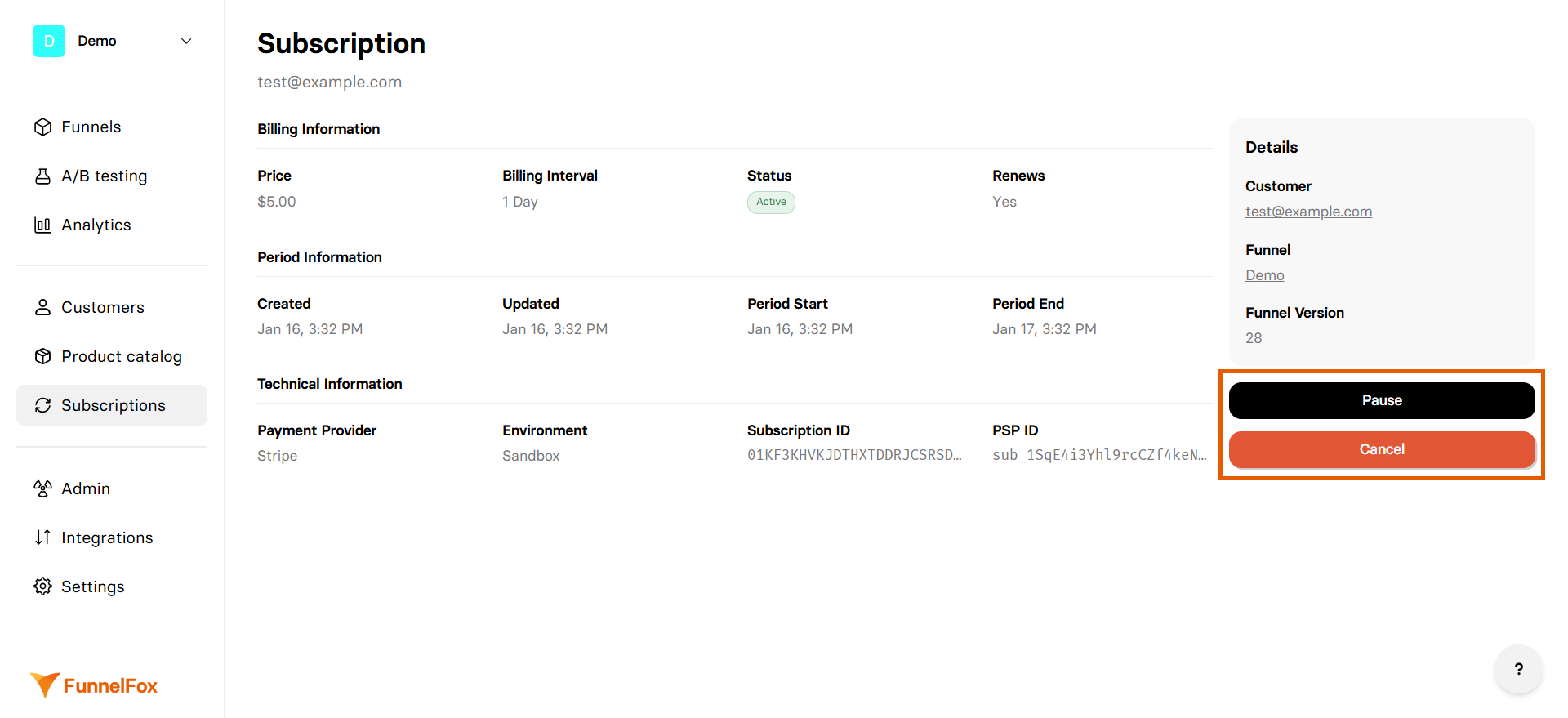 ## Pause subscriptions
Subscriptions purchased in FunnelFox funnels can also be paused through [cancellation funnels](/dashboard/funnels#cancellation-funnels).
Temporarily stop billing while preserving the subscription:
Click on the subscription from the list to open its details.
Click **Pause** on the right. The subscription is paused immediately.
Paused subscriptions can be resumed at any time by clicking **Resume**. Customers are not charged for the paused period.
## Cancel subscriptions
Subscriptions purchased in FunnelFox funnels can also be cancelled through [cancel API](/api-reference/cancel-subscription) and [cancellation funnels](/dashboard/funnels#cancellation-funnels).
Permanently end a subscription:
Click on the subscription from the list to open its details.
Click **Cancel** on the right.
Cancellation behavior depends on the PSP processing the subscription.
Cancellation takes effect immediately for Stripe subscriptions.
Paddle subscriptions are cancelled at the end of the current billing period.
FunnelFox Billing subscriptions are cancelled at the end of the current billing period.
Cancellation flow for Solidgate subscriptions is coming soon!
Cancellation takes effect immediately for PayPal subscriptions.
## Pause subscriptions
Subscriptions purchased in FunnelFox funnels can also be paused through [cancellation funnels](/dashboard/funnels#cancellation-funnels).
Temporarily stop billing while preserving the subscription:
Click on the subscription from the list to open its details.
Click **Pause** on the right. The subscription is paused immediately.
Paused subscriptions can be resumed at any time by clicking **Resume**. Customers are not charged for the paused period.
## Cancel subscriptions
Subscriptions purchased in FunnelFox funnels can also be cancelled through [cancel API](/api-reference/cancel-subscription) and [cancellation funnels](/dashboard/funnels#cancellation-funnels).
Permanently end a subscription:
Click on the subscription from the list to open its details.
Click **Cancel** on the right.
Cancellation behavior depends on the PSP processing the subscription.
Cancellation takes effect immediately for Stripe subscriptions.
Paddle subscriptions are cancelled at the end of the current billing period.
FunnelFox Billing subscriptions are cancelled at the end of the current billing period.
Cancellation flow for Solidgate subscriptions is coming soon!
Cancellation takes effect immediately for PayPal subscriptions.