> ## Documentation Index
> Fetch the complete documentation index at: https://funnelfox.com/docs/llms.txt
> Use this file to discover all available pages before exploring further.
# Customer management
> View and manage funnel customers in FunnelFox. Track user profiles, purchase history, subscription status, and support requests.
The [Customers page](https://app.funnelfox.com/customers) provides a complete
view of everyone who interacts with your funnels. Unlike subscriptions or
products that you manage, customer profiles are automatically created when
someone visits any of your funnels — no purchase required.
**Automatic tracking**: Customer profiles are created instantly when anyone
opens your funnel. You'll see all visitors, not just paying customers,
giving you insights into your entire conversion funnel.
## Understanding Profiles vs Sessions
FunnelFox tracks visitors using two key concepts that work together to give
you a complete picture of user behavior:
### What is a Profile?
A profile represents a **unique visitor** across all their interactions
with your funnels. Think of it as one consistent device or browser that
returns multiple times.
**Key characteristics:**
* Created when someone first visits any funnel
* Persists across multiple visits
* Tracks the same person/device over time
* Contains all sessions, transactions, and subscriptions
* Uses browser cookies for identification
* Unique per project (same person = different profiles in different projects)
In the dashboard, "Customer" and "Profile" mean the same thing.
We use "Customer" in the UI for clarity, but technically these
are visitor profiles regardless of purchase status.
### What is a Session?
A session represents a **single visit** to your funnel. One profile
can have many sessions as they return to your funnels over time.
**Key characteristics:**
* Created each time someone opens a funnel
* Tracks one continuous visit from entry to exit
* Records the specific funnel, URL, and user agent
* Links back to the parent profile
* Captures conversion events within that visit
Sessions help you understand user behavior patterns. For example,
you might see a customer visited 3 times before purchasing, helping
you optimize your funnel flow.
### Preview vs Production Behavior
**Important difference for preview funnels**: To ensure fresh testing,
preview funnels generate a new profile and session on every visit. This
prevents cached data from affecting your tests but means preview visitor
data shouldn't be used for analytics.
| Environment | Profile Behavior | Session Behavior | Use Case |
| -------------- | ------------------------ | ---------------------- | ------------------------ |
| **Production** | Persistent across visits | New session per visit | Real visitor tracking |
| **Preview** | New profile every time | New session every time | Fresh testing experience |
## Why Unified Customer View Matters
Having all customer data in one place solves critical business challenges:
See every touchpoint from first visit to purchase, understanding
the full customer journey across all funnels.
When customers contact support, instantly see their complete
history including all visits, purchases, and interactions.
Identify patterns like how many visits before purchase, which
funnels work together, and where visitors drop off.
See customer data from connected services like Adapty or
RevenueCat, providing app subscription status alongside web activity.
## Viewing Customers
### Customer List
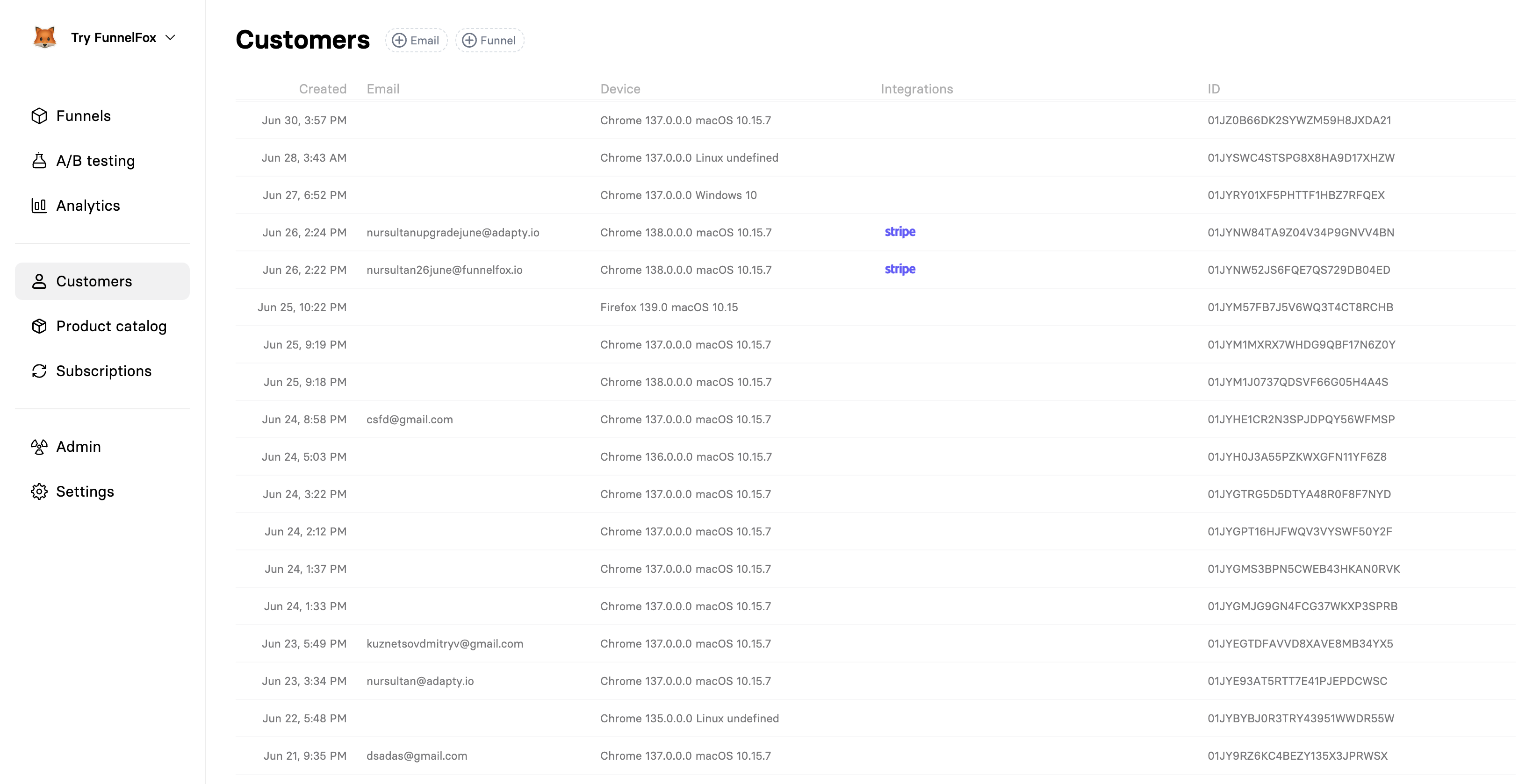
The main customers page displays all profiles in a comprehensive table:
 #### Understanding the Columns
When this profile first visited any of your funnels. This is the
customer's "first touch" timestamp in the UTC timezone, useful for cohort analysis.
The customer’s email, if provided via Email input or OAuth. This value can be updated later.
Browser and operating system information extracted from the user agent.
Helps identify platform-specific issues or opportunities.
Connected 3rd party services.
The unique Profile ID used throughout FunnelFox. This is what you'll
use in webhooks, API calls, and when searching for specific customers.
### Filtering Options
Quickly find specific customers or segments:
**Email Filter**: Search for customers by email address. Useful for
support requests or checking if someone is already in your system.
Email search is partial match, so searching "john" will find
"[john@example.com](mailto:john@example.com)" and "[johndoe@gmail.com](mailto:johndoe@gmail.com)".
**Funnel Filter**: See all customers who visited a specific funnel.
Perfect for analyzing funnel-specific conversion rates and behavior.
**Integration Filter**: Find customers with data in specific services.
For example, filter by "Adapty" to see all mobile app users.
**Date Range**: Filter customers by when they first visited. Useful
for cohort analysis and tracking growth over time.
## Customer Details
Click any customer to view their complete profile and activity history:
#### Understanding the Columns
When this profile first visited any of your funnels. This is the
customer's "first touch" timestamp in the UTC timezone, useful for cohort analysis.
The customer’s email, if provided via Email input or OAuth. This value can be updated later.
Browser and operating system information extracted from the user agent.
Helps identify platform-specific issues or opportunities.
Connected 3rd party services.
The unique Profile ID used throughout FunnelFox. This is what you'll
use in webhooks, API calls, and when searching for specific customers.
### Filtering Options
Quickly find specific customers or segments:
**Email Filter**: Search for customers by email address. Useful for
support requests or checking if someone is already in your system.
Email search is partial match, so searching "john" will find
"[john@example.com](mailto:john@example.com)" and "[johndoe@gmail.com](mailto:johndoe@gmail.com)".
**Funnel Filter**: See all customers who visited a specific funnel.
Perfect for analyzing funnel-specific conversion rates and behavior.
**Integration Filter**: Find customers with data in specific services.
For example, filter by "Adapty" to see all mobile app users.
**Date Range**: Filter customers by when they first visited. Useful
for cohort analysis and tracking growth over time.
## Customer Details
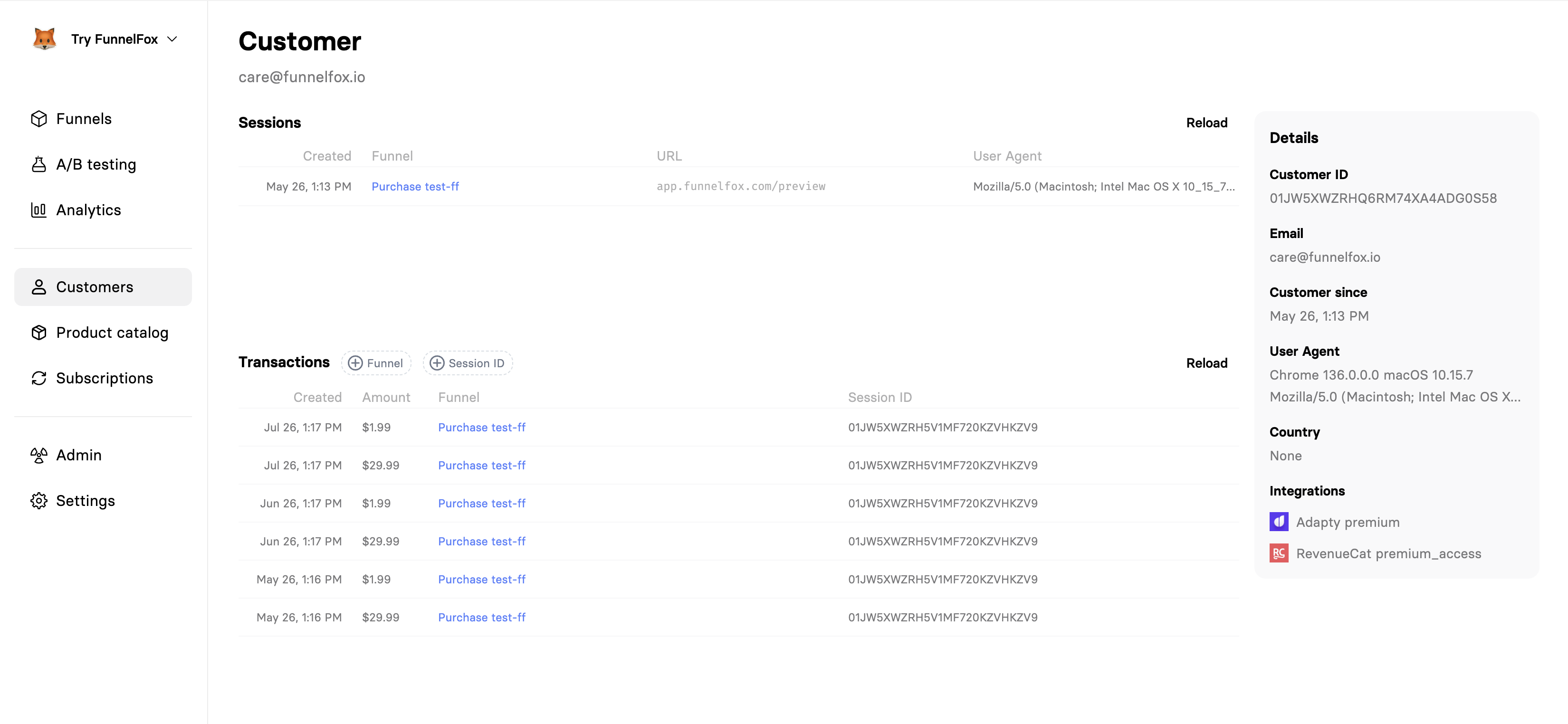
Click any customer to view their complete profile and activity history:
 ### Profile Information
The details sidebar shows comprehensive customer data:
The unique internal identifier FunnelFox automatically assigns to every profile.
Use this when working with webhooks, API calls, or support tickets.
An external identifier supplied by you. The user ID from your own
backend or captured through an input element in the funnel. Use it to
cross-reference a FunnelFox profile against the matching user record in
your system.
You can set the User ID in two ways:
* **Custom input**: Add an input element with the `_USERID_` element ID.
Its value becomes the User ID for the profile.
* **From your backend**: Fetch the user ID from your backend and set it
using [custom code](/editor/coding) inside a Raw HTML element:
```
```
The customer’s email, if provided via Email input or OAuth. This value can be updated later.
When this profile was first created in the UTC timezone (first funnel visit). Shows
how long they've been in your ecosystem.
Complete browser and device information. Useful for debugging
device-specific issues or understanding your audience's tech stack.
Geographic location based on IP address. Helps with localization
decisions and regional marketing strategies.
External services with data for this customer:
* **Subscription platforms** (Adapty, RevenueCat)
* **Payment providers** (Stripe, PayPal)
### Sessions History
View all visits from this customer:
When each session started in the UTC timezone. Shows visit frequency and patterns.
Which funnel they visited. Click to see the specific funnel configuration.
The complete URL including parameters. Useful for tracking campaign
sources and A/B test variants.
Browser details for each session. Helps identify if customers switch
devices or update browsers.
Sessions are listed chronologically, making it easy to see the
customer's journey over time. Look for patterns like multiple visits
before purchase or returning after cancellation.
### Transactions History
All payments and purchases from this customer:
When the transaction occurred. Matches your PSP's transaction time.
Transaction value in the original currency. Includes one-time
payments and subscription charges.
Which funnel generated this transaction. Helps attribute revenue
to specific campaigns.
Links the transaction to a specific session. Click to see the
complete session details including the conversion path.
## Editing Customer Email
You can edit any customer email:
1. Click any customer to open their details.
2. Click the pencil icon in the top right.
### Profile Information
The details sidebar shows comprehensive customer data:
The unique internal identifier FunnelFox automatically assigns to every profile.
Use this when working with webhooks, API calls, or support tickets.
An external identifier supplied by you. The user ID from your own
backend or captured through an input element in the funnel. Use it to
cross-reference a FunnelFox profile against the matching user record in
your system.
You can set the User ID in two ways:
* **Custom input**: Add an input element with the `_USERID_` element ID.
Its value becomes the User ID for the profile.
* **From your backend**: Fetch the user ID from your backend and set it
using [custom code](/editor/coding) inside a Raw HTML element:
```
```
The customer’s email, if provided via Email input or OAuth. This value can be updated later.
When this profile was first created in the UTC timezone (first funnel visit). Shows
how long they've been in your ecosystem.
Complete browser and device information. Useful for debugging
device-specific issues or understanding your audience's tech stack.
Geographic location based on IP address. Helps with localization
decisions and regional marketing strategies.
External services with data for this customer:
* **Subscription platforms** (Adapty, RevenueCat)
* **Payment providers** (Stripe, PayPal)
### Sessions History
View all visits from this customer:
When each session started in the UTC timezone. Shows visit frequency and patterns.
Which funnel they visited. Click to see the specific funnel configuration.
The complete URL including parameters. Useful for tracking campaign
sources and A/B test variants.
Browser details for each session. Helps identify if customers switch
devices or update browsers.
Sessions are listed chronologically, making it easy to see the
customer's journey over time. Look for patterns like multiple visits
before purchase or returning after cancellation.
### Transactions History
All payments and purchases from this customer:
When the transaction occurred. Matches your PSP's transaction time.
Transaction value in the original currency. Includes one-time
payments and subscription charges.
Which funnel generated this transaction. Helps attribute revenue
to specific campaigns.
Links the transaction to a specific session. Click to see the
complete session details including the conversion path.
## Editing Customer Email
You can edit any customer email:
1. Click any customer to open their details.
2. Click the pencil icon in the top right.
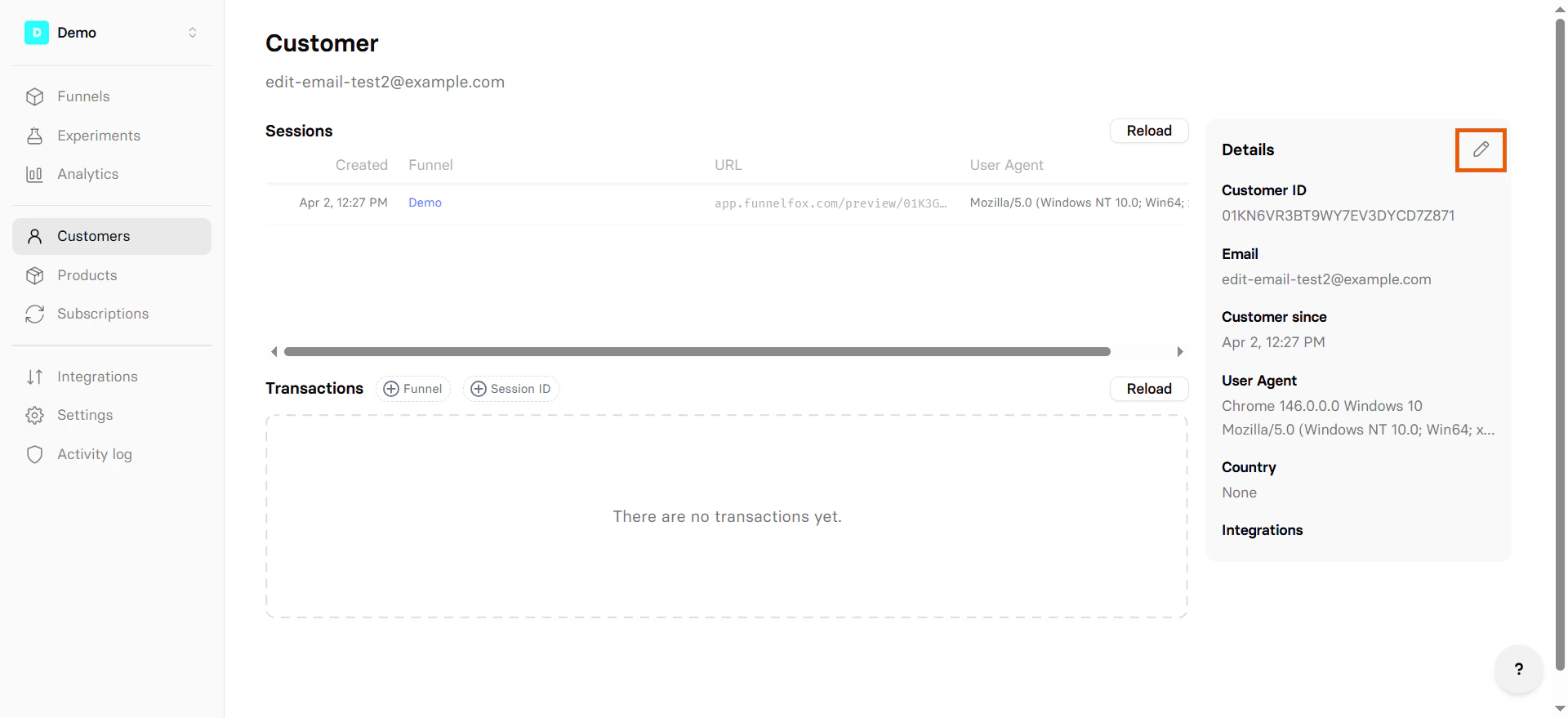 3. Enter a new email.
4. Press **Enter** or click **Update customer**.
Editing the email triggers the [`profile.updated` webhook](/api-reference/webhook-reference/profileupdated), allowing you to sync changes with your backend.
## Common Use Cases
### Support Workflows
When a customer contacts support:
Search by email or ask for their Profile ID from any FunnelFox email
Check sessions to understand their journey and any issues they faced
Verify payments, subscriptions, and any failed transactions
Check their status in connected services like mobile app subscriptions
## Privacy and Data Management
### Customer Data Rights
FunnelFox helps you comply with privacy regulations:
* **Data Access**: Export all data for a specific profile
* **Data Deletion**: Remove profiles and their associated data
* **Data Portability**: Export customer data in standard formats
* **Consent Tracking**: Record and manage consent preferences
When deleting a customer profile, all associated sessions and
non-financial data are removed. Transaction records are retained
for legal compliance but anonymized.
### Anonymous Visitors
Many profiles won't have email addresses—these are anonymous visitors who:
* Haven't made a purchase
* Haven't filled out a form
* Haven't opted into tracking
These profiles are still valuable for:
* Understanding traffic patterns
* Analyzing funnel drop-off points
* A/B testing and optimization
* Device and browser analytics
## Frequently Asked Questions
Profiles are created for all visitors, not just converters. Anonymous
profiles help you understand your entire funnel, including drop-offs.
Emails are only captured through forms or purchases.
FunnelFox uses browser cookies to identify returning visitors.
This works across sessions within the same project but creates new
profiles if users clear cookies, switch devices, or visit a different
project's funnels.
Preview funnels create new profiles on each visit to ensure fresh
testing experiences. This prevents cached data, stored forms, or
cookie data from affecting your tests. Production funnels maintain
persistent profiles as expected.
Currently, profiles cannot be manually merged. If a customer uses
different devices, clears cookies, or visits different projects,
they will appear as separate profiles. Use email addresses to
identify the same person across profiles.
Customer profiles and sessions are retained indefinitely unless manually
deleted. You can request to delete user PII from your manager.
Yes, you can export customer data via:
* API endpoints for programmatic access
* Individual profile export for GDPR requests
## Need Help?
* Review [Sessions & Analytics](/dashboard/analytics) for deeper insights
* Check [Subscription Management](/dashboard/subscriptions) for customer payments
* Read [Integration Guides](/integrations/index) for platform-specific setup
3. Enter a new email.
4. Press **Enter** or click **Update customer**.
Editing the email triggers the [`profile.updated` webhook](/api-reference/webhook-reference/profileupdated), allowing you to sync changes with your backend.
## Common Use Cases
### Support Workflows
When a customer contacts support:
Search by email or ask for their Profile ID from any FunnelFox email
Check sessions to understand their journey and any issues they faced
Verify payments, subscriptions, and any failed transactions
Check their status in connected services like mobile app subscriptions
## Privacy and Data Management
### Customer Data Rights
FunnelFox helps you comply with privacy regulations:
* **Data Access**: Export all data for a specific profile
* **Data Deletion**: Remove profiles and their associated data
* **Data Portability**: Export customer data in standard formats
* **Consent Tracking**: Record and manage consent preferences
When deleting a customer profile, all associated sessions and
non-financial data are removed. Transaction records are retained
for legal compliance but anonymized.
### Anonymous Visitors
Many profiles won't have email addresses—these are anonymous visitors who:
* Haven't made a purchase
* Haven't filled out a form
* Haven't opted into tracking
These profiles are still valuable for:
* Understanding traffic patterns
* Analyzing funnel drop-off points
* A/B testing and optimization
* Device and browser analytics
## Frequently Asked Questions
Profiles are created for all visitors, not just converters. Anonymous
profiles help you understand your entire funnel, including drop-offs.
Emails are only captured through forms or purchases.
FunnelFox uses browser cookies to identify returning visitors.
This works across sessions within the same project but creates new
profiles if users clear cookies, switch devices, or visit a different
project's funnels.
Preview funnels create new profiles on each visit to ensure fresh
testing experiences. This prevents cached data, stored forms, or
cookie data from affecting your tests. Production funnels maintain
persistent profiles as expected.
Currently, profiles cannot be manually merged. If a customer uses
different devices, clears cookies, or visits different projects,
they will appear as separate profiles. Use email addresses to
identify the same person across profiles.
Customer profiles and sessions are retained indefinitely unless manually
deleted. You can request to delete user PII from your manager.
Yes, you can export customer data via:
* API endpoints for programmatic access
* Individual profile export for GDPR requests
## Need Help?
* Review [Sessions & Analytics](/dashboard/analytics) for deeper insights
* Check [Subscription Management](/dashboard/subscriptions) for customer payments
* Read [Integration Guides](/integrations/index) for platform-specific setup