> ## Documentation Index
> Fetch the complete documentation index at: https://funnelfox.com/docs/llms.txt
> Use this file to discover all available pages before exploring further.
# View subscriptions
> Monitor and analyze subscriptions in the dedicated FunnelFox Billing dashboard or using the FunnelFox Billing API
View and monitor subscriptions from your FunnelFox Billing dashboard.
This covers all FunnelFox Billing users — whether your customers
subscribe through FunnelFox or your own custom funnels.
## Subscriptions list
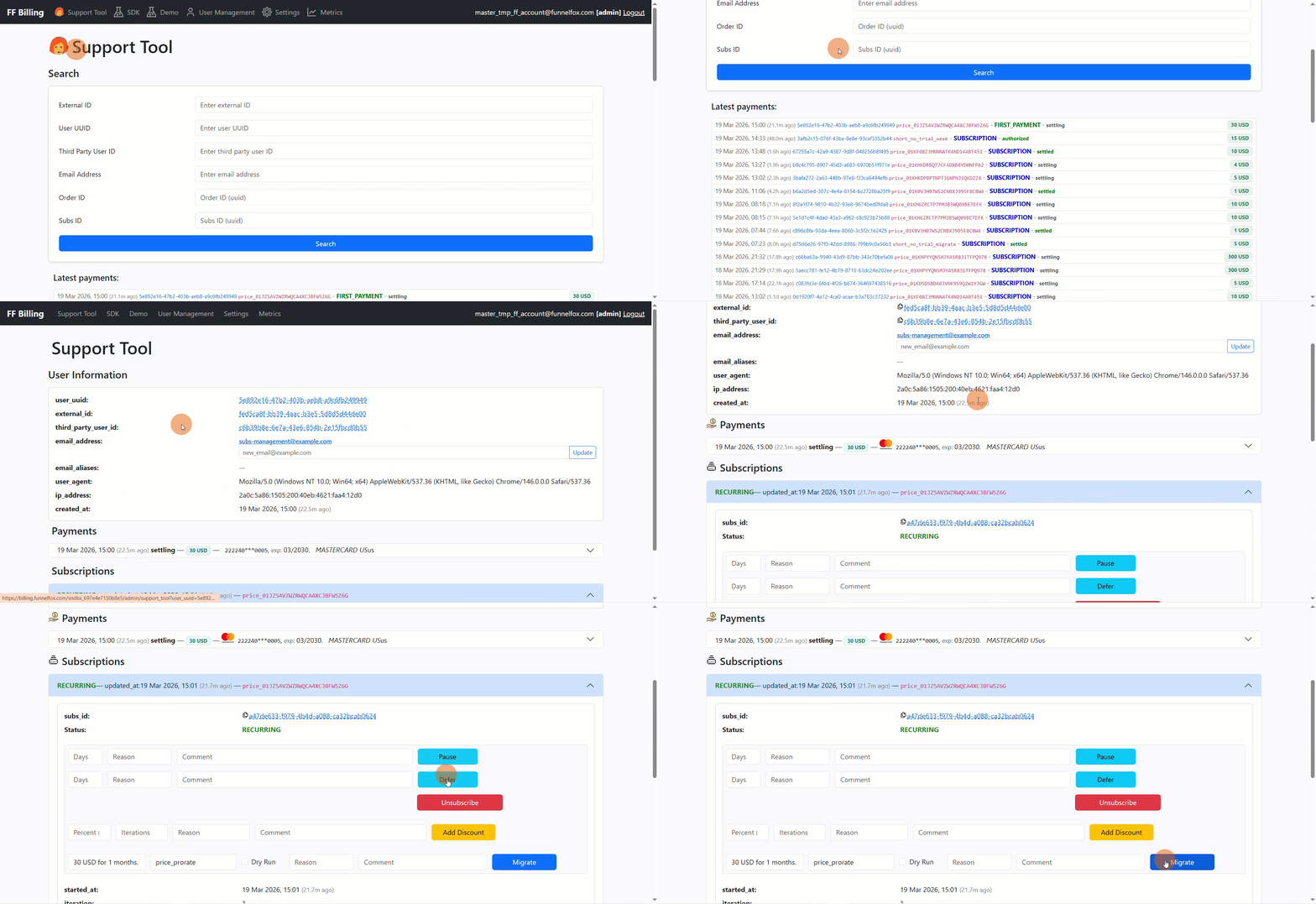
A global subscriptions list is not yet available in FunnelFox Billing. However, you can view subscriptions for a specific customer:
1. Go to the **Support Tool** page in your FunnelFox Billing dashboard.
2. Search for a user or click on the User UUID under **Latest payments**.
3. View all customer subscriptions under the **Subscriptions** section.
You can also search and filter subscriptions with the [FunnelFox Billing API](/api-reference/subscription-management/search-and-filter-subscriptions).
 ## Subscription details
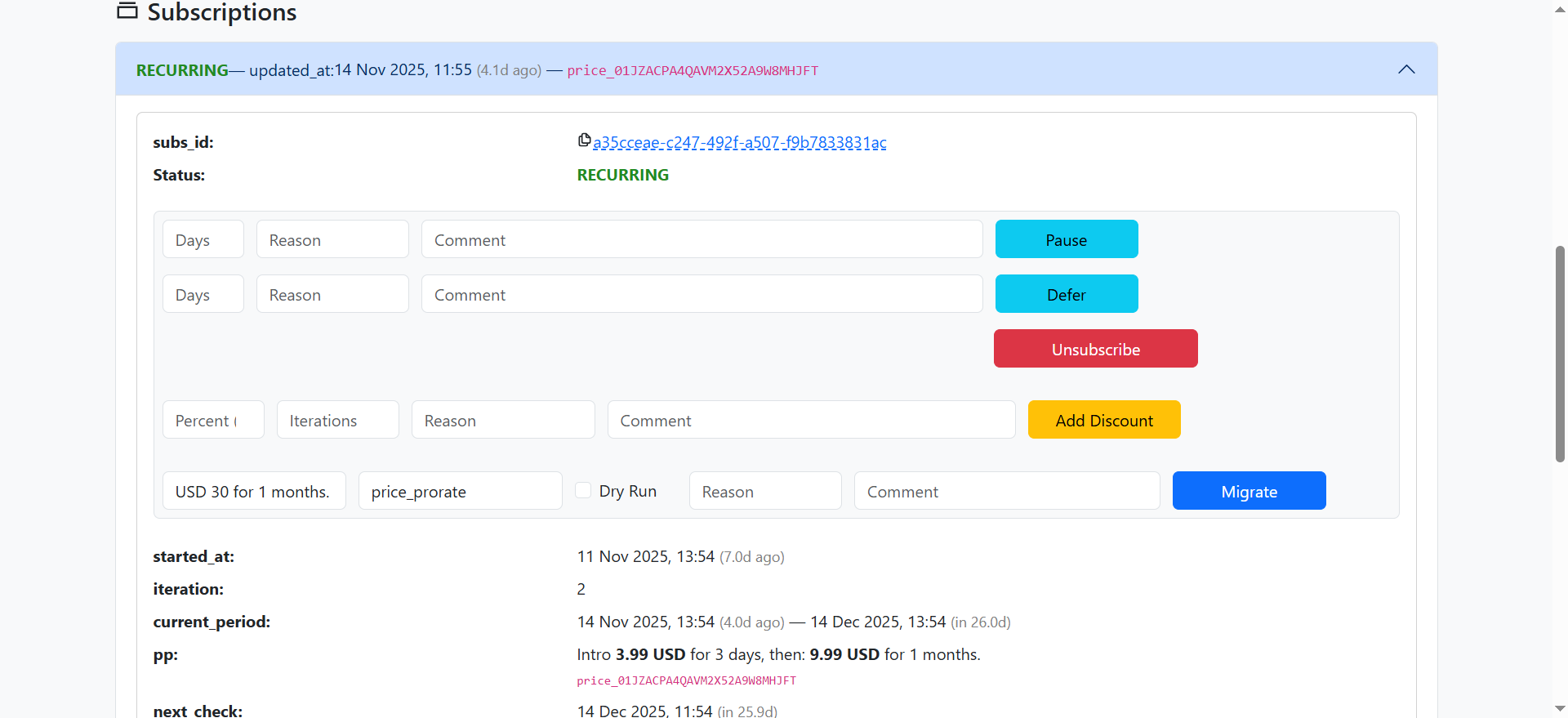
For each subscription, the following fields are available:
* **subs\_id**: A unique identifier for this subscription
record. Each billing cycle creates a new order, but all orders
for the same subscription share this ID.
* **started\_at**: The UTC timestamp of when the subscription
first became active. This value is set once and never changes.
* **iteration**: A count of billing periods that have started,
beginning at 1 when the first period activates.
* **current\_period**: The active billing period, displayed as a
date range.
* **pp**: The price point attached to this
subscription.
* **next\_payment\_at**: The date and time when the subscription will be charged next.
* **unused\_premium\_after\_pause**: The remaining paid time the user hadn't consumed when the subscription was paused.
The **Subscription** section also shows two key fields that tell you the current state and what happens next:
* [Status](/billing/subscription-engine-subscription-management#status)
* [Next check](/billing/subscription-engine-subscription-management#next-check)
## Subscription details
For each subscription, the following fields are available:
* **subs\_id**: A unique identifier for this subscription
record. Each billing cycle creates a new order, but all orders
for the same subscription share this ID.
* **started\_at**: The UTC timestamp of when the subscription
first became active. This value is set once and never changes.
* **iteration**: A count of billing periods that have started,
beginning at 1 when the first period activates.
* **current\_period**: The active billing period, displayed as a
date range.
* **pp**: The price point attached to this
subscription.
* **next\_payment\_at**: The date and time when the subscription will be charged next.
* **unused\_premium\_after\_pause**: The remaining paid time the user hadn't consumed when the subscription was paused.
The **Subscription** section also shows two key fields that tell you the current state and what happens next:
* [Status](/billing/subscription-engine-subscription-management#status)
* [Next check](/billing/subscription-engine-subscription-management#next-check)
 ### Status
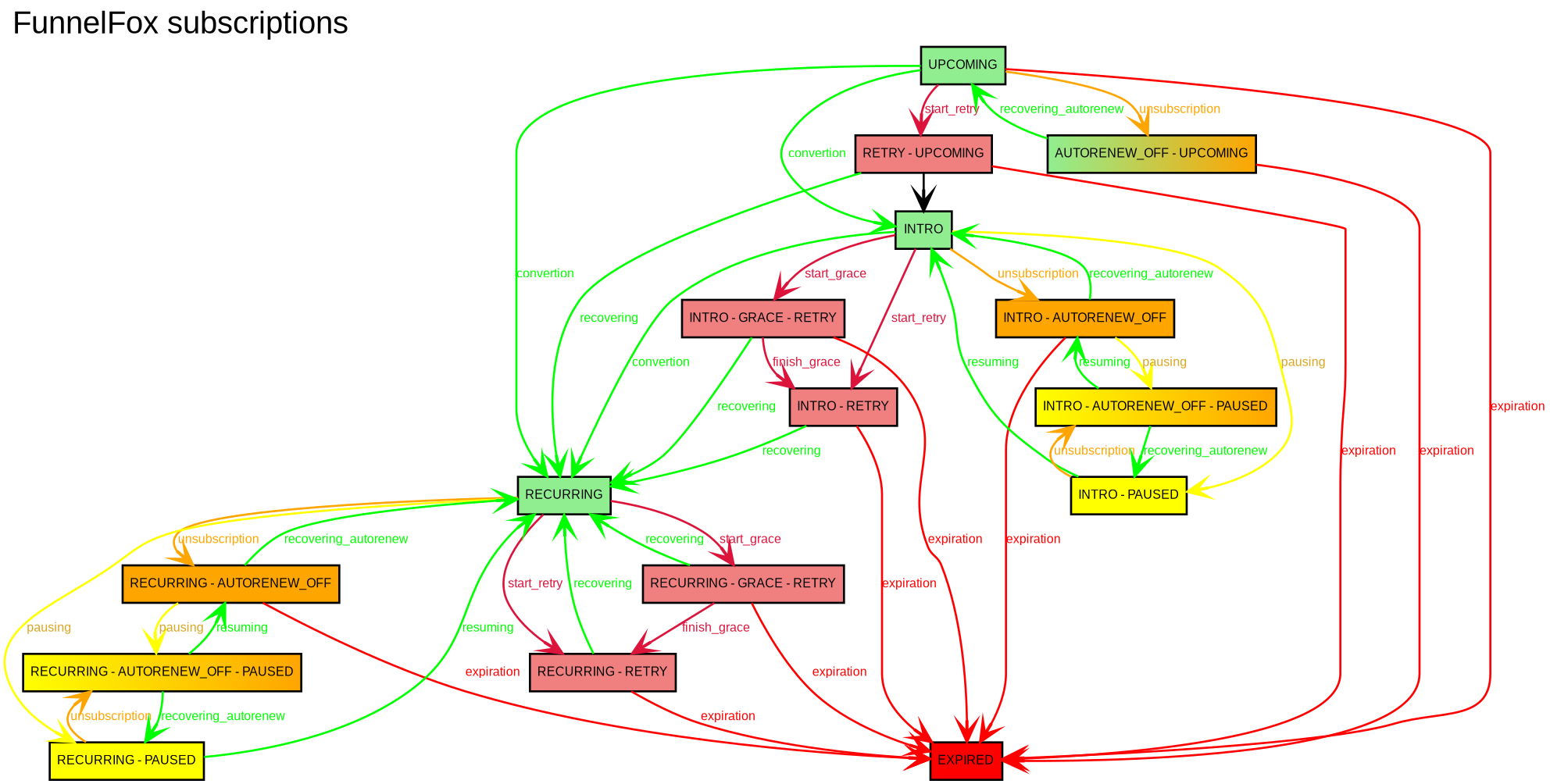
The **status** field shows the current subscription state:
* **INTRO**: The subscription is in its trial period.
* **UPCOMING**: The subscription is scheduled to start in the future using migration with the `delayed_start` strategy. It transitions to RECURRING when the previous subscription expires at the end of its paid period.
* **RECURRING**: The trial is over and the subscription is active. Charges occur 2 hours before each billing cycle to ensure uninterrupted access.
* **AUTORENEW\_OFF**: Auto-renewal is disabled. The subscription will end after the current period.
* **PAUSED**: The subscription is paused until a set date. Premium access is unavailable during this time.
* **GRACE**: Payment failed, but the user still has temporary access.
* **RETRY**: Payment failed and the system is retrying the charge.
* **EXPIRED**: The subscription has ended.
### Status
The **status** field shows the current subscription state:
* **INTRO**: The subscription is in its trial period.
* **UPCOMING**: The subscription is scheduled to start in the future using migration with the `delayed_start` strategy. It transitions to RECURRING when the previous subscription expires at the end of its paid period.
* **RECURRING**: The trial is over and the subscription is active. Charges occur 2 hours before each billing cycle to ensure uninterrupted access.
* **AUTORENEW\_OFF**: Auto-renewal is disabled. The subscription will end after the current period.
* **PAUSED**: The subscription is paused until a set date. Premium access is unavailable during this time.
* **GRACE**: Payment failed, but the user still has temporary access.
* **RETRY**: Payment failed and the system is retrying the charge.
* **EXPIRED**: The subscription has ended.
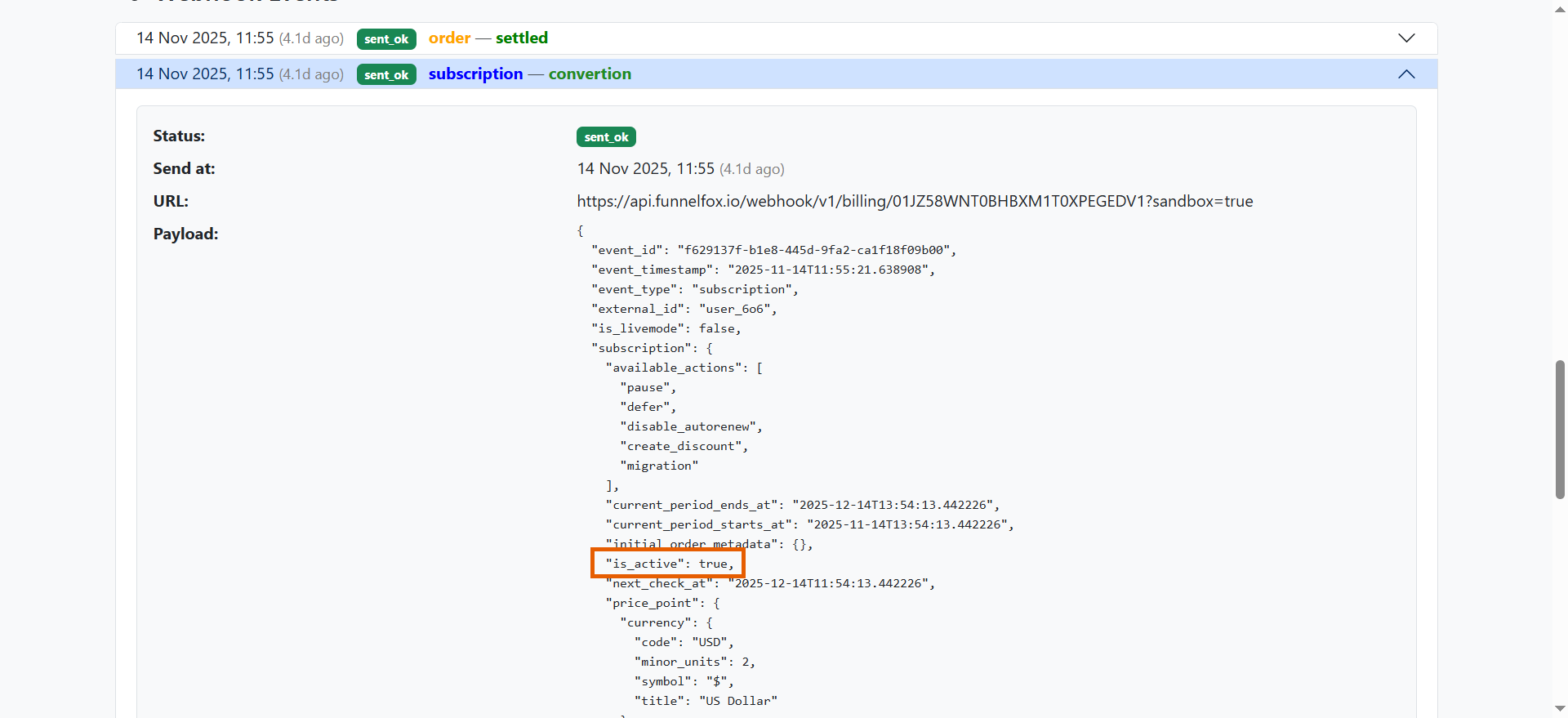
 The `is_active` webhook property is `true` when premium access is active, and `false` when it's disabled.
 ### Next check
The **next\_check** field shows when the next subscription action will occur. What happens depends on the current status:
| Status | What happens at `next_check` |
| ------------------ | ---------------------------------------------------------- |
| **INTRO** | User is charged and the subscription converts to recurring |
| **RECURRING** | User is charged for the upcoming billing cycle |
| **AUTORENEW\_OFF** | Subscription expires and premium access is revoked |
| **PAUSED** | Subscription resumes automatically |
| **GRACE** | System attempts to charge the user again |
| **RETRY** | System attempts to charge the user again |
| **EXPIRED** | No action (subscription fully stopped) |
A subscription can have multiple statuses simultaneously. When this happens, all corresponding actions occur at `next_check`. For example, a subscription with both **RECURRING** and **AUTORENEW\_OFF** statuses won't charge again (auto-renewal is disabled), but the current premium access remains active until it expires.
### Track status changes
Track all subscription status changes to maintain your own analytics and stay up-to-date on user activity.
Each status change creates an event that you can view in two places:
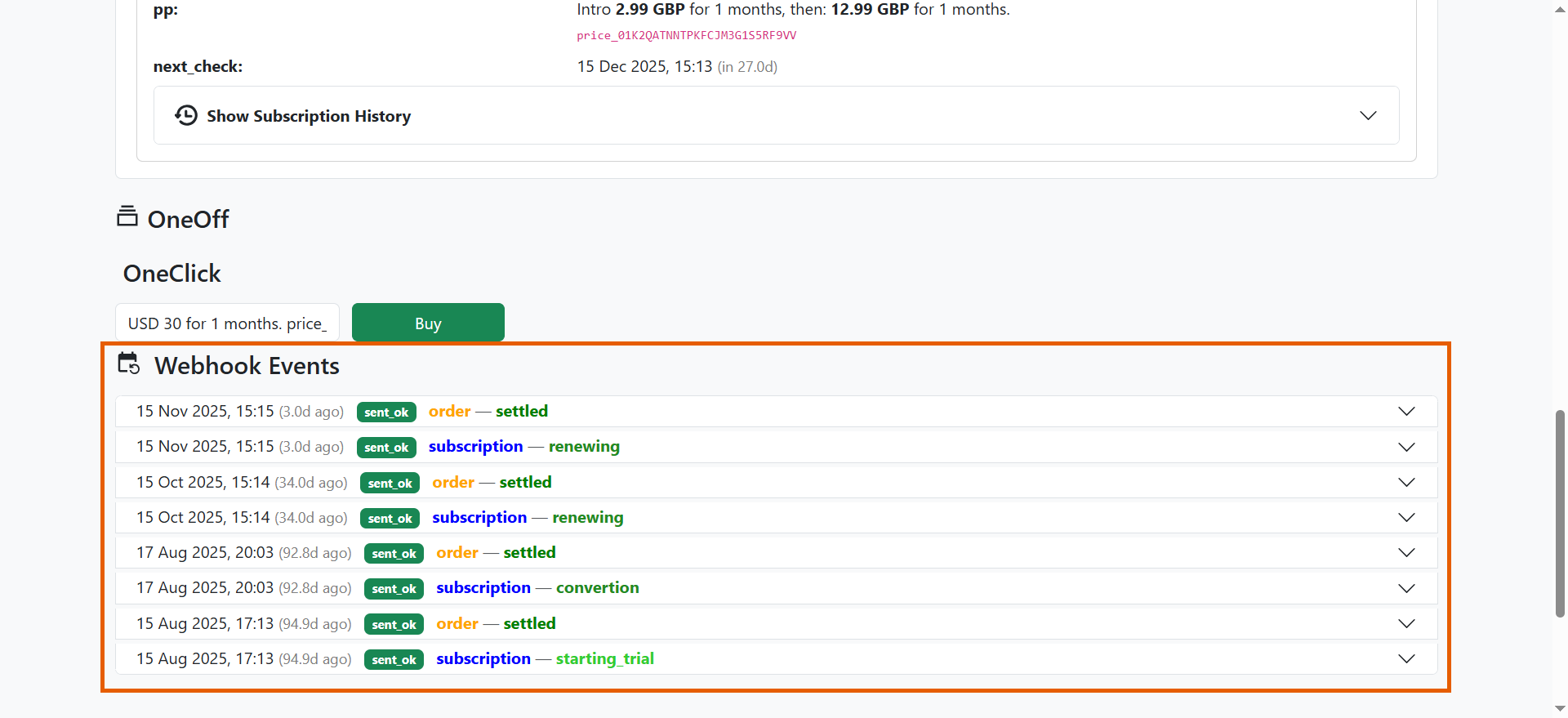
* In the **Webhook Events** section on the user's information page in the Support Tool.
* At your backend via webhook (if configured).
Learn more about [FunnelFox Billing webhook events](/develop/webhooks-billing).
### Next check
The **next\_check** field shows when the next subscription action will occur. What happens depends on the current status:
| Status | What happens at `next_check` |
| ------------------ | ---------------------------------------------------------- |
| **INTRO** | User is charged and the subscription converts to recurring |
| **RECURRING** | User is charged for the upcoming billing cycle |
| **AUTORENEW\_OFF** | Subscription expires and premium access is revoked |
| **PAUSED** | Subscription resumes automatically |
| **GRACE** | System attempts to charge the user again |
| **RETRY** | System attempts to charge the user again |
| **EXPIRED** | No action (subscription fully stopped) |
A subscription can have multiple statuses simultaneously. When this happens, all corresponding actions occur at `next_check`. For example, a subscription with both **RECURRING** and **AUTORENEW\_OFF** statuses won't charge again (auto-renewal is disabled), but the current premium access remains active until it expires.
### Track status changes
Track all subscription status changes to maintain your own analytics and stay up-to-date on user activity.
Each status change creates an event that you can view in two places:
* In the **Webhook Events** section on the user's information page in the Support Tool.
* At your backend via webhook (if configured).
Learn more about [FunnelFox Billing webhook events](/develop/webhooks-billing).
 ## User information
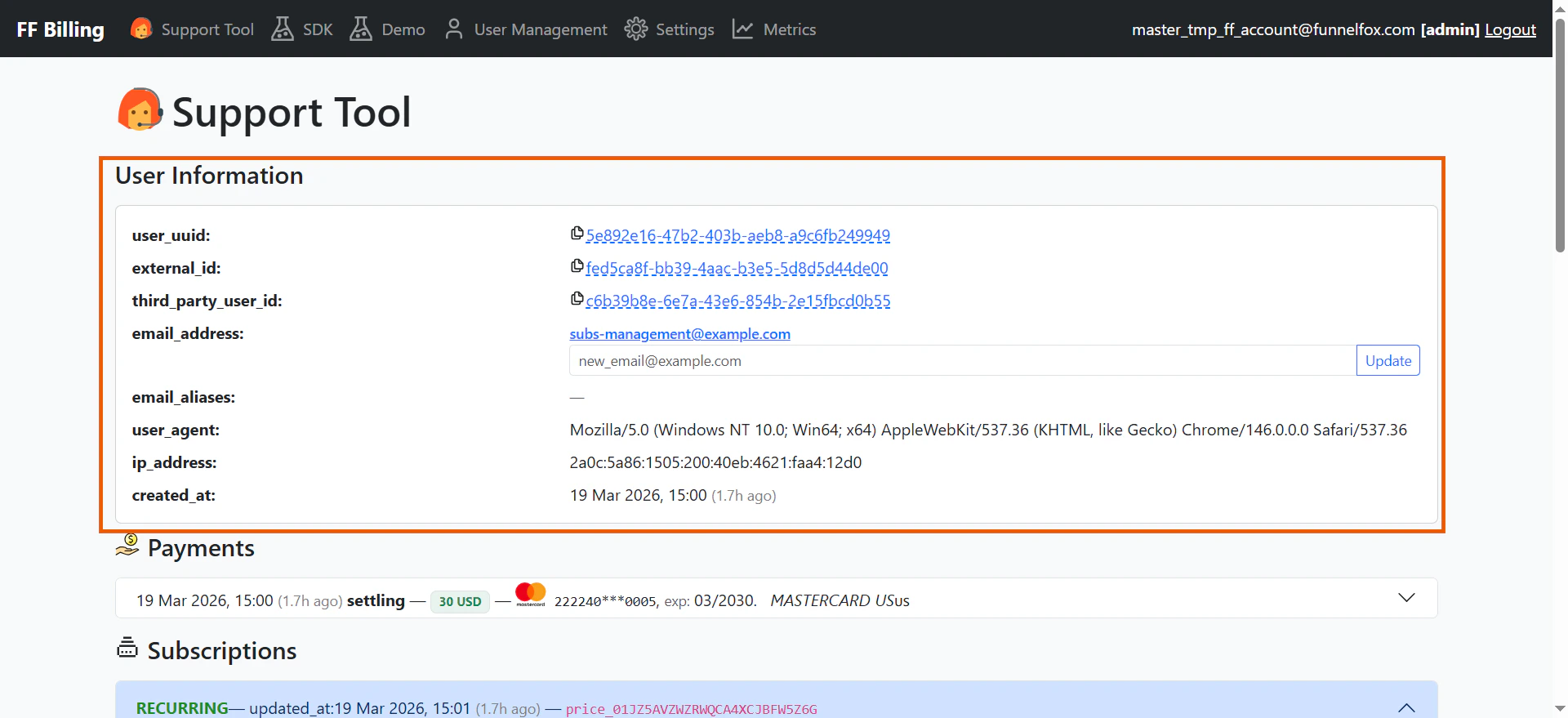
When you search a user's page in the Support Tool, the
**User information** section displays the following details about your subscriber:
* **User UUID**: A system-generated unique identifier that
links the user to their orders, subscriptions, purchases,
and webhook events.
* **External ID**: Your unique identifier for the customer. Use this ID to reference the
customer in all API calls — checkout sessions, refunds,
cancellations, and email updates.
* **Third-party user ID**: A system-generated identifier
used when communicating with the integrated payment service.
* **Email address**:The customer's current primary email,
collected at checkout or from [Apple Pay](/billing/payments-management#email). You can update it later. FunnelFox Billing also sends this email with payment
[metadata](/billing/payments-management#metadata).
* **Email aliases**: A record of all previous email
addresses. When the email address is updated, the old value
is saved as an alias.
* **User agent**: The browser and device information
captured from the customer's checkout session.
* **IP address**: The customer's IP address at checkout
time. Used for fraud scoring and compliance.
* **Created at**: The UTC timestamp of when the user record
was created.
## User information
When you search a user's page in the Support Tool, the
**User information** section displays the following details about your subscriber:
* **User UUID**: A system-generated unique identifier that
links the user to their orders, subscriptions, purchases,
and webhook events.
* **External ID**: Your unique identifier for the customer. Use this ID to reference the
customer in all API calls — checkout sessions, refunds,
cancellations, and email updates.
* **Third-party user ID**: A system-generated identifier
used when communicating with the integrated payment service.
* **Email address**:The customer's current primary email,
collected at checkout or from [Apple Pay](/billing/payments-management#email). You can update it later. FunnelFox Billing also sends this email with payment
[metadata](/billing/payments-management#metadata).
* **Email aliases**: A record of all previous email
addresses. When the email address is updated, the old value
is saved as an alias.
* **User agent**: The browser and device information
captured from the customer's checkout session.
* **IP address**: The customer's IP address at checkout
time. Used for fraud scoring and compliance.
* **Created at**: The UTC timestamp of when the user record
was created.
 ## Next steps
* Learn how to [manage subscriptions](/billing/manage-subscriptions-billing) in the FunnelFox Billing dashboard.
## Next steps
* Learn how to [manage subscriptions](/billing/manage-subscriptions-billing) in the FunnelFox Billing dashboard.