> ## Documentation Index
> Fetch the complete documentation index at: https://funnelfox.com/docs/llms.txt
> Use this file to discover all available pages before exploring further.
# Testing billing & payments
> Test payment flows in FunnelFox before going live. Use sandbox mode, test cards, and verify subscriptions in the preview environment.
Thoroughly test your billing implementation using FunnelFox's sandbox
environment and test cards. Simulate every scenario your customers might
encounter without processing real payments.
Only test cards work in sandbox mode. Using real card
numbers will return an error. This protects you from accidental charges
during development.
## Test environment
FunnelFox Billing provides a complete sandbox for testing:
Use test cards work in preview mode only.
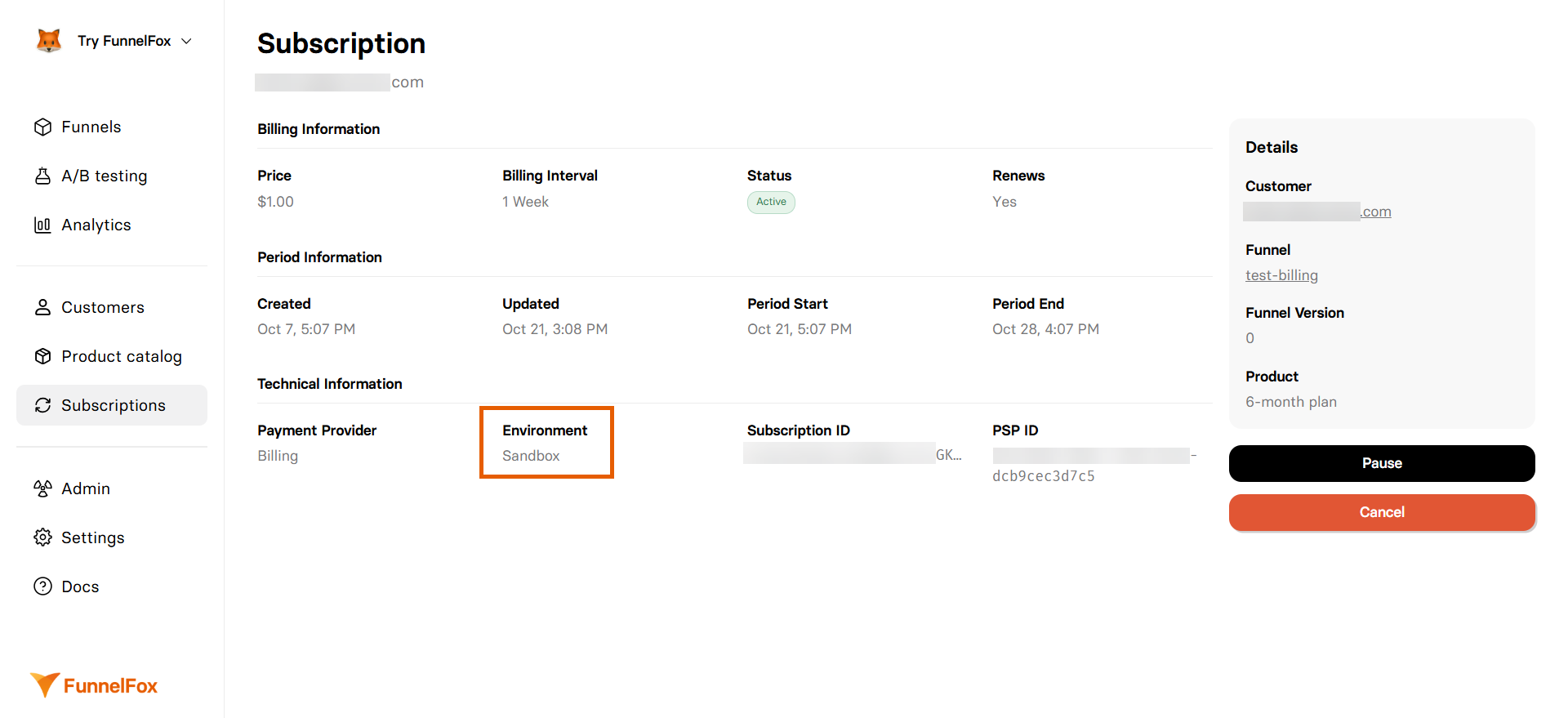
Look for **Sandbox** badges in the dashboard **Subscriptions** page when using test
credentials. This confirms your sandbox transactions.
 ## Test cards
Test cards you use depend on the PSP processing your transactions.
### Successful payment cards
Use these cards to simulate successful transactions:
* **Number**: `4242 4242 4242 4242`
* **Expiry date**: Any valid future date (e.g., `12/34`)
* **CVC**: Any three-digit CVC
Find more [Stripe test cards](https://docs.stripe.com/testing) for successful payment.
* **Number**: `5454 5454 5454 5454`
* **Expiry date**: `03/2030`
* **CVC**: `737`
Find more [Adyen test cards](https://docs.adyen.com/development-resources/test-cards-and-credentials/test-card-numbers) for successful payment.
* **Number**: `5436031030606378`
* **Expiry date**: Any future date in `MM/YY` format
* **CVC**: Any three-digit CVV
Find more [Checkout.com test cards](https://www.checkout.com/docs/developer-resources/testing/test-cards) for successful payment.
For other payment service providers, refer to their official documentation to find the appropriate test card numbers and testing requirements.
### Declined payment cards
Test failure scenarios with these cards:
* **Number**: `4000 0000 0000 0002`
* **Expiry date**: Any valid future date (e.g., `12/34`)
* **CVC**: Any three-digit CVC
Find more [Stripe test cards](https://docs.stripe.com/testing) for declined payment.
* **Number**: `4111 1111 1111 1111`
* **Expiry date**: `03/2030`
* **CVC**: `737`
Find more [Adyen test cards](https://docs.adyen.com/development-resources/test-cards-and-credentials/test-card-numbers) for declined payment.
* **Number**: `5437 8211 3539 9682`
* **Expiry date**: Any future date in `MM/YY` format
* **CVC**: Any three-digit CVV
Find more [Checkout.com test cards](https://www.checkout.com/docs/developer-resources/testing/test-cards) for declined payment.
For other payment service providers, refer to their official documentation to find the appropriate test card numbers and testing requirements.
### 3D Secure testing
Test Strong Customer Authentication (SCA) flows:
* **Number**: `4000 0027 6000 3184`
* **Expiry date**: Any valid future date (e.g., `12/34`)
* **CVC**: Any three-digit CVC
Find more [Stripe test cards](https://docs.stripe.com/testing) for 3D Secure.
* **Number**: `5454 5454 5454 5454`
* **Expiry date**: `03/2030`
* **CVC**: `737`
When prompted for 3D Secure 2 text challenges:
* For web and mobile browser integrations, use password: `password`
* For native mobile (app-based) integrations, use password: `1234`
Find more [Adyen test cards](https://docs.adyen.com/development-resources/test-cards-and-credentials/test-card-numbers) for 3D Secure.
* **Number**: `5588 6861 1642 6417`
* **Expiry date**: Any future date in `MM/YY` format
* **CVC**: Any three-digit CVV
Find more [Checkout.com test cards](https://www.checkout.com/docs/developer-resources/testing/test-cards) for 3D Secure.
For other payment service providers, refer to their official documentation to find the appropriate test card numbers and testing requirements.
**3D Secure flows**: These may open additional windows or iframes.
Ensure your funnel handles these popups correctly and doesn't block them.
## Testing scenarios
Test the complete subscription journey:
1. Create product with 7-day trial.
2. Purchase with test card.
3. Verify trial status in dashboard.
4. Simulate trial.
5. Confirm conversion to paid.
1. Create subscription several minutes long.
2. Purchase with test card.
3. Verify renewal charge.
4. Check invoice generation.
1. Set up subscription.
2. Simulate payment failure.
3. Verify retry attempts.
## Test checklist
Before going live, verify these scenarios:
### Payment processing
* [ ] Successful payment with primary card types
* [ ] Declined payments with various reasons
* [ ] 3D Secure authentication flow
* [ ] International cards and currencies
* [ ] Payment method updates
### Subscription management
* [ ] Free trial creation and conversion
* [ ] Paid trial processing
* [ ] Subscription renewals
* [ ] Plan upgrades and downgrades
* [ ] Pause and resume functionality
* [ ] Cancellation flow
## Next steps
* [Payment Flow](/billing/paymentflow) - Understand the complete flow
* [Products Setup](/dashboard/products) - Configure your catalog
## Test cards
Test cards you use depend on the PSP processing your transactions.
### Successful payment cards
Use these cards to simulate successful transactions:
* **Number**: `4242 4242 4242 4242`
* **Expiry date**: Any valid future date (e.g., `12/34`)
* **CVC**: Any three-digit CVC
Find more [Stripe test cards](https://docs.stripe.com/testing) for successful payment.
* **Number**: `5454 5454 5454 5454`
* **Expiry date**: `03/2030`
* **CVC**: `737`
Find more [Adyen test cards](https://docs.adyen.com/development-resources/test-cards-and-credentials/test-card-numbers) for successful payment.
* **Number**: `5436031030606378`
* **Expiry date**: Any future date in `MM/YY` format
* **CVC**: Any three-digit CVV
Find more [Checkout.com test cards](https://www.checkout.com/docs/developer-resources/testing/test-cards) for successful payment.
For other payment service providers, refer to their official documentation to find the appropriate test card numbers and testing requirements.
### Declined payment cards
Test failure scenarios with these cards:
* **Number**: `4000 0000 0000 0002`
* **Expiry date**: Any valid future date (e.g., `12/34`)
* **CVC**: Any three-digit CVC
Find more [Stripe test cards](https://docs.stripe.com/testing) for declined payment.
* **Number**: `4111 1111 1111 1111`
* **Expiry date**: `03/2030`
* **CVC**: `737`
Find more [Adyen test cards](https://docs.adyen.com/development-resources/test-cards-and-credentials/test-card-numbers) for declined payment.
* **Number**: `5437 8211 3539 9682`
* **Expiry date**: Any future date in `MM/YY` format
* **CVC**: Any three-digit CVV
Find more [Checkout.com test cards](https://www.checkout.com/docs/developer-resources/testing/test-cards) for declined payment.
For other payment service providers, refer to their official documentation to find the appropriate test card numbers and testing requirements.
### 3D Secure testing
Test Strong Customer Authentication (SCA) flows:
* **Number**: `4000 0027 6000 3184`
* **Expiry date**: Any valid future date (e.g., `12/34`)
* **CVC**: Any three-digit CVC
Find more [Stripe test cards](https://docs.stripe.com/testing) for 3D Secure.
* **Number**: `5454 5454 5454 5454`
* **Expiry date**: `03/2030`
* **CVC**: `737`
When prompted for 3D Secure 2 text challenges:
* For web and mobile browser integrations, use password: `password`
* For native mobile (app-based) integrations, use password: `1234`
Find more [Adyen test cards](https://docs.adyen.com/development-resources/test-cards-and-credentials/test-card-numbers) for 3D Secure.
* **Number**: `5588 6861 1642 6417`
* **Expiry date**: Any future date in `MM/YY` format
* **CVC**: Any three-digit CVV
Find more [Checkout.com test cards](https://www.checkout.com/docs/developer-resources/testing/test-cards) for 3D Secure.
For other payment service providers, refer to their official documentation to find the appropriate test card numbers and testing requirements.
**3D Secure flows**: These may open additional windows or iframes.
Ensure your funnel handles these popups correctly and doesn't block them.
## Testing scenarios
Test the complete subscription journey:
1. Create product with 7-day trial.
2. Purchase with test card.
3. Verify trial status in dashboard.
4. Simulate trial.
5. Confirm conversion to paid.
1. Create subscription several minutes long.
2. Purchase with test card.
3. Verify renewal charge.
4. Check invoice generation.
1. Set up subscription.
2. Simulate payment failure.
3. Verify retry attempts.
## Test checklist
Before going live, verify these scenarios:
### Payment processing
* [ ] Successful payment with primary card types
* [ ] Declined payments with various reasons
* [ ] 3D Secure authentication flow
* [ ] International cards and currencies
* [ ] Payment method updates
### Subscription management
* [ ] Free trial creation and conversion
* [ ] Paid trial processing
* [ ] Subscription renewals
* [ ] Plan upgrades and downgrades
* [ ] Pause and resume functionality
* [ ] Cancellation flow
## Next steps
* [Payment Flow](/billing/paymentflow) - Understand the complete flow
* [Products Setup](/dashboard/products) - Configure your catalog