> ## Documentation Index
> Fetch the complete documentation index at: https://funnelfox.com/docs/llms.txt
> Use this file to discover all available pages before exploring further.
# Subscription migration
> Migrate a customer's subscription to a new plan using the FunnelFox Billing API or dashboard
FunnelFox Billing provides multiple ways to seamlessly migrate customers from one subscription plan (price point) to another.
## How it works
When a customer wants to change their subscription, you need to transition them from their current price point to the new one.
To migrate a subscription, you need:
* `subs_id` of their current subscription.
* `pp_ident` of the new price point.
You can find the required identifiers in the Support Tool and Settings pages of your FunnelFox Billing dashboard or using [price\_points](https://funnelfox.com/docs/api-reference/pricepoints/list-price-points) and [my\_assets](https://funnelfox.com/docs/api-reference/information/list-a-users-subscriptions-and-one-off-purchases) APIs.
You can choose between [two migration strategies](/billing/subscription-migration-billing#migration-strategies) depending on whether you want to apply proration immediately with a billing schedule change, or schedule the new plan to start at the end of the current billing period.
Regardless of the strategy you choose, you can process the migration:
* [Using FunnelFox Billing dashboard](/billing/subscription-migration-billing#migrate-using-funnelfox-billing-dashboard)
* [Using FunnelFox Billing API](/billing/subscription-migration-billing#migrate-using-funnelfox-billing-api)
### Migration strategies
Migration can result in either immediate proration with a billing schedule change, or scheduling the new plan to start at the end of the current billing period.
Choose a migration strategy for your use case:
* **delayed\_start**: Schedules the new subscription to start when the customer's already-paid time ends. The customer keeps access to the old plan until that moment, then seamlessly switches to the new plan.
* **price\_prorate**: Migrates to the new plan immediately. Unused time is credited toward the new plan's first payment. Preview charges without executing the migration using the **Dry Run** setting.
By default, if you select a migration strategy that can't be applied to the specific scenario, the API returns a 400 error.
You can set `strict_mode` to `false` in the [API request](/api-reference/subscription-management/migrate-a-subscription-to-a-new-plan) to automatically switch to the appropriate migration strategy when the selected one fails. The `strict_mode` parameter defaults to `true`.
The API response includes the `migration_strategy` field, which shows the strategy that was actually applied to the migration.
Here are scenarios where the selected strategy would fail:
User has a `$100/month` subscription. After 1 day, they want to downgrade to a `$5/day` plan.
With `price_prorate`, the system would calculate the credit toward the first payment:
* Unused value: `(29 days / 30 days) × $100 = $96.67`
* New plan charge: `$5`
This would result in a negative charge: `$5 - $96.67 = -$91.67`
Since negative charges are impossible:
* With `strict_mode: true` (default): The migration fails with a 400 error.
* With `strict_mode: false`: The strategy automatically switches to `delayed_start`. The current `$100/month` subscription continues until it expires, and the new `$5/day` subscription is created as `UPCOMING` to start at the old subscription's expiration.
User has a `$100/month` subscription. After 1 day, they want to upgrade to a `Lifetime plan for $120`.
With `delayed_start`, the lifetime plan would start only after the current monthly period ends, so the user wouldn't get immediate access to their upgrade (even though they're purchasing permanent access now).
This doesn't make sense for the user, so:
* With `strict_mode: true` (default): The migration fails with a 400 error
* With `strict_mode: false`: The strategy automatically switches to `price_prorate`:
* Credit for unused time: `(29 days / 30 days) × $100 = $96.67`
* Immediate charge: `$120 - $96.67 = $23.33`
* The user gets lifetime access right away and only pays the difference
### Migration examples
Use the following real-world migration examples to understand how subscription migration works.
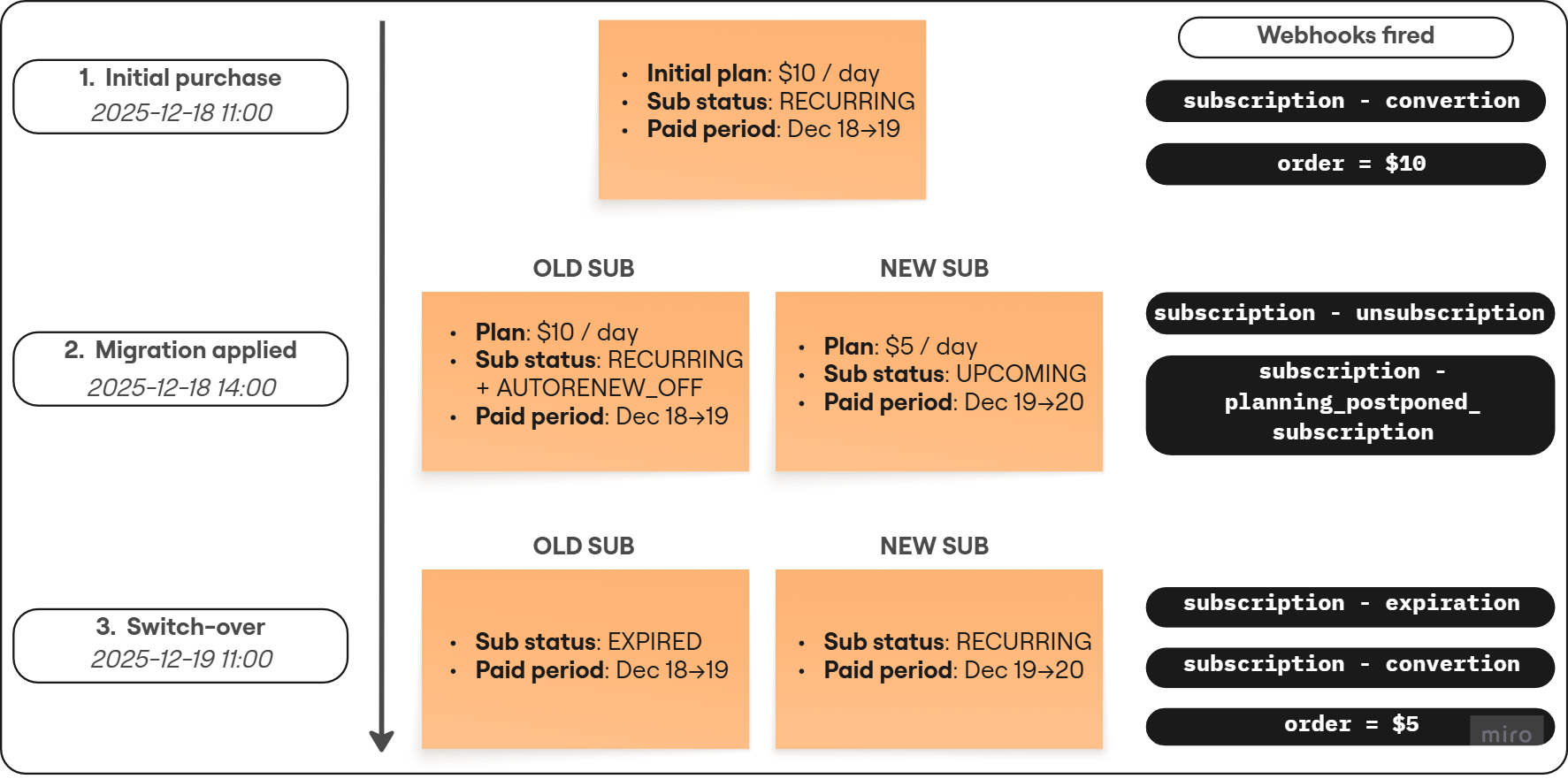 The logic explained below applies to all similar migration flows that use `delayed_start`, such as `no_trial -> free_trial`, `paid_trial -> no_trial`, and others.
This example migrates a user from a `$10 / day` plan to a `$5 / day` plan using `delayed_start`.
**What `delayed_start` does:** it schedules the new subscription to start when the customer's already-paid time ends. The customer keeps access to the old plan until that moment, then seamlessly switches to the new plan.
**Timeline**
Customer purchases the initial subscription (`$10 / day`).
FunnelFox Billing fires a `subscription - convertion` webhook.
You run migration with `delayed_start`. FunnelFox Billing does two things:
* Disables auto-renewal on the old subscription (it keeps `RECURRING` status, but also gets `AUTORENEW_OFF`).
* Creates a new subscription in `UPCOMING` state with `started_at` set to the end of the current paid period (here: **2025-12-19 11:00**).
FunnelFox Billing fires `subscription - unsubscription` for the old subscription and `subscription - planning_postponed_subscription` for the new subscription.
The switch-over happens automatically:
* Old subscription transitions to `EXPIRED` (a `subscription - expiration` webhook is fired).
* New subscription transitions from `UPCOMING` → `RECURRING` (a `subscription - convertion` webhook is fired).
* The customer is charged `$5` approximately 2 hours before the new paid period starts (an `order` webhook is fired).
**Webhooks you receive**
**`subscription - convertion`**
```json theme={null}
{
"event_timestamp": "2025-12-18T11:00:00.766550",
"event_type": "subscription",
"subtype": "convertion",
// ... other fields
"subscription": {
"subs_id": "948811fe-a452-4834-ab77-f840c7c9c928",
"status": ["RECURRING"],
"is_active": true,
"started_at": "2025-12-18T11:00:00.759873",
"current_period_starts_at": "2025-12-18T11:00:00.759873",
"current_period_ends_at": "2025-12-19T11:00:00.759873",
"next_check_at": "2025-12-19T09:00:00.759873",
"price_point": {
"next_price": "10",
"next_period": 1,
"next_period_duration": "days"
// ... other fields
}
}
}
```
```json theme={null}
{
"event_timestamp": "2025-12-18T14:00:00.371798",
"event_type": "subscription",
"subtype": "unsubscription",
// ... other fields
},
"subscription": {
"subs_id": "948811fe-a452-4834-ab77-f840c7c9c928",
"status": ["AUTORENEW_OFF", "RECURRING"],
"is_active": true,
"started_at": "2025-12-18T11:00:00.759873",
"current_period_starts_at": "2025-12-18T11:00:00.759873",
"current_period_ends_at": "2025-12-19T11:00:00.759873",
"next_check_at": "2025-12-19T09:00:00.759873",
"price_point": {
"next_price": "10",
"next_period": 1,
"next_period_duration": "days"
// ... other fields
}
}
```
```json theme={null}
{
"event_timestamp": "2025-12-18T14:00:00.388549",
"event_type": "subscription",
"subtype": "planning_postponed_subscription",
"subscription": {
"subs_id": "73d520ae-42ff-4c52-877a-fa4a82534699",
"status": ["UPCOMING"],
"is_active": false,
"started_at": "2025-12-19T11:00:00.759873",
"current_period_starts_at": "2025-12-19T11:00:00.759873",
"current_period_ends_at": "2025-12-20T11:00:00.759873",
"next_check_at": "2025-12-19T11:00:00.759873",
"price_point": {
"next_price": "5",
"next_period": 1,
"next_period_duration": "days"
// ... other fields
}
}
}
```
```json theme={null}
{
"event_timestamp": "2025-12-19T11:00:00.575746",
"event_type": "subscription",
"subtype": "expiration",
// ... other fields
},
"subscription": {
"subs_id": "948811fe-a452-4834-ab77-f840c7c9c928",
"status": ["EXPIRED"],
"is_active": false,
"started_at": "2025-12-18T11:00:00.759873",
"current_period_starts_at": "2025-12-18T11:00:00.759873",
"current_period_ends_at": "2025-12-19T11:00:00.759873",
"next_check_at": null,
"price_point": {
"ident": "short_no_trial",
"next_price": "10",
"next_period": 1,
"next_period_duration": "days"
// ... other fields
}
}
```
```json theme={null}
{
"event_timestamp": "2025-12-19T11:00:00.766550",
"event_type": "subscription",
"subtype": "convertion",
// ... other fields
},
"subscription": {
"subs_id": "73d520ae-42ff-4c52-877a-fa4a82534699",
"status": ["RECURRING"],
"is_active": true,
"started_at": "2025-12-19T11:00:00.759873",
"current_period_starts_at": "2025-12-19T11:00:00.759873",
"current_period_ends_at": "2025-12-20T11:00:00.759873",
"next_check_at": "2025-12-20T09:00:00.759873",
"price_point": {
"ident": "short_no_trial_migrate",
"next_price": "5",
"next_period": 1,
"next_period_duration": "days"
// ... other fields
}
}
```
The logic explained below applies to all similar migration flows that use `delayed_start`, such as `no_trial -> free_trial`, `paid_trial -> no_trial`, and others.
This example migrates a user from a `$10 / day` plan to a `$5 / day` plan using `delayed_start`.
**What `delayed_start` does:** it schedules the new subscription to start when the customer's already-paid time ends. The customer keeps access to the old plan until that moment, then seamlessly switches to the new plan.
**Timeline**
Customer purchases the initial subscription (`$10 / day`).
FunnelFox Billing fires a `subscription - convertion` webhook.
You run migration with `delayed_start`. FunnelFox Billing does two things:
* Disables auto-renewal on the old subscription (it keeps `RECURRING` status, but also gets `AUTORENEW_OFF`).
* Creates a new subscription in `UPCOMING` state with `started_at` set to the end of the current paid period (here: **2025-12-19 11:00**).
FunnelFox Billing fires `subscription - unsubscription` for the old subscription and `subscription - planning_postponed_subscription` for the new subscription.
The switch-over happens automatically:
* Old subscription transitions to `EXPIRED` (a `subscription - expiration` webhook is fired).
* New subscription transitions from `UPCOMING` → `RECURRING` (a `subscription - convertion` webhook is fired).
* The customer is charged `$5` approximately 2 hours before the new paid period starts (an `order` webhook is fired).
**Webhooks you receive**
**`subscription - convertion`**
```json theme={null}
{
"event_timestamp": "2025-12-18T11:00:00.766550",
"event_type": "subscription",
"subtype": "convertion",
// ... other fields
"subscription": {
"subs_id": "948811fe-a452-4834-ab77-f840c7c9c928",
"status": ["RECURRING"],
"is_active": true,
"started_at": "2025-12-18T11:00:00.759873",
"current_period_starts_at": "2025-12-18T11:00:00.759873",
"current_period_ends_at": "2025-12-19T11:00:00.759873",
"next_check_at": "2025-12-19T09:00:00.759873",
"price_point": {
"next_price": "10",
"next_period": 1,
"next_period_duration": "days"
// ... other fields
}
}
}
```
```json theme={null}
{
"event_timestamp": "2025-12-18T14:00:00.371798",
"event_type": "subscription",
"subtype": "unsubscription",
// ... other fields
},
"subscription": {
"subs_id": "948811fe-a452-4834-ab77-f840c7c9c928",
"status": ["AUTORENEW_OFF", "RECURRING"],
"is_active": true,
"started_at": "2025-12-18T11:00:00.759873",
"current_period_starts_at": "2025-12-18T11:00:00.759873",
"current_period_ends_at": "2025-12-19T11:00:00.759873",
"next_check_at": "2025-12-19T09:00:00.759873",
"price_point": {
"next_price": "10",
"next_period": 1,
"next_period_duration": "days"
// ... other fields
}
}
```
```json theme={null}
{
"event_timestamp": "2025-12-18T14:00:00.388549",
"event_type": "subscription",
"subtype": "planning_postponed_subscription",
"subscription": {
"subs_id": "73d520ae-42ff-4c52-877a-fa4a82534699",
"status": ["UPCOMING"],
"is_active": false,
"started_at": "2025-12-19T11:00:00.759873",
"current_period_starts_at": "2025-12-19T11:00:00.759873",
"current_period_ends_at": "2025-12-20T11:00:00.759873",
"next_check_at": "2025-12-19T11:00:00.759873",
"price_point": {
"next_price": "5",
"next_period": 1,
"next_period_duration": "days"
// ... other fields
}
}
}
```
```json theme={null}
{
"event_timestamp": "2025-12-19T11:00:00.575746",
"event_type": "subscription",
"subtype": "expiration",
// ... other fields
},
"subscription": {
"subs_id": "948811fe-a452-4834-ab77-f840c7c9c928",
"status": ["EXPIRED"],
"is_active": false,
"started_at": "2025-12-18T11:00:00.759873",
"current_period_starts_at": "2025-12-18T11:00:00.759873",
"current_period_ends_at": "2025-12-19T11:00:00.759873",
"next_check_at": null,
"price_point": {
"ident": "short_no_trial",
"next_price": "10",
"next_period": 1,
"next_period_duration": "days"
// ... other fields
}
}
```
```json theme={null}
{
"event_timestamp": "2025-12-19T11:00:00.766550",
"event_type": "subscription",
"subtype": "convertion",
// ... other fields
},
"subscription": {
"subs_id": "73d520ae-42ff-4c52-877a-fa4a82534699",
"status": ["RECURRING"],
"is_active": true,
"started_at": "2025-12-19T11:00:00.759873",
"current_period_starts_at": "2025-12-19T11:00:00.759873",
"current_period_ends_at": "2025-12-20T11:00:00.759873",
"next_check_at": "2025-12-20T09:00:00.759873",
"price_point": {
"ident": "short_no_trial_migrate",
"next_price": "5",
"next_period": 1,
"next_period_duration": "days"
// ... other fields
}
}
```
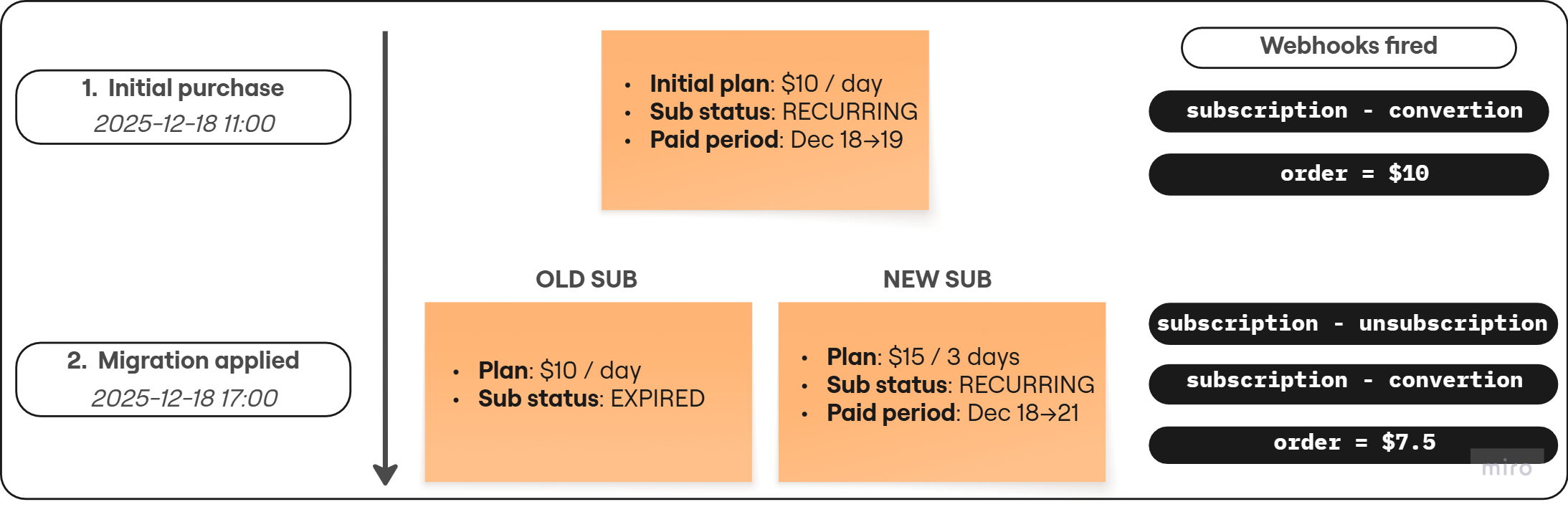 The logic explained below applies to all similar migration flows that use `price_prorate`, such as `no_trial -> free_trial`, `paid_trial -> no_trial`, and others.
This example migrates a user from a `$10 / day` plan to a `$15 / 3 days` plan using `price_prorate`.
**What `price_prorate` does:** it credits the unused time from the old subscription toward the first payment of the new plan. The customer is charged immediately for the new plan minus the prorated credit, and the new subscription starts right away.
**Timeline**
Customer purchases the initial subscription (`$10 / day`).
FunnelFox Billing fires a `subscription - convertion` webhook and an `order` webhook charging the customer `$10`.
The subscription enters `RECURRING` status.
You run migration with `price_prorate`. FunnelFox Billing:
* Calculates the unused time from the old subscription and credits it toward the new plan's first payment.
* Charges the customer `$7.5` (the prorated amount after applying the credit).
* Immediately transitions the old subscription to `EXPIRED`.
* Immediately starts the new subscription in `RECURRING` status with `started_at` set to **2025-12-18 17:00**.
FunnelFox Billing fires webhooks:
* Old subscription: `subscription - unsubscription` and `subscription - expiration`
* New subscription: `subscription - convertion` and `order` (charging `$7.5`)
**Webhooks you receive**
**`subscription - convertion`**
```json theme={null}
{
"event_timestamp": "2025-12-18T11:00:35.505558",
"event_type": "subscription",
"subtype": "convertion",
// ... other fields
},
"subscription": {
"subs_id": "0b33ee2a-7434-4480-a78b-aa0852aa9a64",
"status": ["RECURRING"],
"is_active": true,
"started_at": "2025-12-18T11:00:35.500977",
"current_period_starts_at": "2025-12-18T11:00:35.500977",
"current_period_ends_at": "2025-12-19T11:00:35.500977",
"next_check_at": "2025-12-19T09:00:35.500977",
"price_point": {
"next_price": "10",
"next_period": 1,
"next_period_duration": "days"
// ... other fields
}
}
```
```json theme={null}
{
"event_timestamp": "2025-12-18T17:00:12.250721",
"event_type": "subscription",
"subtype": "unsubscription",
// ... other fields
},
"subscription": {
"subs_id": "0b33ee2a-7434-4480-a78b-aa0852aa9a64",
"status": ["AUTORENEW_OFF", "RECURRING"],
"is_active": true,
"started_at": "2025-12-18T11:00:35.500977",
"current_period_starts_at": "2025-12-18T11:00:35.500977",
"current_period_ends_at": "2025-12-19T11:00:35.500977",
"next_check_at": "2025-12-19T09:00:35.500977",
"price_point": {
"next_price": "10",
"next_period": 1,
"next_period_duration": "days"
// ... other fields
}
}
```
```json theme={null}
{
"event_timestamp": "2025-12-18T17:00:12.268383",
"event_type": "subscription",
"subtype": "expiration",
// ... other fields
},
"subscription": {
"subs_id": "0b33ee2a-7434-4480-a78b-aa0852aa9a64",
"status": ["EXPIRED"],
"is_active": false,
"started_at": "2025-12-18T11:00:35.500977",
"current_period_starts_at": "2025-12-18T11:00:35.500977",
"current_period_ends_at": "2025-12-18T17:00:12.257883",
"next_check_at": null,
"price_point": {
"next_price": "10",
"next_period": 1,
"next_period_duration": "days"
// ... other fields
}
}
```
```json theme={null}
{
"event_timestamp": "2025-12-18T17:00:12.232746",
"event_type": "subscription",
"subtype": "convertion",
// ... other fields
},
"subscription": {
"subs_id": "d3eaecfa-f443-4a1c-a166-d2284231aa34",
"status": ["RECURRING"],
"is_active": true,
"started_at": "2025-12-18T17:00:12.227985",
"current_period_starts_at": "2025-12-18T17:00:12.227985",
"current_period_ends_at": "2025-12-25T17:00:12.227985",
"next_check_at": "2025-12-25T15:00:12.227985",
"price_point": {
"next_price": "15",
"next_period": 1,
"next_period_duration": "weeks"
// ... other fields
}
}
```
## Migrate using FunnelFox Billing dashboard
You can migrate subscriptions directly from the Support Tool of your FunnelFox Billing dashboard:
1. Go to the **Subscriptions** section of the **User Information** page.
2. Set up fields next to the **Migrate** button:
* **Price Point**: Subscription plan identifier to migrate to.
* **Migration strategy**: **delayed\_start** or **price\_prorate**. Learn about [migration strategies](/billing/subscription-migration-billing).
* **Dry Run**: Enable if you want to preview proration without executing the migration.
* **Reason**: Optional migration reason code.
* **Comment**: Optional human-readable comment or reference (e.g., support ticket link).
3. Click **Migrate**.
The logic explained below applies to all similar migration flows that use `price_prorate`, such as `no_trial -> free_trial`, `paid_trial -> no_trial`, and others.
This example migrates a user from a `$10 / day` plan to a `$15 / 3 days` plan using `price_prorate`.
**What `price_prorate` does:** it credits the unused time from the old subscription toward the first payment of the new plan. The customer is charged immediately for the new plan minus the prorated credit, and the new subscription starts right away.
**Timeline**
Customer purchases the initial subscription (`$10 / day`).
FunnelFox Billing fires a `subscription - convertion` webhook and an `order` webhook charging the customer `$10`.
The subscription enters `RECURRING` status.
You run migration with `price_prorate`. FunnelFox Billing:
* Calculates the unused time from the old subscription and credits it toward the new plan's first payment.
* Charges the customer `$7.5` (the prorated amount after applying the credit).
* Immediately transitions the old subscription to `EXPIRED`.
* Immediately starts the new subscription in `RECURRING` status with `started_at` set to **2025-12-18 17:00**.
FunnelFox Billing fires webhooks:
* Old subscription: `subscription - unsubscription` and `subscription - expiration`
* New subscription: `subscription - convertion` and `order` (charging `$7.5`)
**Webhooks you receive**
**`subscription - convertion`**
```json theme={null}
{
"event_timestamp": "2025-12-18T11:00:35.505558",
"event_type": "subscription",
"subtype": "convertion",
// ... other fields
},
"subscription": {
"subs_id": "0b33ee2a-7434-4480-a78b-aa0852aa9a64",
"status": ["RECURRING"],
"is_active": true,
"started_at": "2025-12-18T11:00:35.500977",
"current_period_starts_at": "2025-12-18T11:00:35.500977",
"current_period_ends_at": "2025-12-19T11:00:35.500977",
"next_check_at": "2025-12-19T09:00:35.500977",
"price_point": {
"next_price": "10",
"next_period": 1,
"next_period_duration": "days"
// ... other fields
}
}
```
```json theme={null}
{
"event_timestamp": "2025-12-18T17:00:12.250721",
"event_type": "subscription",
"subtype": "unsubscription",
// ... other fields
},
"subscription": {
"subs_id": "0b33ee2a-7434-4480-a78b-aa0852aa9a64",
"status": ["AUTORENEW_OFF", "RECURRING"],
"is_active": true,
"started_at": "2025-12-18T11:00:35.500977",
"current_period_starts_at": "2025-12-18T11:00:35.500977",
"current_period_ends_at": "2025-12-19T11:00:35.500977",
"next_check_at": "2025-12-19T09:00:35.500977",
"price_point": {
"next_price": "10",
"next_period": 1,
"next_period_duration": "days"
// ... other fields
}
}
```
```json theme={null}
{
"event_timestamp": "2025-12-18T17:00:12.268383",
"event_type": "subscription",
"subtype": "expiration",
// ... other fields
},
"subscription": {
"subs_id": "0b33ee2a-7434-4480-a78b-aa0852aa9a64",
"status": ["EXPIRED"],
"is_active": false,
"started_at": "2025-12-18T11:00:35.500977",
"current_period_starts_at": "2025-12-18T11:00:35.500977",
"current_period_ends_at": "2025-12-18T17:00:12.257883",
"next_check_at": null,
"price_point": {
"next_price": "10",
"next_period": 1,
"next_period_duration": "days"
// ... other fields
}
}
```
```json theme={null}
{
"event_timestamp": "2025-12-18T17:00:12.232746",
"event_type": "subscription",
"subtype": "convertion",
// ... other fields
},
"subscription": {
"subs_id": "d3eaecfa-f443-4a1c-a166-d2284231aa34",
"status": ["RECURRING"],
"is_active": true,
"started_at": "2025-12-18T17:00:12.227985",
"current_period_starts_at": "2025-12-18T17:00:12.227985",
"current_period_ends_at": "2025-12-25T17:00:12.227985",
"next_check_at": "2025-12-25T15:00:12.227985",
"price_point": {
"next_price": "15",
"next_period": 1,
"next_period_duration": "weeks"
// ... other fields
}
}
```
## Migrate using FunnelFox Billing dashboard
You can migrate subscriptions directly from the Support Tool of your FunnelFox Billing dashboard:
1. Go to the **Subscriptions** section of the **User Information** page.
2. Set up fields next to the **Migrate** button:
* **Price Point**: Subscription plan identifier to migrate to.
* **Migration strategy**: **delayed\_start** or **price\_prorate**. Learn about [migration strategies](/billing/subscription-migration-billing).
* **Dry Run**: Enable if you want to preview proration without executing the migration.
* **Reason**: Optional migration reason code.
* **Comment**: Optional human-readable comment or reference (e.g., support ticket link).
3. Click **Migrate**.
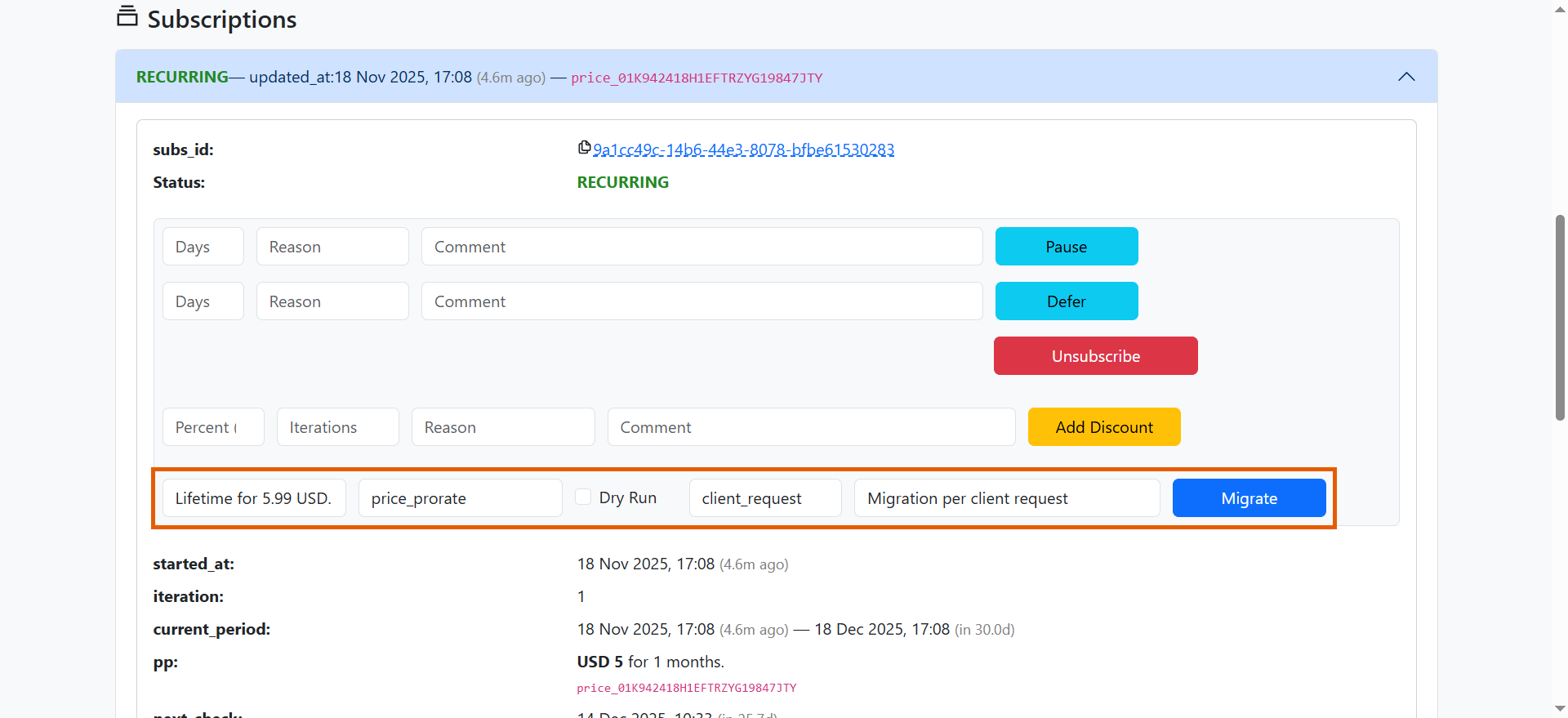 Once the page reloads, you will see changes under **Subscription** and **Webhook Events** sections.
## Migrate using FunnelFox Billing API
[Subscription migration API](/api-reference/subscription-management/migrate-a-subscription-to-a-new-plan) in FunnelFox Billing requires the following parameters:
* `subs_id`: Current subscription identifier.
* `pp_ident`: The new price point identifier.
The response includes the migration strategy applied, payment result, charged amount, and new `subs_id` or `oneoff_id`.
```
curl -X 'POST' \
'https://billing.funnelfox.com/sndbx_************/v1/subscription/migration' \
-H 'accept: application/json' \
-H 'Content-Type: application/json' \
-d '{
"reason": "",
"comment": "",
"external_id": "c79bdcf5-5c63-4e3b-91b4-339f4679ef76",
"subs_id": "66b3028d-79bb-4615-8ec2-3160f15657f6",
"pp_ident": "price_01K949WZ9MR1BZKK9YRY6P6P36",
"strategy": "price_prorate",
"dry_run": false,
"strict_mode": true
}'
```
```
{
"data": {
"payment_result": {
"checkout_status": "succeeded",
"failed_message_for_user": "",
"order_id": "496e38a1-ee33-4009-875b-96d00b0e64f1"
},
"charged_amount": "5.76",
"subs_id": "76533d49-2aa6-43aa-a6ec-cc70b6d37354",
"oneoff_id": null,
"migration_strategy": "price_prorate"
},
"status": "success"
}
```
Learn more in the complete [FunnelFox Billing API reference](/api-reference/subscription-management/migrate-a-subscription-to-a-new-plan).
Once the page reloads, you will see changes under **Subscription** and **Webhook Events** sections.
## Migrate using FunnelFox Billing API
[Subscription migration API](/api-reference/subscription-management/migrate-a-subscription-to-a-new-plan) in FunnelFox Billing requires the following parameters:
* `subs_id`: Current subscription identifier.
* `pp_ident`: The new price point identifier.
The response includes the migration strategy applied, payment result, charged amount, and new `subs_id` or `oneoff_id`.
```
curl -X 'POST' \
'https://billing.funnelfox.com/sndbx_************/v1/subscription/migration' \
-H 'accept: application/json' \
-H 'Content-Type: application/json' \
-d '{
"reason": "",
"comment": "",
"external_id": "c79bdcf5-5c63-4e3b-91b4-339f4679ef76",
"subs_id": "66b3028d-79bb-4615-8ec2-3160f15657f6",
"pp_ident": "price_01K949WZ9MR1BZKK9YRY6P6P36",
"strategy": "price_prorate",
"dry_run": false,
"strict_mode": true
}'
```
```
{
"data": {
"payment_result": {
"checkout_status": "succeeded",
"failed_message_for_user": "",
"order_id": "496e38a1-ee33-4009-875b-96d00b0e64f1"
},
"charged_amount": "5.76",
"subs_id": "76533d49-2aa6-43aa-a6ec-cc70b6d37354",
"oneoff_id": null,
"migration_strategy": "price_prorate"
},
"status": "success"
}
```
Learn more in the complete [FunnelFox Billing API reference](/api-reference/subscription-management/migrate-a-subscription-to-a-new-plan).