> ## Documentation Index
> Fetch the complete documentation index at: https://funnelfox.com/docs/llms.txt
> Use this file to discover all available pages before exploring further.
# Subscription engine
> The engine that owns subscription state in FunnelFox Payments, from the product catalog through renewals and entitlements.
The Subscription engine owns subscription state in FunnelFox Payments. It
records what a customer bought, what they have access to, and when they are
charged next.
That state is kept independently of any PSP. Providers move the money; the engine decides what
happens and when, so you can switch providers without breaking renewals.
## How it works
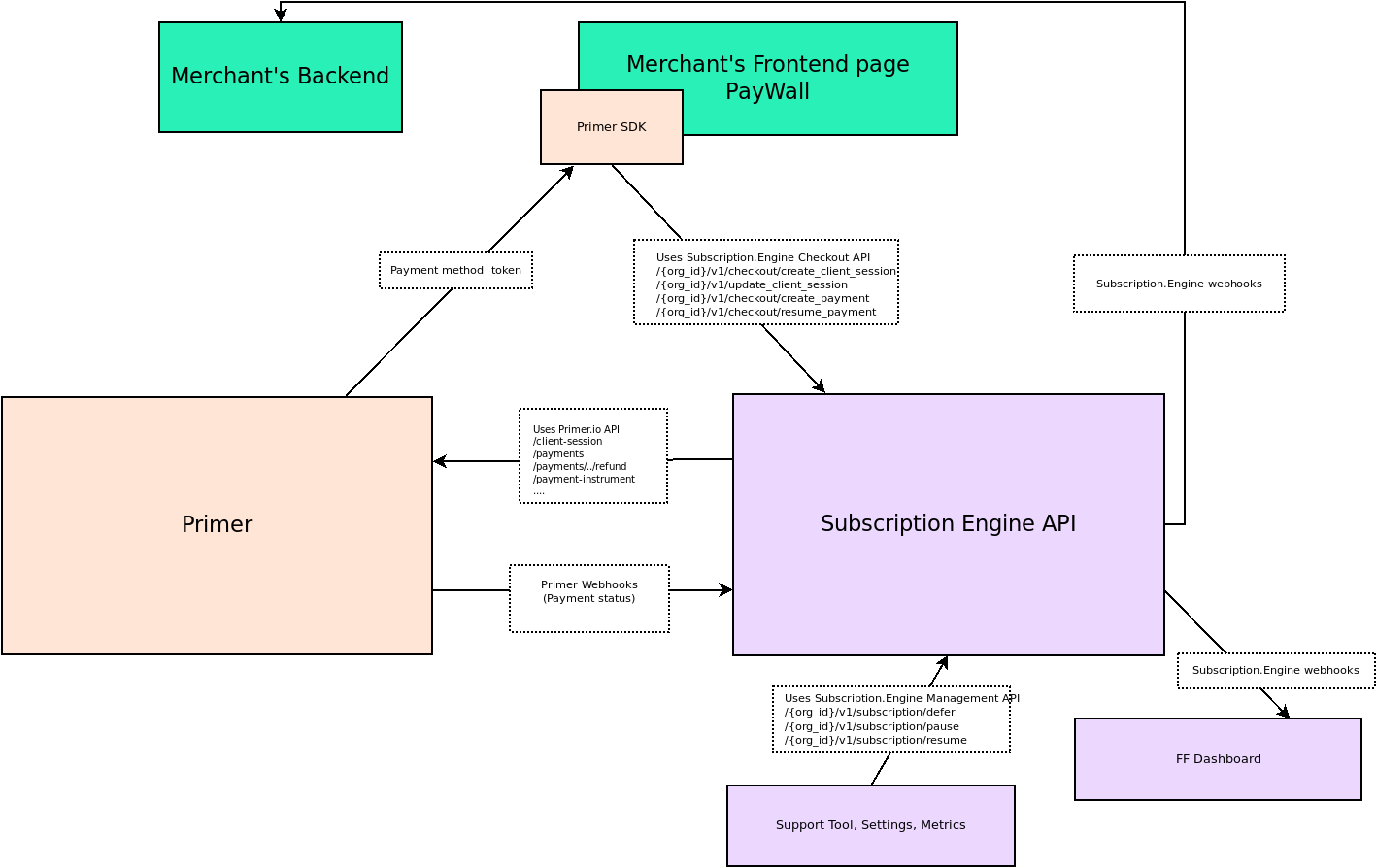
Your checkout calls the Subscription engine to create a subscription. The
engine then sends each payment out through [Primer](https://primer.io/), which
routes it to the provider that should take it, such as Stripe, Adyen,
Airwallex, or Checkout.com.
* **Checkout**: Your paywall uses the Primer SDK and calls Subscription engine
APIs to create subscriptions.
* **Payment processing**: The engine processes payments through Primer while
managing subscription state.
* **Real-time updates**: Webhooks keep your backend synchronized with
subscription changes.
 ## Data model
Three objects describe what you sell and what a customer holds.
* **Offering (Feature)**: A named unit of entitlement, meaning what a customer
gets access to, kept separate from pricing. An offering must exist before a
price point can grant it. Learn more about
[offerings](/docs/billing/settings-offerings).
* **Price point**: One versioned, sellable pricing configuration. It sets the
currency, what is charged now, whether there is a trial, and the renewal
terms, and it grants one or more offerings. Learn more about
[price points](/docs/billing/settings-price-points).
* **Purchase**: What the customer ends up holding. A recurring subscription, a
one-off that grants lifetime access, or a
[consumable](/docs/billing/consumables) granted without tracking either.
Separating entitlement from pricing means you can change what you charge
without changing what customers can access.
## Payment types
FunnelFox Payments handles recurring subscription payments, one-off purchases,
free trials, and consumables.
### Subscription payments
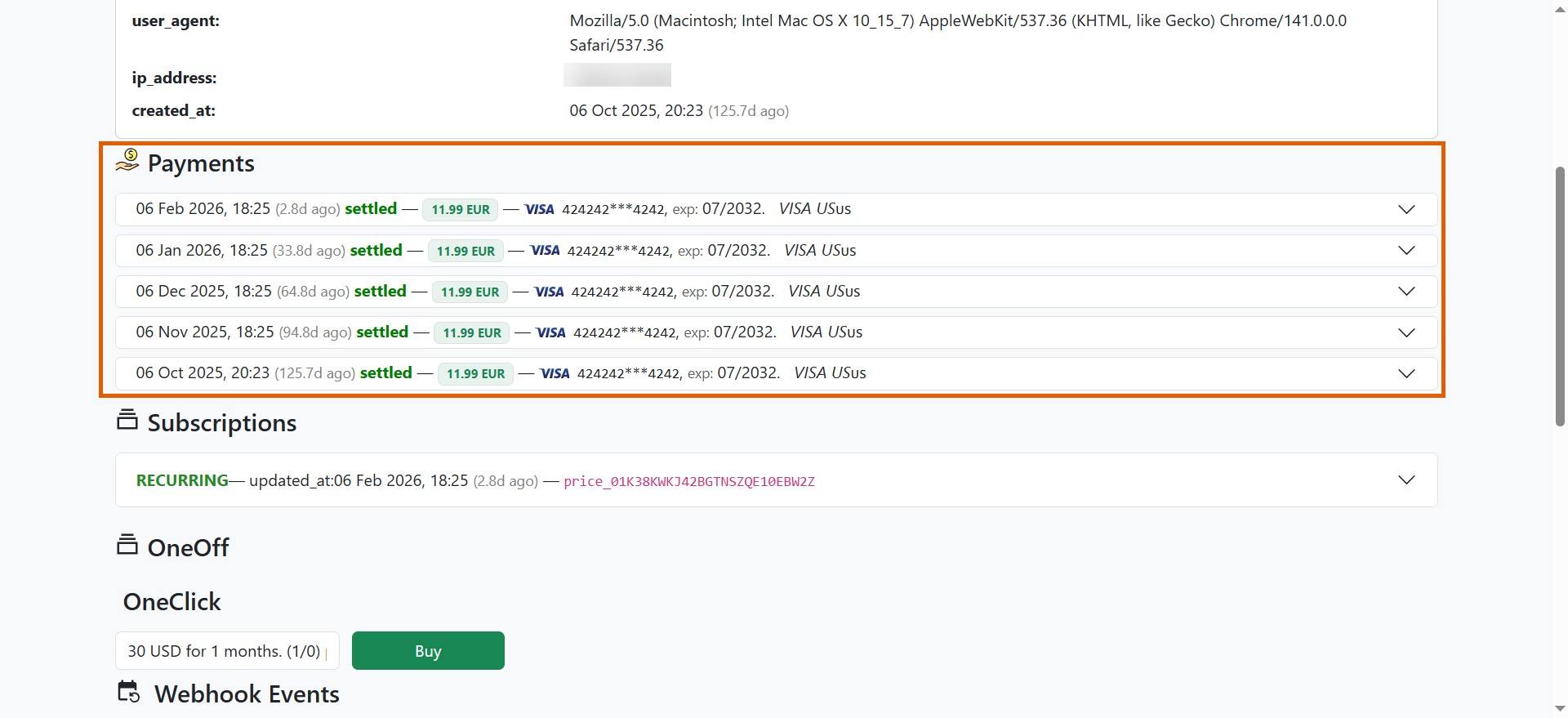
All your subscription payments appear under the **Payments** section.
## Data model
Three objects describe what you sell and what a customer holds.
* **Offering (Feature)**: A named unit of entitlement, meaning what a customer
gets access to, kept separate from pricing. An offering must exist before a
price point can grant it. Learn more about
[offerings](/docs/billing/settings-offerings).
* **Price point**: One versioned, sellable pricing configuration. It sets the
currency, what is charged now, whether there is a trial, and the renewal
terms, and it grants one or more offerings. Learn more about
[price points](/docs/billing/settings-price-points).
* **Purchase**: What the customer ends up holding. A recurring subscription, a
one-off that grants lifetime access, or a
[consumable](/docs/billing/consumables) granted without tracking either.
Separating entitlement from pricing means you can change what you charge
without changing what customers can access.
## Payment types
FunnelFox Payments handles recurring subscription payments, one-off purchases,
free trials, and consumables.
### Subscription payments
All your subscription payments appear under the **Payments** section.
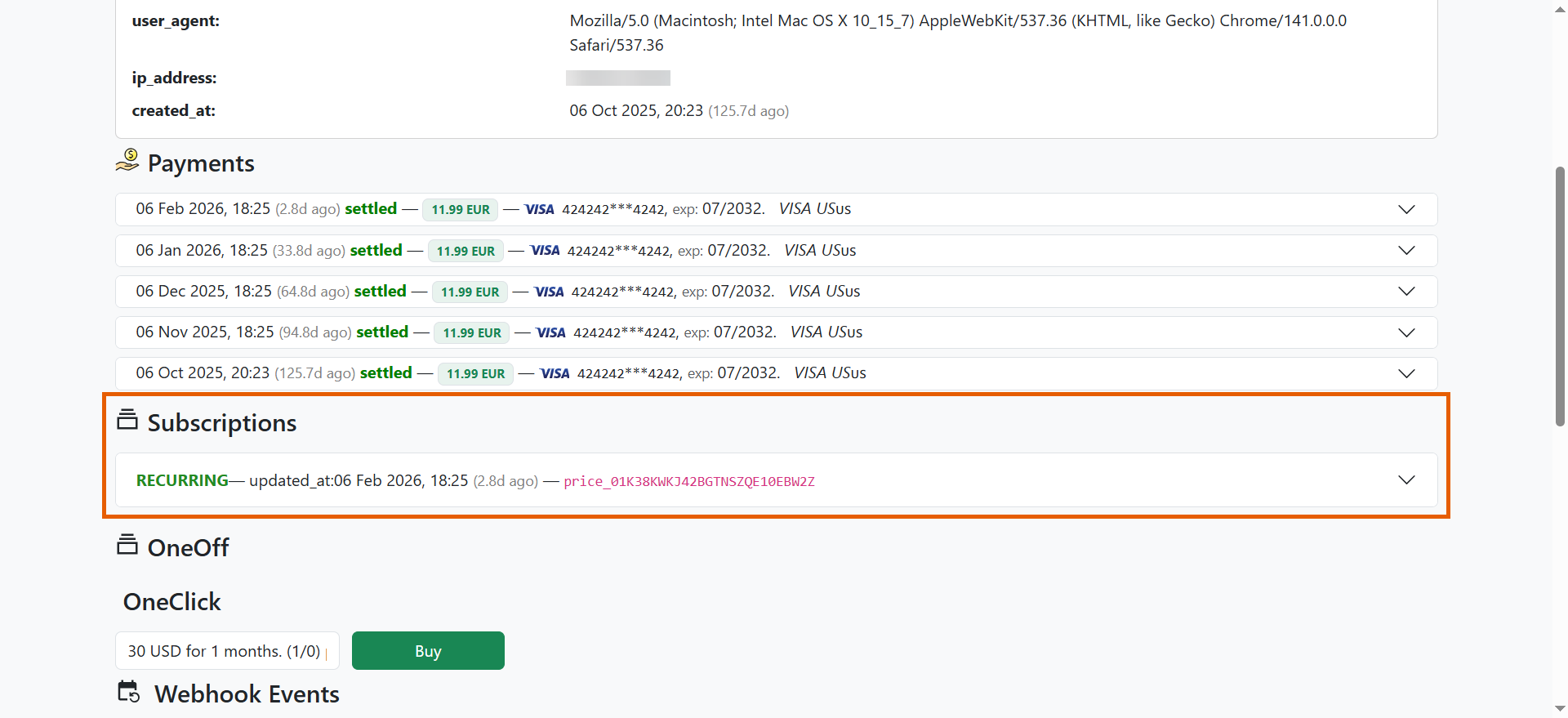
 Purchased subscriptions are displayed under **Subscriptions**. All payments are linked to active subscriptions and show the billing iteration in the metadata.
 The Subscription engine API enforces a limit of two charges per day per [payment method token](/docs/api-reference/checkout/complete-payment-for-an-order).
### One-off purchases
One-offs grant lifetime access.
All transactions also appear under the **Payments** section along with subscription payments.
Purchased one-offs are displayed under **OneOff** below.
The Subscription engine API enforces a limit of two charges per day per [payment method token](/docs/api-reference/checkout/complete-payment-for-an-order).
### One-off purchases
One-offs grant lifetime access.
All transactions also appear under the **Payments** section along with subscription payments.
Purchased one-offs are displayed under **OneOff** below.
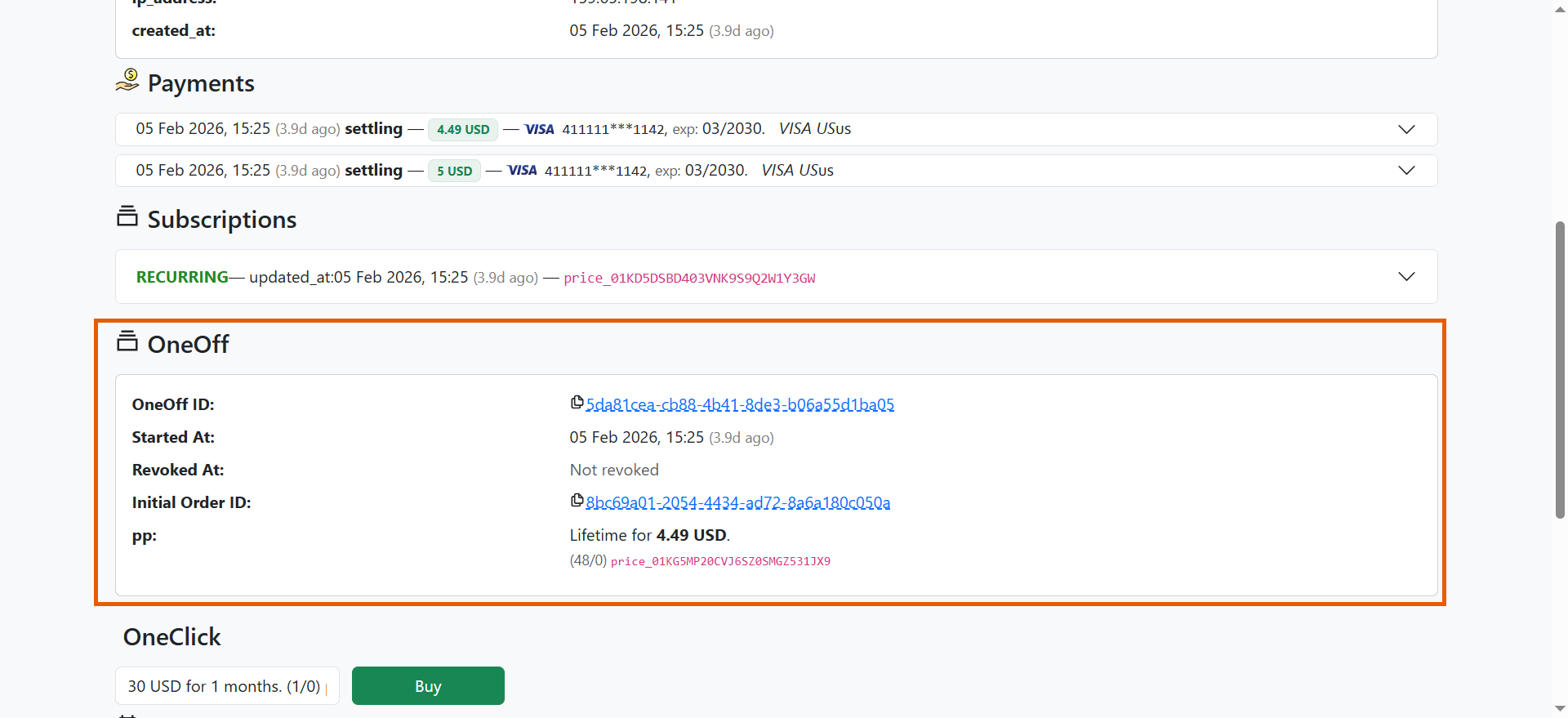 Each purchased one-off shows:
* **OneOff ID** — Unique identifier for the lifetime access grant.
* **Started At** — When lifetime access was activated.
* **Revoked At** — Shows "Not revoked" unless a full refund was issued.
* **Initial Order ID** — Links to the original payment transaction.
* **Price Point** — The lifetime product purchased and its price.
One-off purchases remain active permanently unless revoked through a full refund.
### Free trials
You can launch free trials without payment transactions.
When you create a price point with a free trial, FunnelFox Payments processes it like a normal payment but cancels it before completing the transaction.
This saves payment details for subscription renewal without charging the customer.
### Consumables
Consumables grant a customer an entitlement without tracking it as a
subscription or a lifetime purchase. This makes them suited to credit packs,
one-time add-ons, and similar products.
A consumable is an Offering (Feature) with the type `consumable` that you
attach to a price point. How often it is granted depends on the product
carrying it: a subscription product re-grants it on every billing cycle, while
a lifetime product grants it once.
Each customer's consumables appear in the **Consumables** section of their user
page in the Support Tool, with a status of active or revoked.
Learn more about [consumables](/docs/billing/consumables).
## Subscription lifecycle
Every subscription starts, renews, and eventually ends. Its **status** tells
you where it is.
A subscription with a trial starts as `INTRO`. It becomes `RECURRING`
when the engine charges the customer at the end of the trial.
A subscription created by a
[migration](/docs/billing/subscription-migration-billing) with the
`delayed_start` strategy waits as `UPCOMING` instead. It starts when the
previous subscription expires.
A `RECURRING` subscription is charged two hours before each billing
cycle, so access never lapses. Each successful charge starts the next
cycle.
A failed renewal does not end the subscription. The engine sets `GRACE`,
which keeps the customer's access, or `RETRY`, which means it is still
trying to charge.
Both end in `RECURRING` if a charge succeeds, or `EXPIRED` if recovery
runs out. Learn more about
[recovering failed payments](/docs/billing/payments-retries).
Turning off auto-renewal sets `AUTORENEW_OFF`. The subscription runs to
the end of the period the customer already paid for, then expires.
`EXPIRED` means access is revoked.
`PAUSED` sits outside this cycle. It suspends access until a set date, then
resumes on its own.
A subscription can hold more than one status at a time. See
[subscription status](/docs/billing/view-subscriptions-billing#status) for the full
reference.
## Next steps
* [Create offerings](/docs/billing/settings-offerings) and
[price points](/docs/billing/settings-price-points)
* [Integrate with the Web SDK](/docs/billing/integration-web-sdk)
* [View and manage subscriptions](/docs/billing/subscription-management-overview)
* [Handle webhook events](/docs/develop/webhooks-billing)
* [Recover failed payments](/docs/billing/payments-retries)
Each purchased one-off shows:
* **OneOff ID** — Unique identifier for the lifetime access grant.
* **Started At** — When lifetime access was activated.
* **Revoked At** — Shows "Not revoked" unless a full refund was issued.
* **Initial Order ID** — Links to the original payment transaction.
* **Price Point** — The lifetime product purchased and its price.
One-off purchases remain active permanently unless revoked through a full refund.
### Free trials
You can launch free trials without payment transactions.
When you create a price point with a free trial, FunnelFox Payments processes it like a normal payment but cancels it before completing the transaction.
This saves payment details for subscription renewal without charging the customer.
### Consumables
Consumables grant a customer an entitlement without tracking it as a
subscription or a lifetime purchase. This makes them suited to credit packs,
one-time add-ons, and similar products.
A consumable is an Offering (Feature) with the type `consumable` that you
attach to a price point. How often it is granted depends on the product
carrying it: a subscription product re-grants it on every billing cycle, while
a lifetime product grants it once.
Each customer's consumables appear in the **Consumables** section of their user
page in the Support Tool, with a status of active or revoked.
Learn more about [consumables](/docs/billing/consumables).
## Subscription lifecycle
Every subscription starts, renews, and eventually ends. Its **status** tells
you where it is.
A subscription with a trial starts as `INTRO`. It becomes `RECURRING`
when the engine charges the customer at the end of the trial.
A subscription created by a
[migration](/docs/billing/subscription-migration-billing) with the
`delayed_start` strategy waits as `UPCOMING` instead. It starts when the
previous subscription expires.
A `RECURRING` subscription is charged two hours before each billing
cycle, so access never lapses. Each successful charge starts the next
cycle.
A failed renewal does not end the subscription. The engine sets `GRACE`,
which keeps the customer's access, or `RETRY`, which means it is still
trying to charge.
Both end in `RECURRING` if a charge succeeds, or `EXPIRED` if recovery
runs out. Learn more about
[recovering failed payments](/docs/billing/payments-retries).
Turning off auto-renewal sets `AUTORENEW_OFF`. The subscription runs to
the end of the period the customer already paid for, then expires.
`EXPIRED` means access is revoked.
`PAUSED` sits outside this cycle. It suspends access until a set date, then
resumes on its own.
A subscription can hold more than one status at a time. See
[subscription status](/docs/billing/view-subscriptions-billing#status) for the full
reference.
## Next steps
* [Create offerings](/docs/billing/settings-offerings) and
[price points](/docs/billing/settings-price-points)
* [Integrate with the Web SDK](/docs/billing/integration-web-sdk)
* [View and manage subscriptions](/docs/billing/subscription-management-overview)
* [Handle webhook events](/docs/develop/webhooks-billing)
* [Recover failed payments](/docs/billing/payments-retries)